Don't miss your chance to take the Fabric Data Engineer (DP-700) exam on us!
Learn moreWe've captured the moments from FabCon & SQLCon that everyone is talking about, and we are bringing them to the community, live and on-demand. Starts on April 14th. Register now
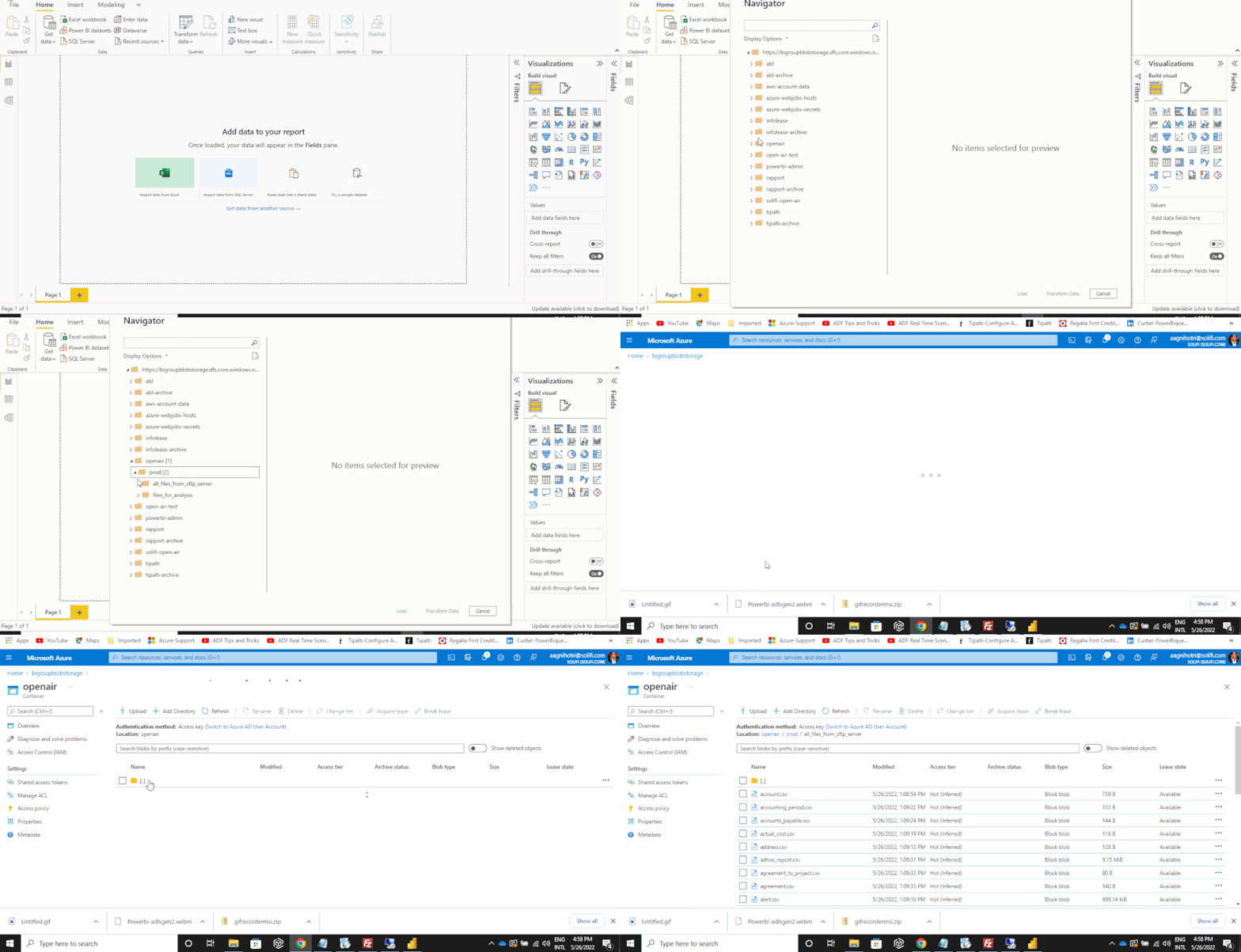
I am having sub folders in azure datalake gen 2 as shown
The path is openair / prod / all_files_from_sftp_server
Now i want to access files of the last subfolder ( all_files_from_sftp_server) in power bi desktop . I am trying to use CDM folder view (beta) option
I am able to navigate through the subfolders but no files are showing .
can anybodey help me to access the files from subfolders ?
Hi @Amar-Agnihotri
I am facing the same issue. Could you please let me know the solution if you have resolved it?
Hii,
Were you able to get data from subfolder?
hi @Awachit ,
You can acces the data from sub folders only if you make that container a CDM means Common Data Model Functionality. To do that you should have a model.json file inside the container . It is not easy to create a model.json file for a very large number of tables so i used another approach. I configured my workspace in Power bi service with azure data lake rather then generic data lake, then i created a data flow inside the same workspace. Now, whenever a dataflow will be refreshed it will create a model.json files inside the container alongwith the data snapshots. This is the only way you can do if you are not having a model.json file.
If you come to know about any tool or script through which you can create model.json file then please let me know
hi @amitchandak ,
thanks fro the reply. My last subfolder is all_files_from_sftp_server and it is containg 56 csv files so when selecting this folders all the files should be doiaplayed in the preview but nothing is displaying in the preview Please see the attached gif
@Amar-Agnihotri , Using that down allow, open, and check are there more sub folders?
If you have recently started exploring Fabric, we'd love to hear how it's going. Your feedback can help with product improvements.
A new Power BI DataViz World Championship is coming this June! Don't miss out on submitting your entry.
Share feedback directly with Fabric product managers, participate in targeted research studies and influence the Fabric roadmap.
| User | Count |
|---|---|
| 53 | |
| 35 | |
| 31 | |
| 19 | |
| 17 |
| User | Count |
|---|---|
| 74 | |
| 72 | |
| 39 | |
| 35 | |
| 23 |