FabCon is coming to Atlanta
Join us at FabCon Atlanta from March 16 - 20, 2026, for the ultimate Fabric, Power BI, AI and SQL community-led event. Save $200 with code FABCOMM.
Register now!- Power BI forums
- Get Help with Power BI
- Desktop
- Service
- Report Server
- Power Query
- Mobile Apps
- Developer
- DAX Commands and Tips
- Custom Visuals Development Discussion
- Health and Life Sciences
- Power BI Spanish forums
- Translated Spanish Desktop
- Training and Consulting
- Instructor Led Training
- Dashboard in a Day for Women, by Women
- Galleries
- Data Stories Gallery
- Themes Gallery
- Contests Gallery
- QuickViz Gallery
- Quick Measures Gallery
- Visual Calculations Gallery
- Notebook Gallery
- Translytical Task Flow Gallery
- TMDL Gallery
- R Script Showcase
- Webinars and Video Gallery
- Ideas
- Custom Visuals Ideas (read-only)
- Issues
- Issues
- Events
- Upcoming Events
The Power BI Data Visualization World Championships is back! Get ahead of the game and start preparing now! Learn more
- Subscribe to RSS Feed
- Mark Topic as New
- Mark Topic as Read
- Float this Topic for Current User
- Bookmark
- Subscribe
- Printer Friendly Page


- Mark as New
- Bookmark
- Subscribe
- Mute
- Subscribe to RSS Feed
- Permalink
- Report Inappropriate Content
uptime
Hi professionals, I have data like this
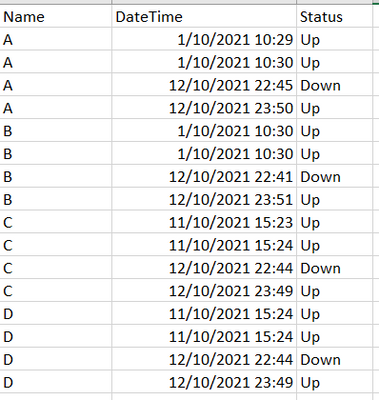
I need %up time, %down time, uptime hours and downtime hours
Can someone give me ideas please.
Thanks.
Solved! Go to Solution.
- Mark as New
- Bookmark
- Subscribe
- Mute
- Subscribe to RSS Feed
- Permalink
- Report Inappropriate Content
Hello @ryan_mayu here is the sample data. desired outcome is
1. %up time
2.%downtime
3.up time hours
4.downtime hours
thank you
| Name | DateTime | Duration | Status |
| A | 1/10/2021 10:29 | 59 | Up |
| A | 1/10/2021 10:30 | 478957 | Up |
| A | 12/10/2021 22:45 | 3894 | Down |
| A | 12/10/2021 23:50 | 145046 | Up |
| B | 1/10/2021 10:30 | 37 | Up |
| B | 1/10/2021 10:30 | 479099 | Up |
| B | 12/10/2021 22:41 | 4195 | Down |
| B | 12/10/2021 23:51 | 144955 | Up |
| C | 11/10/2021 15:23 | 37 | Up |
| C | 11/10/2021 15:24 | 112805 | Up |
| C | 12/10/2021 22:44 | 3895 | Down |
| C | 12/10/2021 23:49 | 145159 | Up |
| D | 11/10/2021 15:24 | 37 | Up |
| D | 11/10/2021 15:24 | 112805 | Up |
| D | 12/10/2021 22:44 | 3895 | Down |
| D | 12/10/2021 23:49 | 144943 | Up |


- Mark as New
- Bookmark
- Subscribe
- Mute
- Subscribe to RSS Feed
- Permalink
- Report Inappropriate Content
Hi, @jaipal
here goes your solution, if your Duration is in second:
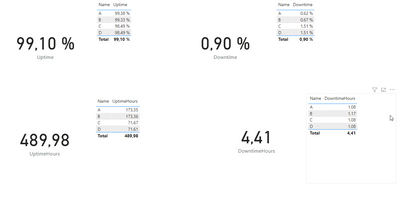
Four measures:
Uptime = 1 - (SUMX(FILTER('Table','Table'[Status]="Down"),'Table'[Duration]) / (SUMX(FILTER('Table','Table'[Status]="Up"),'Table'[Duration])))

Downtime = SUMX(FILTER('Table','Table'[Status]="Down"),'Table'[Duration]) / (SUMX(FILTER('Table','Table'[Status]="Up"),'Table'[Duration]))

UptimeHours = (SUMX(FILTER('Table','Table'[Status]="Up"),'Table'[Duration]))/60/60

DowntimeHours = (SUMX(FILTER('Table','Table'[Status]="Down"),'Table'[Duration]))/60/60
- Mark as New
- Bookmark
- Subscribe
- Mute
- Subscribe to RSS Feed
- Permalink
- Report Inappropriate Content
I am glad it's working, if you could Kudo my original message, so this threat is marked as Solved.
@jaipal Many thanks

- Mark as New
- Bookmark
- Subscribe
- Mute
- Subscribe to RSS Feed
- Permalink
- Report Inappropriate Content
@jaipal , Create a new columns
time in hour = datediff( [Datetime], maxx(filter(Table, [Name] = earlier([Name]) && [Datetime] < earlier([Datetime]) ),[Datetime]) , minute)/60
Last Status = Var _max= maxx(filter(Table, [Name] = earlier([Name]) && [Datetime] < earlier([Datetime]) ),[Datetime])
return
maxx(filter(Table, [Name] = earlier([Name]) && [Datetime] =_max ),[status])
Then create measures
Uptime = sumx(filter(Table,[Last Status] ="Up"),[time in hour])
Dwontime = sumx(filter(Table,[Last Status] ="Down"),[time in hour])
0, [[Datetime]] )
- Mark as New
- Bookmark
- Subscribe
- Mute
- Subscribe to RSS Feed
- Permalink
- Report Inappropriate Content
- Mark as New
- Bookmark
- Subscribe
- Mute
- Subscribe to RSS Feed
- Permalink
- Report Inappropriate Content
- Mark as New
- Bookmark
- Subscribe
- Mute
- Subscribe to RSS Feed
- Permalink
- Report Inappropriate Content
Hello @amitchandak Amit, thank you for your reply, I just added duration to each event, now I needed
1. %up time
2.%downtime
3.up time hours
4.downtime hours
thanks in advance
| Name | DateTime | Duration | Status |
| A | 1/10/2021 10:29 | 59 | Up |
| A | 1/10/2021 10:30 | 478957 | Up |
| A | 12/10/2021 22:45 | 3894 | Down |
| A | 12/10/2021 23:50 | 145046 | Up |
| B | 1/10/2021 10:30 | 37 | Up |
| B | 1/10/2021 10:30 | 479099 | Up |
| B | 12/10/2021 22:41 | 4195 | Down |
| B | 12/10/2021 23:51 | 144955 | Up |
| C | 11/10/2021 15:23 | 37 | Up |
| C | 11/10/2021 15:24 | 112805 | Up |
| C | 12/10/2021 22:44 | 3895 | Down |
| C | 12/10/2021 23:49 | 145159 | Up |
| D | 11/10/2021 15:24 | 37 | Up |
| D | 11/10/2021 15:24 | 112805 | Up |
| D | 12/10/2021 22:44 | 3895 | Down |
| D | 12/10/2021 23:49 | 144943 | Up |

- Mark as New
- Bookmark
- Subscribe
- Mute
- Subscribe to RSS Feed
- Permalink
- Report Inappropriate Content
could you pls provide the data in the table not the screenshot? What's more, pls provide the expected output based on your sample data.
Did I answer your question? Mark my post as a solution!
Proud to be a Super User!
- Mark as New
- Bookmark
- Subscribe
- Mute
- Subscribe to RSS Feed
- Permalink
- Report Inappropriate Content
Hello @ryan_mayu here is the sample data. desired outcome is
1. %up time
2.%downtime
3.up time hours
4.downtime hours
thank you
| Name | DateTime | Duration | Status |
| A | 1/10/2021 10:29 | 59 | Up |
| A | 1/10/2021 10:30 | 478957 | Up |
| A | 12/10/2021 22:45 | 3894 | Down |
| A | 12/10/2021 23:50 | 145046 | Up |
| B | 1/10/2021 10:30 | 37 | Up |
| B | 1/10/2021 10:30 | 479099 | Up |
| B | 12/10/2021 22:41 | 4195 | Down |
| B | 12/10/2021 23:51 | 144955 | Up |
| C | 11/10/2021 15:23 | 37 | Up |
| C | 11/10/2021 15:24 | 112805 | Up |
| C | 12/10/2021 22:44 | 3895 | Down |
| C | 12/10/2021 23:49 | 145159 | Up |
| D | 11/10/2021 15:24 | 37 | Up |
| D | 11/10/2021 15:24 | 112805 | Up |
| D | 12/10/2021 22:44 | 3895 | Down |
| D | 12/10/2021 23:49 | 144943 | Up |
- Mark as New
- Bookmark
- Subscribe
- Mute
- Subscribe to RSS Feed
- Permalink
- Report Inappropriate Content
Hi, @jaipal
here goes your solution, if your Duration is in second:
Four measures:
Uptime = 1 - (SUMX(FILTER('Table','Table'[Status]="Down"),'Table'[Duration]) / (SUMX(FILTER('Table','Table'[Status]="Up"),'Table'[Duration])))

Downtime = SUMX(FILTER('Table','Table'[Status]="Down"),'Table'[Duration]) / (SUMX(FILTER('Table','Table'[Status]="Up"),'Table'[Duration]))

UptimeHours = (SUMX(FILTER('Table','Table'[Status]="Up"),'Table'[Duration]))/60/60

DowntimeHours = (SUMX(FILTER('Table','Table'[Status]="Down"),'Table'[Duration]))/60/60
- Mark as New
- Bookmark
- Subscribe
- Mute
- Subscribe to RSS Feed
- Permalink
- Report Inappropriate Content
do you want to calculate overall %up/ down time? or the percentage for each name?
how to calculate the hours?Using the duration? is the duration seconds or minutes?
Did I answer your question? Mark my post as a solution!
Proud to be a Super User!
- Mark as New
- Bookmark
- Subscribe
- Mute
- Subscribe to RSS Feed
- Permalink
- Report Inappropriate Content
I need overall %uptime and %downtime for month. and each name as well
and need to calculate duration based on duration, and yes duration is in seconds.
- Mark as New
- Bookmark
- Subscribe
- Mute
- Subscribe to RSS Feed
- Permalink
- Report Inappropriate Content
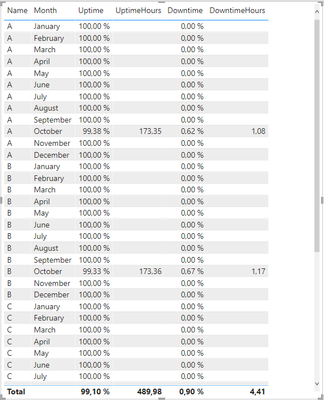
Uptime =
var Uptime = CALCULATE(
    1 - (SUMX(FILTER('Table','Table'[Status]="Down"),'Table'[Duration]) / (SUMX(FILTER('Table','Table'[Status]="Up"),'Table'[Duration]))),
    FILTER('Table','Table'[DateTime].[MonthNo]<=MAX('Table'[DateTime].[MonthNo]))
)

var Check = IF(ISBLANK(Uptime),1, Uptime)

Return Check

Downtime =
var Downtime = CALCULATE(
    SUMX(FILTER('Table','Table'[Status]="Down"),'Table'[Duration]) / (SUMX(FILTER('Table','Table'[Status]="Up"),'Table'[Duration])),
    FILTER('Table','Table'[DateTime].[MonthNo]<=MAX('Table'[DateTime].[MonthNo]))
)
var Check = IF(ISBLANK(Downtime),0, Downtime)

Return Check


UptimeHours = CALCULATE(
    (SUMX(FILTER('Table','Table'[Status]="Up"),'Table'[Duration])/60/60),
    FILTER('Table','Table'[DateTime].[MonthNo]<=MAX('Table'[DateTime].[MonthNo])))

DowntimeHours = CALCULATE((SUMX(FILTER('Table','Table'[Status]="Down"),'Table'[Duration]))/60/60,
FILTER('Table','Table'[DateTime].[MonthNo]<=MAX('Table'[DateTime].[MonthNo])))
Helpful resources

Power BI Dataviz World Championships
The Power BI Data Visualization World Championships is back! Get ahead of the game and start preparing now!

Power BI Monthly Update - December 2025
Check out the December 2025 Power BI Holiday Recap!

FabCon Atlanta 2026
Join us at FabCon Atlanta, March 16-20, for the ultimate Fabric, Power BI, AI and SQL community-led event. Save $200 with code FABCOMM.

| User | Count |
|---|---|
| 39 | |
| 37 | |
| 33 | |
| 33 | |
| 29 |


| User | Count |
|---|---|
| 132 | |
| 90 | |
| 78 | |
| 66 | |
| 65 |


