This time we’re going bigger than ever. Fabric, Power BI, SQL, AI and more. We're covering it all. You won't want to miss it.
Learn moreLevel up your Power BI skills this month - build one visual each week and tell better stories with data! Get started
Hi,
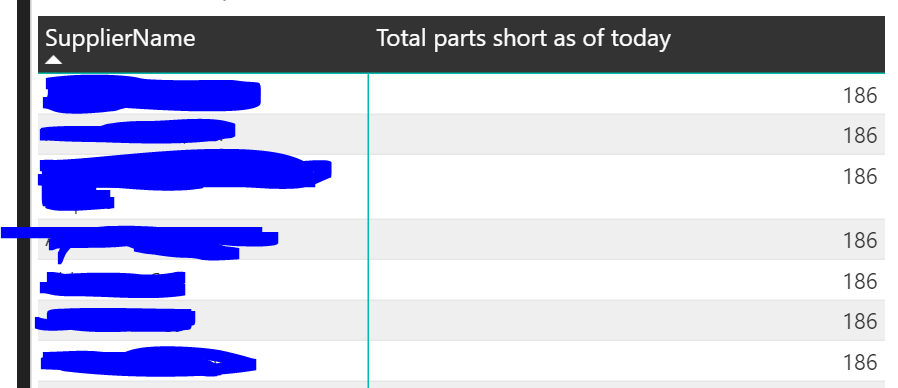
I have a visual which is displaying the same value of parts against all the suppliers in a matric visual.
Upon selecting a site in another visual it should display the count againse each supplier which should vary accordingly.
Please help me in correcting it.
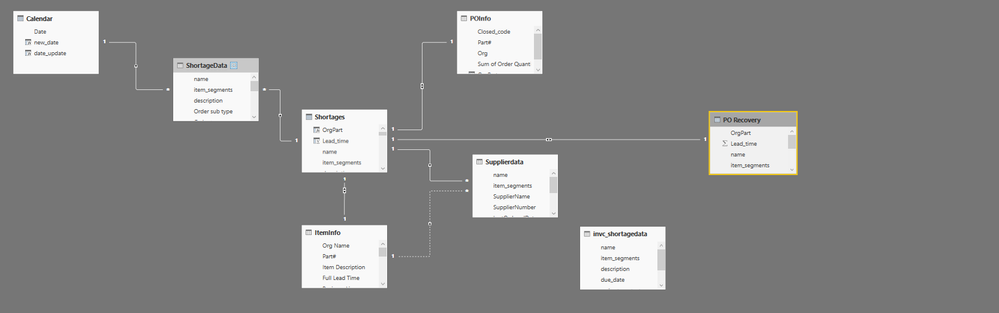
This might be a relationship issue, or it might be an issue with the measure you're using to count the total parts - what does your data model look like and how are you calculating your values?
Hi,
The measure is:
Total Shortage Count = if(
COUNTROWS(
VALUES(Shortages[name])
) = 1,
[ShortageCount],
SUMX(
VALUES(Shortages[name]),
[ShortageCount]
)
)
ShortageCount =
var itemName = FIRSTNONBLANK(Shortages[name],Shortages[name])
RETURN
CALCULATE(
count(Shortages[item_segments]),
filter(Shortages,Shortages[Shortage day] = -1 &&
Shortages[name] = itemName
This is my model:
)
Hi sajal161292,
If my understanding is right, you want to achieve the aggregation value grouped by Supplier, right? You can create your measure in table 'Supplierdata' like pattern below and check if it can meet your requirement.
ShortageCount =
VAR itemName =
FIRSTNONBLANK ( Shortages[name], Shortages[name] )
RETURN
CALCULATE (
COUNT ( Shortages[item_segments] ),
FILTER (
ALLEXCEPT ( Supplierdata, Supplierdata[SupplierName] ),
Shortages[Shortage day] = -1
&& Shortages[name] = itemName
)
)
Hope it's helpful to you.
Jimmy Tao
Check out the April 2026 Power BI update to learn about new features.
Sign up to receive a private message when registration opens and key events begin.
If you have recently started exploring Fabric, we'd love to hear how it's going. Your feedback can help with product improvements.
| User | Count |
|---|---|
| 36 | |
| 33 | |
| 26 | |
| 24 | |
| 17 |
| User | Count |
|---|---|
| 67 | |
| 49 | |
| 32 | |
| 27 | |
| 22 |