Join us at FabCon Atlanta from March 16 - 20, 2026, for the ultimate Fabric, Power BI, AI and SQL community-led event. Save $200 with code FABCOMM.
Register now!The Power BI Data Visualization World Championships is back! Get ahead of the game and start preparing now! Learn more
Hi, people.
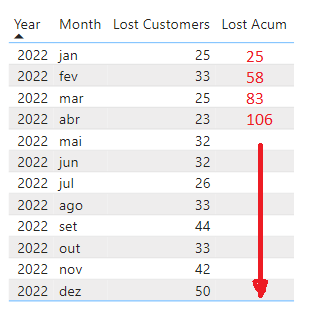
How to calculate acumulative per month using the measure below
Lost =
VAR VarCustomerTotal =
CALCULATETABLE(
SELECTCOLUMNS(
dClientes,
"IDClienteMatriz",
dClientes[IDCliente]
),
ALL('dCalendário'),
dClientes[Matriz] = "Não"
)
VAR Result =
CALCULATETABLE(
VALUES('fFaturamento Consolidado Churn'[IDClienteMatriz])
, USERELATIONSHIP('dCalendário'[Data],'fFaturamento Consolidado Churn'[DataUltimaCompraPagamento])
, PREVIOUSMONTH('dCalendário'[Data])
, FILTER(
ALL('dCalendário')
, 'dCalendário'[Data] < MAX('dCalendário'[Data])
)
)
RETURN
COUNTROWS(EXCEPT(Result, VarCustomerTotal))
Solved! Go to Solution.
Hi @CSpina
You can try the following code I have modified
Measure 2 = var _addcolumns=ADDCOLUMNS(ALLSELECTED('Table'),"Measure",[Measure])
return SUMX(FILTER(_addcolumns,[Year]=MAX('Table'[Year])&&[Mon_num]<=MAX([Mon_num])),[Measure])
Best Regards!
Yolo Zhu
If this post helps, then please consider Accept it as the solution to help the other members find it more quickly.
Hi @CSpina
You can refer to the following example:
You can create a new column in table first:
Mon_num = SWITCH([Month],
"Jan", 1,
"fev",2,
"mar",3,
"abr",4,
"mai",5,
"Jun",6,
"Jul",7,
"ago",8,
"Set",9,
"out",10,
"Nov",11,
"Dez",12
)
Then create a measure:
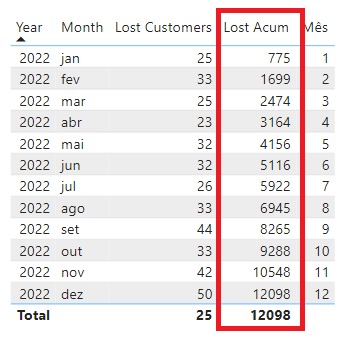
Measure 2 = SUMX(FILTER(ALL('Table'),[Year]=MAX('Table'[Year])&&[Mon_num]<=MAX([Mon_num])),[Measure])
Output:
Best Regards!
Yolo Zhu
If this post helps, then please consider Accept it as the solution to help the other members find it more quickly.
Thanks Yolo.
Your solution is very good but due to the calculations in the measure I am getting other results.
Hi @CSpina
You can try the following code I have modified
Measure 2 = var _addcolumns=ADDCOLUMNS(ALLSELECTED('Table'),"Measure",[Measure])
return SUMX(FILTER(_addcolumns,[Year]=MAX('Table'[Year])&&[Mon_num]<=MAX([Mon_num])),[Measure])
Best Regards!
Yolo Zhu
If this post helps, then please consider Accept it as the solution to help the other members find it more quickly.
The Power BI Data Visualization World Championships is back! Get ahead of the game and start preparing now!
| User | Count |
|---|---|
| 39 | |
| 37 | |
| 33 | |
| 32 | |
| 29 |
| User | Count |
|---|---|
| 133 | |
| 88 | |
| 85 | |
| 68 | |
| 64 |