cancel
Showing results for 
Search instead for 
Did you mean: 

The Power BI Data Visualization World Championships is back! Get ahead of the game and start preparing now! Learn more

Reply
Anonymous
Not applicable

undefined

I have a month wise data that gets updated every new month. So i want to do contional formatting on the condition that if the value of reporting month is greater or lesser than the previous month. Please help me out with this.


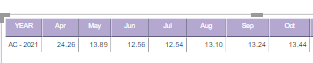
For example this is the data. 

october value is greater than september value. so october values background colour should turn green.

garima12_0-1612438017392.png

Please help me out.

5 REPLIES 5
Anonymous
Not applicable

Hi @Anonymous , you can calculate the variance between monthly values and refer that measure for conditional formatting. If the variance is positive (current month value > prev month), then green else red.
Variance measure:

Variance = 
VAR _prevmth = CALCULATE(SUM(Sales[Sales Amount]),PREVIOUSMONTH('Date'[Date]))
VAR _currentmth = CALCULATE(SUM(Sales[Sales Amount]), MONTH('Date'[Date]) = TODAY())
RETURN

_currentmth - _prevmth


Did I solve your problem?

If yes, please mark my solution Accepted!

Anonymous
Not applicable

Hi @Anonymous 


I don't have date in date format. It's a text format that i have to use. So can we modify previous month in any way so that it can text text value as well.

Anonymous
Not applicable

@Anonymous , you can create a separate Date table for this and map the month names which will give you the date column. Please refer to following links to create a date table:


https://kohera.be/blog/power-bi/how-to-create-a-date-table-in-power-bi-in-2-simple-steps/
https://docs.microsoft.com/en-us/power-bi/guidance/model-date-tables


You can then create the above mentioned measure for conditional formatting.


Did I solve your problem?

If yes, please mark my solution Accepted!

amitchandak
Super User
Super User

@Anonymous , You need use time intelligence and color measure


MTD Sales = CALCULATE(SUM(Sales[Sales Amount]),DATESMTD('Date'[Date]))
last MTD Sales = CALCULATE(SUM(Sales[Sales Amount]),DATESMTD(dateadd('Date'[Date],-1,MONTH)))
last month Sales = CALCULATE(SUM(Sales[Sales Amount]),previousmonth('Date'[Date]))
next month Sales = CALCULATE(SUM(Sales[Sales Amount]),nextmonth('Date'[Date]))
this month =MTD Sales = CALCULATE(SUM(Sales[Sales Amount]),DATESMTD(ENDOFMONTH('Date'[Date])))
last MTD (complete) Sales = CALCULATE(SUM(Sales[Sales Amount]),DATESMTD(ENDOFMONTH(dateadd('Date'[Date],-1,MONTH))))
previous month value = CALCULATE(sum('Table'[total hours value]),previousmonth('Date'[Date]))


diff = [MTD Sales]-[last MTD Sales]


color measure

Color = if([Diff] >0, "Green", "red")


use this in conditional formatting with "Field value" option


refer for step

https://radacad.com/dax-and-conditional-formatting-better-together-find-the-biggest-and-smallest-numbers-in-the-column
https://docs.microsoft.com/en-us/power-bi/desktop-conditional-table-formatting#color-by-color-values

Share with Power BI Enthusiasts: Full Power BI Video (20 Hours) YouTube
Microsoft Fabric Series 60+ Videos YouTube
Microsoft Fabric Hindi End to End YouTube
Anonymous
Not applicable

Hi @amitchandak 

Actually these are already calculated numbers from a measure with specific filters. So i can't calculate them again. Kindly provide solution with this condition .


Thanks

Helpful resources

Announcements
Power BI DataViz World Championships

Power BI Dataviz World Championships

The Power BI Data Visualization World Championships is back! Get ahead of the game and start preparing now!

December 2025 Power BI Update Carousel

Power BI Monthly Update - December 2025

Check out the December 2025 Power BI Holiday Recap!

FabCon Atlanta 2026 carousel

FabCon Atlanta 2026

Join us at FabCon Atlanta, March 16-20, for the ultimate Fabric, Power BI, AI and SQL community-led event. Save $200 with code FABCOMM.