This is best Fabric, Power BI, SQL and AI community event. How do we know? The last event sold out! Save €200 with code FABCMTY200.
Register nowA new Data Days event is coming soon! This time we’re going bigger than ever. Fabric, Power BI, SQL, AI and more. Don't miss out.
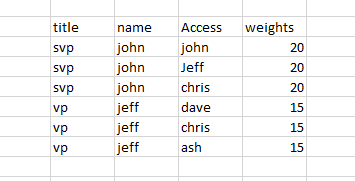
I have implement security model for following data structure.
Employee is sales rep and will only see his territory.Manager, and needs to see his own territory AND his Employee
I have tried creating roles and using Username() function on access as [access]=USERNAME() .
please give some suggestions.
Hi @aka,
1. You create a role by clicking manage roles->create a new role->type [Access]=USERNAME().
2. Select the View as roles to test if you create the role correctly.
3. Publish the report to Power BI service. Select the dataset->Security. Add the member, apply the role to him. Then share the dashbord to them.
More details, please reference to the articles.
Row level security with Power BI Embedded
Row-level security (RLS) with Power BI
If you have other issues, please feel free to ask.
Best Regards,
Angelia
Check out the May 2026 Power BI update to learn about new features.
Sign up to receive a private message when registration opens and key events begin.
If you have recently started exploring Fabric, we'd love to hear how it's going. Your feedback can help with product improvements.
| User | Count |
|---|---|
| 32 | |
| 26 | |
| 25 | |
| 24 | |
| 15 |
| User | Count |
|---|---|
| 63 | |
| 48 | |
| 27 | |
| 23 | |
| 20 |