Hi All,
Background: I am trying to utilize the 'Hasonefilter()' and 'Isfiltered' DAX function to keep my line chart from displaying data until one of two columns is filtered. I have been able to do this successfully if I do not have anything in the Legend.
My function looks like this:
SiteSelectCheck_child = IF(or(ISFILTERED([MAD_Site]), HASONEFILTER('Hub/Child'[CHILD])),1,2)
Issue: In my line chart I want 'Child' to be the Legend. When I put 'Child' in the legend it counts as a filter with the Hasonefilter() and Isfiltered DAX functions. So the Isfiltered function will always be true, And the Hasonefilter function doesn't seem to be working as expected.
Some images of what I have right now with this function. I have been able to get 2/3 of the scenarios below with different functions, but never all 3 to work.
When nothing is filtered. The chart without a Legend doesn't show any data, but the chart with a Legend does show data (need this to not show data).
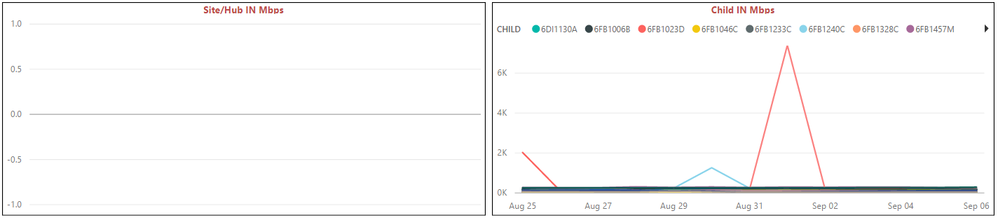
When I filter the Mad_Site. it successfully shows data in both.
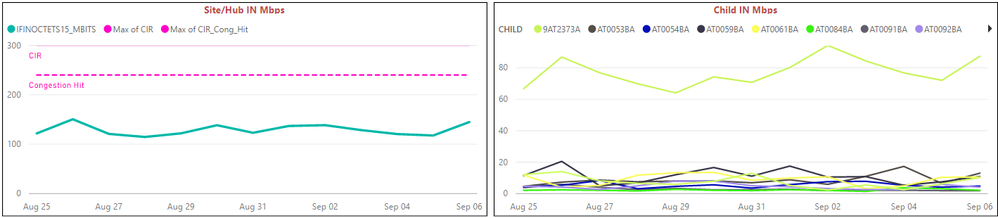
When I filter the Child. It successfully filters only the child.

Conclusion: I can get all 3 of these scenarios if I take out the legend on my line chart, but then I'm not displaying all of the Child values.
Any help would be appreciated!
“Without my morning coffee I’m just like a dried up piece of roast goat.”
-Johann Sebastian Bach


