Forum Discussion
table to list into column
Hello,
I have a table about my products, its promos, and its location. As you can see on the table below, some promos dont have a placement and some products have a placement but no promo.
[Product] [Promo Title] [Placement]
A x 1
B x 1
C - 2
D - 2
E y -
F y -
What I want is to add a column that has a list of products that share the same condition (same promo+placement, just same promo, or just same placement)
[Product] [Promo Title] [Placement] [List]
A x 1 A,B ->(because A and B have same promo and placement)
B x 1 A,B ->(same as above)
C - 2 C,D ->(C and D are equal)
D - 2 C,D
E y - E,F
F y - E,F
Hope this makes sense.
Thanks
@jorgeslzr
Column for Promo:Promo Col = VAR PROMO = CALCULATETABLE(VALUES(Table6[PRODUCT]), Table6[PROMO TITLE] = EARLIER(Table6[PROMO TITLE]), ALL(Table6) ) RETURN IF( OR(Table6[PROMO TITLE]="", COUNTROWS(PROMO)<2),BLANK(), CONCATENATEX( PROMO, Table6[PRODUCT], "|" ) )Column for placement
Place Col = VAR PROMO = CALCULATETABLE(VALUES(Table6[PRODUCT]), Table6[PLACEMENT] = EARLIER(Table6[PLACEMENT]), ALL(Table6) ) RETURN IF( OR(Table6[PLACEMENT]=0, COUNTROWS(PROMO)<2),BLANK(), CONCATENATEX( PROMO, Table6[PRODUCT], "|" ) )________________________
If my answer was helpful, please consider Accept it as the solution to help the other members find it
Click on the Thumbs-Up icon if you like this reply 🙂
4 Replies
- amitchandak
Super User
jorgeslzr , Try new column in dax
concatenatex(filter(Table, [Promo Title] = earlier( [Promo Title] ) ),[Product] )
or "{" & concatenatex(filter(Table, [Promo Title] = earlier( [Promo Title] ) ),[Product] ) & "}"
- Fowmy
Super User
jorgeslzr
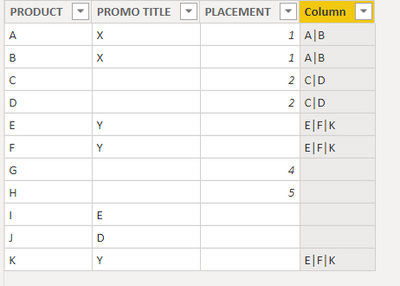
Add the following Column to the table: I tested with various scenarios and it works for me, have a look at the screenshot of the results below the code.Column = VAR PROMO = CALCULATETABLE(VALUES(Table6[PRODUCT]), Table6[PROMO TITLE] = EARLIER(Table6[PROMO TITLE]),ALL(Table6) ) VAR PLACE = CALCULATETABLE(VALUES(Table6[PRODUCT]), Table6[PLACEMENT] = EARLIER(Table6[PLACEMENT]),ALL(Table6) ) VAR MAT = INTERSECT( PROMO , PLACE ) RETURN IF( COUNTROWS(MAT) > 1, CONCATENATEX( MAT, Table6[PRODUCT], "|"), BLANK() )________________________
If my answer was helpful, please consider Accept it as the solution to help the other members find it
Click on the Thumbs-Up icon if you like this reply 🙂
- jorgeslzrFrequent Visitor
Hi. Thank you, it helps a lot and answers what I asked for... but as I saw the solution, I realized my prob is a bit different. Sorry.
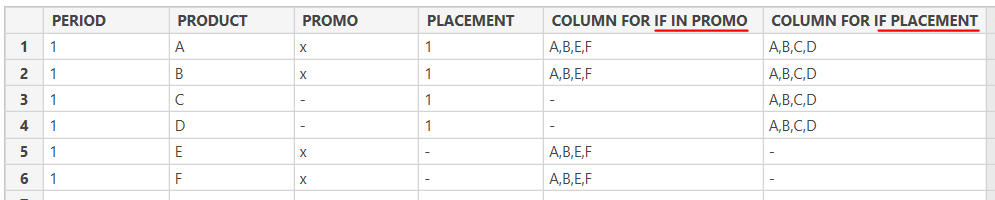
Hope you can help. Can it be two columns depending on where do I have info? Like the image below.
There wont be a different placement or promo on the same period.
- Fowmy
Super User
@jorgeslzr
Column for Promo:Promo Col = VAR PROMO = CALCULATETABLE(VALUES(Table6[PRODUCT]), Table6[PROMO TITLE] = EARLIER(Table6[PROMO TITLE]), ALL(Table6) ) RETURN IF( OR(Table6[PROMO TITLE]="", COUNTROWS(PROMO)<2),BLANK(), CONCATENATEX( PROMO, Table6[PRODUCT], "|" ) )Column for placement
Place Col = VAR PROMO = CALCULATETABLE(VALUES(Table6[PRODUCT]), Table6[PLACEMENT] = EARLIER(Table6[PLACEMENT]), ALL(Table6) ) RETURN IF( OR(Table6[PLACEMENT]=0, COUNTROWS(PROMO)<2),BLANK(), CONCATENATEX( PROMO, Table6[PRODUCT], "|" ) )________________________
If my answer was helpful, please consider Accept it as the solution to help the other members find it
Click on the Thumbs-Up icon if you like this reply 🙂