Join us at FabCon Atlanta from March 16 - 20, 2026, for the ultimate Fabric, Power BI, AI and SQL community-led event. Save $200 with code FABCOMM.
Register now!View all the Fabric Data Days sessions on demand. View schedule
Hello,
I need to sum words from different tables. Example:
TABLE1
Column Name
FCO
FCO
FCO
MSE
MSE
TABLE2
Column Name
MCA
MCA
FCO
MSE
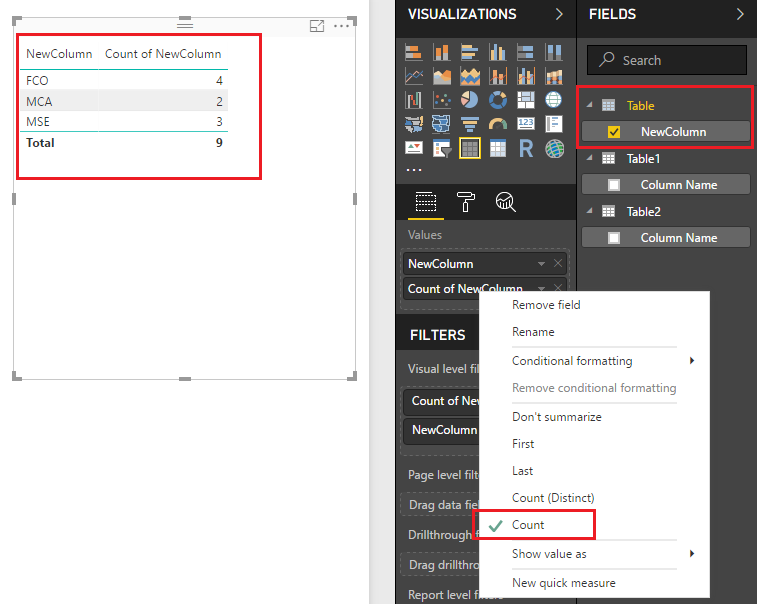
I need to obtain this result: Total: 9. FCO=4, MSE=3, MCA=2.
Could you help me please?
Thanks
Solved! Go to Solution.
Hi @pipignu,
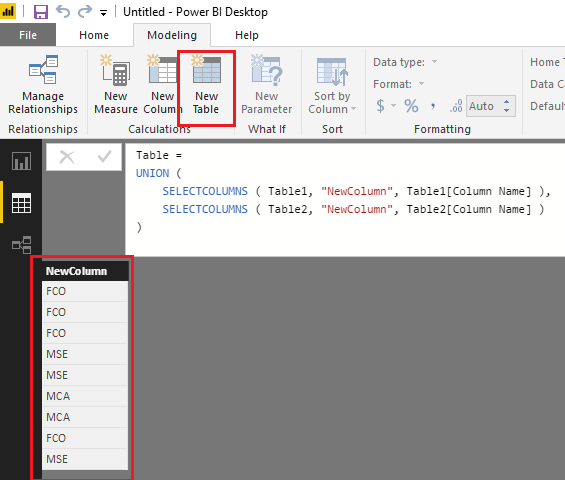
Based on my test, you can firstly use the formula below to create a new union table.
Table =
UNION (
SELECTCOLUMNS ( Table1, "NewColumn", Table1[Column Name] ),
SELECTCOLUMNS ( Table2, "NewColumn", Table2[Column Name] )
)
Then you should be able to show the "NewColumn" and [Count of NewColumn] from the new created table on the Table visual to get your expected result. ![]()
Regards
Hi,
Using Query Editor, you can append data from both tables into a single one and then write this measure.
=COUNTROWS(Data[Names])
Hope this helps.
Hi @pipignu,
Based on my test, you can firstly use the formula below to create a new union table.
Table =
UNION (
SELECTCOLUMNS ( Table1, "NewColumn", Table1[Column Name] ),
SELECTCOLUMNS ( Table2, "NewColumn", Table2[Column Name] )
)
Then you should be able to show the "NewColumn" and [Count of NewColumn] from the new created table on the Table visual to get your expected result. ![]()
Regards
Check out the November 2025 Power BI update to learn about new features.
Advance your Data & AI career with 50 days of live learning, contests, hands-on challenges, study groups & certifications and more!