
cancel
Showing results for 
Search instead for 
Did you mean: 

The Power BI Data Visualization World Championships is back! Get ahead of the game and start preparing now! Learn more

Reply
Anonymous
Not applicable

sum of the value from chart

Hi,
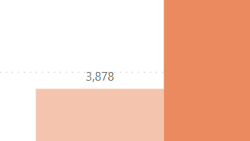
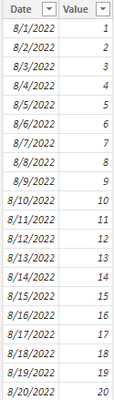
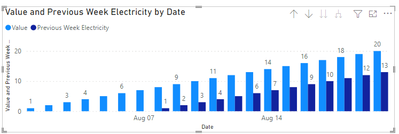
I was using the dax below to calculate my previous week value, and in the pic 1 suppose shown the sum of pic 2 after drill down in the graph. 
 
Previous Week Electricity = calculate(sum(Electrical[Value]),FILTER(all('Calendar'),'Calendar'[Date]=MAX('Calendar'[Date])-7))
 
But I have no idea or maybe the dax formula i using is wrong, why the value is not total but only shown the sunday value. How should I change that? 
 
Thanks for your help. 
 
Kim_Sky_0-1660732791354.png(pic 1)


Kim_Sky_1-1660732806782.png(pic 2)


1 ACCEPTED SOLUTION
v-yanjiang-msft
Community Support
Community Support

Hi @Anonymous ,

According to your description, I create a sample.

Electrical table:

vkalyjmsft_0-1661157997200.png

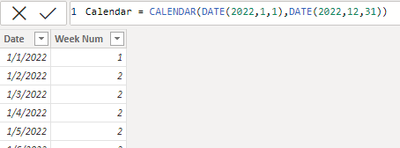
Calendar table with its week num.

vkalyjmsft_1-1661158073203.png

Here's my solution, create a measure:

Previous Week Electricity =
IF (
    ISINSCOPE ( 'Calendar'[Week Num] ),
    CALCULATE (
        SUM ( Electrical[Value] ),
        'Calendar'[Week Num]
            = MAX ( 'Calendar'[Week Num] ) - 1
    ),
    CALCULATE (
        SUM ( Electrical[Value] ),
        FILTER ( ALL ( 'Calendar' ), 'Calendar'[Date] = MAX ( 'Calendar'[Date] ) - 7 )
    )
)

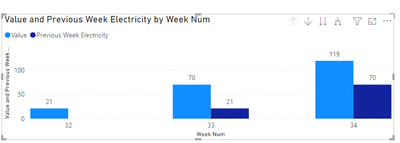
Get the correct result.

vkalyjmsft_2-1661158285397.png

vkalyjmsft_3-1661158298384.png

I attach my sample below for your reference.


Best Regards,
Community Support Team _ kalyj

If this post helps, then please consider Accept it as the solution to help the other members find it more quickly.

View solution in original post

3 REPLIES 3
v-yanjiang-msft
Community Support
Community Support

Hi @Anonymous ,

According to your description, I create a sample.

Electrical table:

vkalyjmsft_0-1661157997200.png

Calendar table with its week num.

vkalyjmsft_1-1661158073203.png

Here's my solution, create a measure:

Previous Week Electricity =
IF (
    ISINSCOPE ( 'Calendar'[Week Num] ),
    CALCULATE (
        SUM ( Electrical[Value] ),
        'Calendar'[Week Num]
            = MAX ( 'Calendar'[Week Num] ) - 1
    ),
    CALCULATE (
        SUM ( Electrical[Value] ),
        FILTER ( ALL ( 'Calendar' ), 'Calendar'[Date] = MAX ( 'Calendar'[Date] ) - 7 )
    )
)

Get the correct result.

vkalyjmsft_2-1661158285397.png

vkalyjmsft_3-1661158298384.png

I attach my sample below for your reference.


Best Regards,
Community Support Team _ kalyj

If this post helps, then please consider Accept it as the solution to help the other members find it more quickly.

nvprasad
Solution Sage
Solution Sage

Hi Kim_Sky,

As you see in below DAX mentioned by you, you are trying to filter maxdate - 7 means only one day. 

Previous Week Electricity = calculate(sum(Electrical[Value]),FILTER(all('Calendar'),'Calendar'[Date]=MAX('Calendar'[Date])-7))

Appreciate a Kudos! ‌‌
If this helps and resolves the issue, please mark it as a Solution! ‌‌

Regards,
N V Durga Prasad

Did I answer your question? Mark my post as a solution! Appreciate your Kudos.
Follow me on LinkedIn.
Anonymous
Not applicable

Hi @nvprasad 

I have try to using calendar [week num] for calculate one week before, but in the graph for daily the value won't be changed. 

Are there any recommended dax that I can use?


Thanks for your help 

Helpful resources

Announcements
Power BI DataViz World Championships

Power BI Dataviz World Championships

The Power BI Data Visualization World Championships is back! Get ahead of the game and start preparing now!

December 2025 Power BI Update Carousel

Power BI Monthly Update - December 2025

Check out the December 2025 Power BI Holiday Recap!

FabCon Atlanta 2026 carousel

FabCon Atlanta 2026

Join us at FabCon Atlanta, March 16-20, for the ultimate Fabric, Power BI, AI and SQL community-led event. Save $200 with code FABCOMM.