cancel
Showing results for 
Search instead for 
Did you mean: 

Get Fabric Certified for FREE during Fabric Data Days. Don't miss your chance! Request now

Reply
Anonymous
Not applicable

subtotals on the bottom of the matrix

Hi,


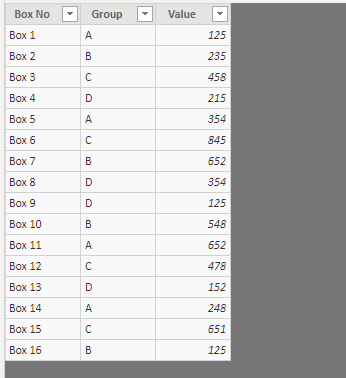
In my dataset I have 16 rows divided into 4 groups (A, B, C, D):

image.png


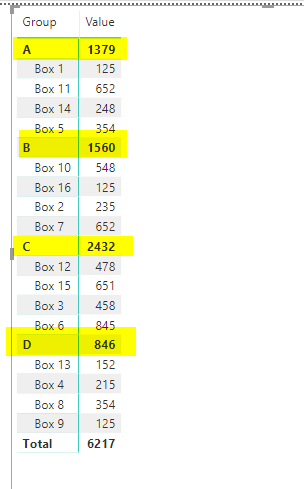
I have a matrix visual with the subtotals for each group:

image.png


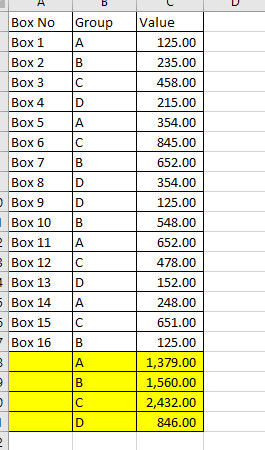
Is it possible to move all subtotals to the bottom of the matrix (so all subtotals are after the detail rows, and all subtotals are next to each other)? I would like to achive something like this:

image.png


Is it possible to achive this with the matrix? Or is there any other visual which allows to do this?

1 ACCEPTED SOLUTION
PaulDBrown
Community Champion
Community Champion

@Anonymous 

I don’t think that is possible. But why not use the “collapse row” feature in the row header under the format pane? 


Did I answer your question? Mark my post as a solution!
In doing so, you are also helping me. Thank you!

Proud to be a Super User!
Paul on Linkedin.


View solution in original post

2 REPLIES 2
PaulDBrown
Community Champion
Community Champion

@Anonymous 

I don’t think that is possible. But why not use the “collapse row” feature in the row header under the format pane? 


Did I answer your question? Mark my post as a solution!
In doing so, you are also helping me. Thank you!

Proud to be a Super User!
Paul on Linkedin.


v-yuta-msft
Community Support
Community Support

@Anonymous ,


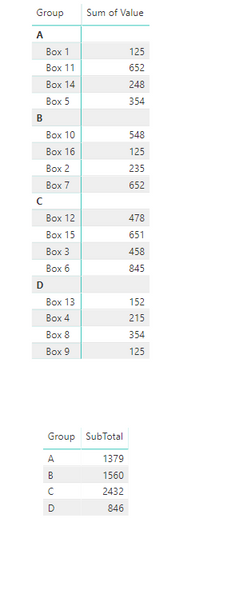
I'm afraid a single visual we can't achieve this because we can not add specific rows in a visual. As a workaround, I would suggest you to create a measure [SubTotal] using DAX below and drag [Group] and [SubTotal] to a table visual.

SubTotal = CALCULATE(SUM('Table'[Value]), ALLEXCEPT('Table', 'Table'[Group]))

Capture.PNG 

Community Support Team _ Jimmy Tao

If this post helps, then please consider Accept it as the solution to help the other members find it more quickly.

Helpful resources

Announcements
November Power BI Update Carousel

Power BI Monthly Update - November 2025

Check out the November 2025 Power BI update to learn about new features.

Fabric Data Days Carousel

Fabric Data Days

Advance your Data & AI career with 50 days of live learning, contests, hands-on challenges, study groups & certifications and more!

FabCon Atlanta 2026 carousel

FabCon Atlanta 2026

Join us at FabCon Atlanta, March 16-20, for the ultimate Fabric, Power BI, AI and SQL community-led event. Save $200 with code FABCOMM.

Top Solution Authors
Top Kudoed Authors