Get certified for free when you join Fabric Data Days 2026 and dive into Fabric, Power BI, SQL, AI, and other essential data skills.
Join nowTry your skills in the Power BI Dataviz World Championship! Round one ends June 26. Join now
Hi,
I am trying to make a report where I have a Subject a score and the date of the test,
So, I have my table
Subject_test:
Studentid SubjectID Subject Score Dateoftest
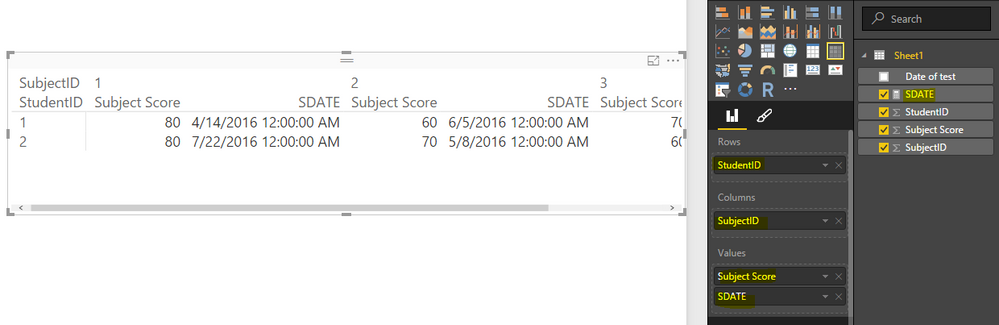
what I want to do is something similar to Pivot but i cant really add date as value what I want as a final imput is someting like this
SUBJECT 1
Student Id || Subject 1 Score || Subject 1 Dateoftest ||....Subject N Score || Subject N Date of test||
I am able to add the score column since there are numbers but i cant add date column because it will count it.
can you help me with this?
thanks in advanced.
Hi cromo,
According to your description, you are trying to use Matrix to show the data, right? Using Matrix in the value well will only display the numerical information. For the other column type such as text or Date/time, it will show the count numbers.
However, we could deal this with Measures, to show the date value in Matrix.
First, create a measure with the following formula:
SDATE = SUM(Sheet1[Date of test]) (Actually, we could also take use of MIN or MAX function here)
Then, when customize the Matrix Visual, put the [SDATE] measure instead of the date column, this would allow the Matrix to show the date correctly. See my testing results:
If any further questions, please feel free to post back.
Regards
If you already have Student Id || Subject 1 Score etc (assuming they are unique), you can derive the date as value by using the formula:
firstnonblank(Student Id ,1)
Don't miss out on Data Days, June 15 through August 7. Learn Fabric, Power BI, SQL, AI and more.
Check out the May 2026 Power BI update to learn about new features.
| User | Count |
|---|---|
| 24 | |
| 22 | |
| 22 | |
| 20 | |
| 12 |
| User | Count |
|---|---|
| 68 | |
| 56 | |
| 42 | |
| 39 | |
| 30 |