Join us at FabCon Atlanta from March 16 - 20, 2026, for the ultimate Fabric, Power BI, AI and SQL community-led event. Save $200 with code FABCOMM.
Register now!The Power BI Data Visualization World Championships is back! Get ahead of the game and start preparing now! Learn more
I have a table visual. I have a text field in the first column and a number field in the second column. I want the table sorted by the first column alphabetically and then by the second column numerically. But instead the second column is being sorted alphabetically. How to I change the sort type of that second column to be numeric?
Solved! Go to Solution.
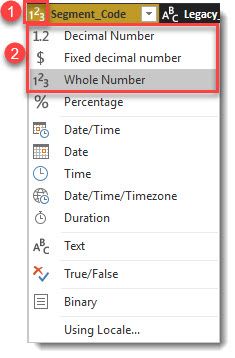
I effectively did that. I added two new entries into the existing Table.TransformColumnTypes. I don't get why it doesn't do that automagically. More specifically, if the underlying "Transform file from X" query makes it numeric, why does the final table have the type as "any". And even the underlying query makes the numeric a decimal whereas clearly it should be integer. I'll report these as bugs through the correct channels.
Hi @intrasight,
As you said, when sorted column is numeric type, the sort function still displayed "Sort ASC/DESC". I think it's a display issue, even if the sorted column is number, the order function also works on it.(perhaps they just forget to dynamic changing display text :smiley happy:)
Regards,
Xiaoxin Sheng
Hi @intrasight
it sounds like you just need to adjust the column format to that of a number type.
the visuals tend to feed of that information.
D
I effectively did that. I added two new entries into the existing Table.TransformColumnTypes. I don't get why it doesn't do that automagically. More specifically, if the underlying "Transform file from X" query makes it numeric, why does the final table have the type as "any". And even the underlying query makes the numeric a decimal whereas clearly it should be integer. I'll report these as bugs through the correct channels.
Go to Edit query and change second colome type to numeric.
The Power BI Data Visualization World Championships is back! Get ahead of the game and start preparing now!
| User | Count |
|---|---|
| 40 | |
| 35 | |
| 34 | |
| 31 | |
| 28 |
| User | Count |
|---|---|
| 137 | |
| 102 | |
| 71 | |
| 67 | |
| 65 |