cancel
Showing results for 
Search instead for 
Did you mean: 

The Power BI Data Visualization World Championships is back! Get ahead of the game and start preparing now! Learn more

Reply
tangutoori
Helper III
Helper III

slicing table for related historical data

Dear All,
 
here is the secenario.
 

SlicerTable =

DISTINCT (
    UNION (
        VALUES ( 'Test Data'[Replace 1]),
        VALUES ('Test Data'[Replace 2] ),
        VALUES ('Test Data'[Replace 3] ),
        VALUES ('Test Data'[Replace 4] )
    )
)


Measure =
IF (
    MIN ( 'Test Data'[count.Part number Previous] ) IN VALUES ( SlicerTable[Replace 1] )
        || MIN ( 'Test Data'[count.Part number Current] ) IN VALUES ( SlicerTable[Replace 1] )
        || MIN ( 'Test Data'[count.UID] ) IN VALUES ( SlicerTable[Replace 1] ),
    1,
    BLANK ()
)


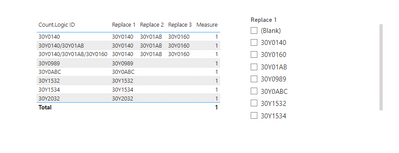
tangutoori_0-1680600602449.png

expected O/P :


if we select 30Y01AB, table shhould display 3 records, as they are related.

30Y0140
30Y0140/30Y01AB
30Y0140/30Y01AB/30Y0160


Regards,

Narender.


1 ACCEPTED SOLUTION
Anonymous
Not applicable

Hi @tangutoori ,

Please hvae a try.

Create another table with the SlicerTable[Replace 1] column .

Create a measure.

Measure = var _1=SELECTEDVALUE('Table 2'[id])
return
if(SEARCH(_1,MAX('Table'[id]),1,0)=1,MAX('Table'[id]),BLANK())

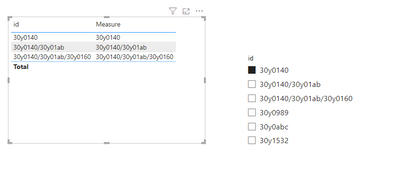
vrongtiepmsft_0-1680759062429.png

You can try to use search:

SEARCH function (DAX) - DAX | Microsoft Learn


How to Get Your Question Answered Quickly 


If it does not help, please provide more details with your desired output and pbix file without privacy information (or some sample data) .


Best Regards
Community Support Team _ Rongtie

If this post helps, then please consider Accept it as the solution to help the other members find it more quickly.

View solution in original post

2 REPLIES 2
tangutoori
Helper III
Helper III

Hi Team,

below is the source data.


S.noPart number PreviousPart number CurrentConcatenateChange DateType of changePart StatusPrev Wei FSCCurr Wei FSC
1 30Y014030Y0140,30Y01XY,30Y0160,30Y0ABC05-01-23New cost itemNew part1010
230Y014030Y01XY30Y0140,30Y01XY,30Y0160,30Y0ABC06-01-23Part ReplacementPart Change1010
330Y01XY30Y016030Y0140,30Y01XY,30Y0160,30Y0ABC07-01-23Part ReplacementPart Change1010
430Y016030Y0ABC30Y0140,30Y01XY,30Y0160,30Y0ABC08-01-23Part ReplacementPart Change1020
5 30Y153430Y153411-01-23New cost itemNew part1010
6 30Y153230Y153212-01-23New cost itemNew part1010
7 30Y098930Y0989/30Y010013-01-23New cost itemNew part1023
830Y098930Y010030Y0989/30Y010014-01-23Part ReplacementPart Change105

below table should genearte on basis of group by concateante column adn show the part num based on Minimum change date and maximum chage date with in the group.

Delta is Curr Wei FSC (at minimun date) - Curr Wei FSC (at maximum date).

First part Numlast Part NumDelta
30Y014030Y0ABC-10
30Y153430Y15340
30Y153230Y15320
30Y098930Y010018


Now if i click on the first row i should show the hostory of changes from 30Y0140 TO 30Y0ABC as below.


S.noPart number PreviousPart number CurrentConcatenateChange DateType of changePart StatusPrev Wei FSCCurr Wei FSC
1 30Y014030Y0140,30Y01XY,30Y0160,30Y0ABC05-01-23New cost itemNew part1010
230Y014030Y01XY30Y0140,30Y01XY,30Y0160,30Y0ABC06-01-23Part ReplacementPart Change1010
330Y01XY30Y016030Y0140,30Y01XY,30Y0160,30Y0ABC07-01-23Part ReplacementPart Change1010
430Y016030Y0ABC30Y0140,30Y01XY,30Y0160,30Y0ABC08-01-23Part ReplacementPart Change1020


Regards,

Narender.


Anonymous
Not applicable

Hi @tangutoori ,

Please hvae a try.

Create another table with the SlicerTable[Replace 1] column .

Create a measure.

Measure = var _1=SELECTEDVALUE('Table 2'[id])
return
if(SEARCH(_1,MAX('Table'[id]),1,0)=1,MAX('Table'[id]),BLANK())

vrongtiepmsft_0-1680759062429.png

You can try to use search:

SEARCH function (DAX) - DAX | Microsoft Learn


How to Get Your Question Answered Quickly 


If it does not help, please provide more details with your desired output and pbix file without privacy information (or some sample data) .


Best Regards
Community Support Team _ Rongtie

If this post helps, then please consider Accept it as the solution to help the other members find it more quickly.

Helpful resources

Announcements
Power BI DataViz World Championships

Power BI Dataviz World Championships

The Power BI Data Visualization World Championships is back! Get ahead of the game and start preparing now!

December 2025 Power BI Update Carousel

Power BI Monthly Update - December 2025

Check out the December 2025 Power BI Holiday Recap!

FabCon Atlanta 2026 carousel

FabCon Atlanta 2026

Join us at FabCon Atlanta, March 16-20, for the ultimate Fabric, Power BI, AI and SQL community-led event. Save $200 with code FABCOMM.