cancel
Showing results for 
Search instead for 
Did you mean: 

View all the Fabric Data Days sessions on demand. View schedule

Reply
Dunner2020
Post Prodigy
Post Prodigy

selecting range of value on line chart

Hi there,


I have a line chart on which the x-axis shows the Month name (as shown in the picture):

myasir_0-1600655119925.png


Now I want to select the range of values (by clicking and dragging) on line chart (as shown in the below picture) and display that selected range at another line chart (which has week values on the x-axis). It would be something like zooming in option.

myasir_0-1600655703898.png


Could anyone help me how to do that?

4 REPLIES 4
Anonymous
Not applicable

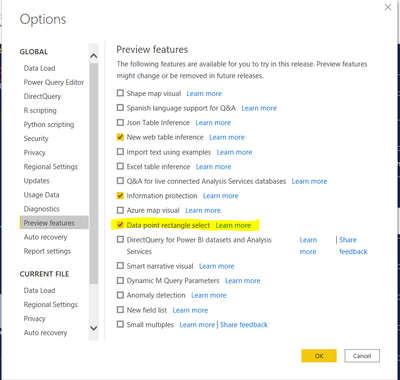
@Dunner2020  This is now a preview feature.  Once you turn on you can use it by clicking CTRL and dragging.


To turn on go to File -> Options and Settings -> Options -> Preview Features 

blorbert_0-1617985174975.png


Fowmy
Super User
Super User

@Dunner2020 

Hope this video will help you :

https://www.youtube.com/watch?v=2bGNzVSrtZA

________________________

If my answer was helpful, please consider Accept it as the solution to help the other members find it

Click on the Thumbs-Up icon if you like this reply 🙂

YouTube  LinkedIn

Did I answer your question? Mark my post as a solution! and hit thumbs up


Subscribe and learn Power BI from these videos

Website LinkedIn PBI User Group

amitchandak
Super User
Super User

@Dunner2020 , I think you are looking for lasso selection. That is planned in Oct-2020.

refer

https://docs.microsoft.com/en-us/power-platform-release-plan/2020wave2/power-bi/lasso-select-datapoi...

Share with Power BI Enthusiasts: Full Power BI Video (20 Hours) YouTube
Microsoft Fabric Series 60+ Videos YouTube
Microsoft Fabric Hindi End to End YouTube

@amitchandak , In my post the example picture (the second one) is already deployed in some Power BI dashboard. So its already in Power BI dashboard.

Helpful resources

Announcements
November Power BI Update Carousel

Power BI Monthly Update - November 2025

Check out the November 2025 Power BI update to learn about new features.

Fabric Data Days Carousel

Fabric Data Days

Advance your Data & AI career with 50 days of live learning, contests, hands-on challenges, study groups & certifications and more!

FabCon Atlanta 2026 carousel

FabCon Atlanta 2026

Join us at FabCon Atlanta, March 16-20, for the ultimate Fabric, Power BI, AI and SQL community-led event. Save $200 with code FABCOMM.

Top Solution Authors
Top Kudoed Authors