cancel
Showing results for 
Search instead for 
Did you mean: 

We've captured the moments from FabCon & SQLCon that everyone is talking about, and we are bringing them to the community, live and on-demand. Starts on April 14th. Register now

Reply
Asim
Helper I
Helper I

scatter chart data aggregation issue

Good Morning,


I have been facing issue while creating scatter chart in my report.

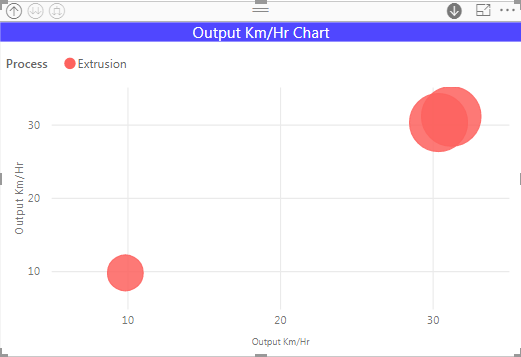
I created a scatter chart in my report and it was showing correct result with machines but when i created a hierarchy which include machines and their capacity group then the quantity produced appearing as an average instead of sum.

for example, I have extrusion as capacity group and there are three machines involve in this process.

the total output km/hr of this group is (9.83+30.35+31.19) = 71.37 km/hr but in the chart it just shows the average = 23.79

whereas by drilling down it shows the correct output of all 3 machines.


How i can get a total value of these three machines in the capacity group

Any solution to overcome this issue,


Best Regards

Asim


scatter chart1.png


scatter chart2.png


4 REPLIES 4
Greg_Deckler
Community Champion
Community Champion

You should be able to change the aggregation type if you click the drop down arrow on the field. But tough to say without source data, formulas and such.


Follow on LinkedIn
@ me in replies or I'll lose your thread!!!
Instead of a Kudo, please vote for this idea
Become an expert!: Enterprise DNA
External Tools: MSHGQM
YouTube Channel!: Microsoft Hates Greg
Latest book!:
DAX For Humans

DAX is easy, CALCULATE makes DAX hard...


Good Morning @Greg_Deckler

I am using below mentioned measure to calculate the output km/hour of each machine.


Output Km/Hr =
calculate (
SUM(PL[Act. Quant. Prod.]),
TREATAS(values(Eventlog[Machine]),PL[Machine])) / 1000 / ( [Total Loading time] / 60 )


As this is measure, hence the dropdown list is not available in the field pane.

Do I need to make some changes in measure.


Please suggest!


Regards

Asim


Anonymous
Not applicable

@Asim,

It seems that the measure re-calculates in different levels. Could you please share sample data of your table for us to test?

Regards,
Lydia

Dear @Anonymous

I am using multiple tables to access the data, kindly provide your email address so that i could send the full file.


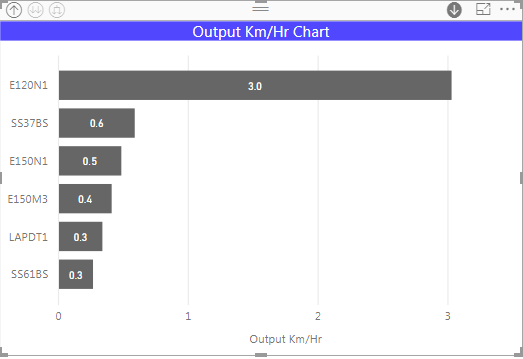
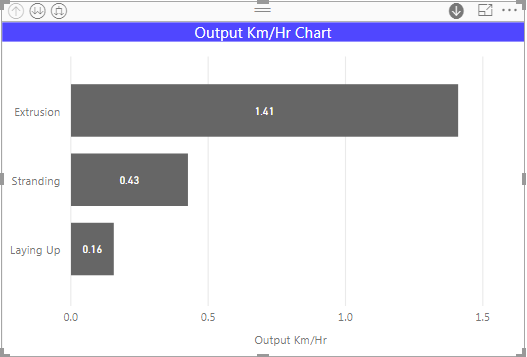
I have created two measures to calculate output km/hr of the machine, these measures works very well at machine level but  when i use the hierarchy feature like capacity group on top of machines then system just provide average of output km/hr.


Output Km/Hr =
calculate (
SUM(PL[Act. Quant. Prod.]),
TREATAS(values(Eventlog[Machine]),PL[Machine])) / 1000 / ( [Total Loading time] / 60 ) 


Total Loading time = sumx(Eventlog,IF(Eventlog[Event]="production",Eventlog[Duration]+Eventlog[TK1]+Eventlog[TK2]+Eventlog[TK3]+Eventlog[TK4],Eventlog[TK1]+Eventlog[TK2]+Eventlog[TK3]+Eventlog[TK4]))


output km.png


output km1.png


Helpful resources

Announcements
New to Fabric survey Carousel

New to Fabric Survey

If you have recently started exploring Fabric, we'd love to hear how it's going. Your feedback can help with product improvements.

Power BI DataViz World Championships carousel

Power BI DataViz World Championships - June 2026

A new Power BI DataViz World Championship is coming this June! Don't miss out on submitting your entry.

Join our Fabric User Panel

Join our Fabric User Panel

Share feedback directly with Fabric product managers, participate in targeted research studies and influence the Fabric roadmap.

March Power BI Update Carousel

Power BI Community Update - March 2026

Check out the March 2026 Power BI update to learn about new features.