FabCon is coming to Atlanta
Join us at FabCon Atlanta from March 16 - 20, 2026, for the ultimate Fabric, Power BI, AI and SQL community-led event. Save $200 with code FABCOMM.
Register now!- Power BI forums
- Get Help with Power BI
- Desktop
- Service
- Report Server
- Power Query
- Mobile Apps
- Developer
- DAX Commands and Tips
- Custom Visuals Development Discussion
- Health and Life Sciences
- Power BI Spanish forums
- Translated Spanish Desktop
- Training and Consulting
- Instructor Led Training
- Dashboard in a Day for Women, by Women
- Galleries
- Data Stories Gallery
- Themes Gallery
- Contests Gallery
- QuickViz Gallery
- Quick Measures Gallery
- Visual Calculations Gallery
- Notebook Gallery
- Translytical Task Flow Gallery
- TMDL Gallery
- R Script Showcase
- Webinars and Video Gallery
- Ideas
- Custom Visuals Ideas (read-only)
- Issues
- Issues
- Events
- Upcoming Events
The Power BI Data Visualization World Championships is back! Get ahead of the game and start preparing now! Learn more
- Power BI forums
- Forums
- Get Help with Power BI
- Desktop
- return Top xxx rows in table
- Subscribe to RSS Feed
- Mark Topic as New
- Mark Topic as Read
- Float this Topic for Current User
- Bookmark
- Subscribe
- Printer Friendly Page


- Mark as New
- Bookmark
- Subscribe
- Mute
- Subscribe to RSS Feed
- Permalink
- Report Inappropriate Content
return Top xxx rows in table
I have a table showing users that have logged into a system. The total table has around 550 users (this can vary), and from this table I need to be able to show the ones who have logged in the most (in this case the top 392).
I have a table showing 2 columns, Username and number of logins.
| Username | Count of login |
| abc@domain.com | 9374 |
| def@domain.com | 6192 |
| ghi@domain.com | 2981 |
| xyz@domain.com | 2510 |
Ideally I would like to add an extra column to this table, showing if they are a Top user or not. So the 392 with the highest number of logins will be flagged as a top user, the other remaining users (variable, but around 160), will not be.
I have tried using the formula:
Measure 2 = TOPN(392,staff,Staff[Login History.LoginTime])
Solved! Go to Solution.


- Mark as New
- Bookmark
- Subscribe
- Mute
- Subscribe to RSS Feed
- Permalink
- Report Inappropriate Content
Hey, try ALL(Staff[Username]) for the table instead of just staff. You need to calculate the rank of one row against all the rows in order to check the ranking. That's why it's 1 for you.
Hope this helps,
Happy to help!
- Mark as New
- Bookmark
- Subscribe
- Mute
- Subscribe to RSS Feed
- Permalink
- Report Inappropriate Content
Hi @andrew_hardwick ,
Please update the formula of your measure as below:
Rank =
RANKX (
    ALL ( Staff[Username] ),
    CALCULATE ( COUNT ( Staff[Login History.LoginTime] ) ),
    ,
    DESC,
    DENSE
)
Rena
- Mark as New
- Bookmark
- Subscribe
- Mute
- Subscribe to RSS Feed
- Permalink
- Report Inappropriate Content
Hi there. The function you are looking for is RANKX. The TOPN returns a table and you need a scalar showing the ranking. Try that function like: RANKX(Table, [Measure]).
Regards,
Happy to help!
- Mark as New
- Bookmark
- Subscribe
- Mute
- Subscribe to RSS Feed
- Permalink
- Report Inappropriate Content
Hi @ibarrau . I tried that, but rank shows as 1 each time.
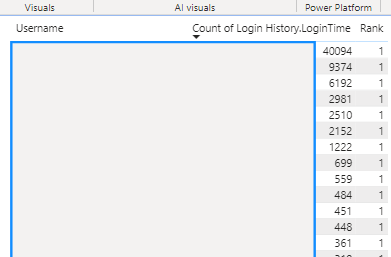
The formula I used was:
Rank = RANKX(Staff,count(Staff[Login History.LoginTime]))
I used Count as without this, I got an error saying:
A single value for column 'Login History.LoginTime' in table 'Staff' cannot be determined. This can happen when a measure formula refers to a column that contains many values without specifying an aggregation such as min, max, count, or sum to get a single result.
- Mark as New
- Bookmark
- Subscribe
- Mute
- Subscribe to RSS Feed
- Permalink
- Report Inappropriate Content
Hi @andrew_hardwick ,
Please update the formula of your measure as below:
Rank =
RANKX (
    ALL ( Staff[Username] ),
    CALCULATE ( COUNT ( Staff[Login History.LoginTime] ) ),
    ,
    DESC,
    DENSE
)
Rena
- Mark as New
- Bookmark
- Subscribe
- Mute
- Subscribe to RSS Feed
- Permalink
- Report Inappropriate Content
Hi, yes the ALL part was the missing part, thanks!
- Mark as New
- Bookmark
- Subscribe
- Mute
- Subscribe to RSS Feed
- Permalink
- Report Inappropriate Content
Hey, try ALL(Staff[Username]) for the table instead of just staff. You need to calculate the rank of one row against all the rows in order to check the ranking. That's why it's 1 for you.
Hope this helps,
Happy to help!

Helpful resources

Power BI Dataviz World Championships
The Power BI Data Visualization World Championships is back! Get ahead of the game and start preparing now!

Power BI Monthly Update - November 2025
Check out the November 2025 Power BI update to learn about new features.

FabCon Atlanta 2026
Join us at FabCon Atlanta, March 16-20, for the ultimate Fabric, Power BI, AI and SQL community-led event. Save $200 with code FABCOMM.

| User | Count |
|---|---|
| 59 | |
| 43 | |
| 42 | |
| 23 | |
| 17 |


| User | Count |
|---|---|
| 190 | |
| 122 | |
| 96 | |
| 66 | |
| 47 |


