
Join us at FabCon Atlanta from March 16 - 20, 2026, for the ultimate Fabric, Power BI, AI and SQL community-led event. Save $200 with code FABCOMM.
Register now!The Power BI Data Visualization World Championships is back! Get ahead of the game and start preparing now! Learn more
Hi,
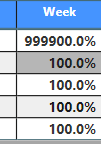
How to convert "99990.0%" to NA, others remain same? I tried to use if statement, but got error message. Thanks!
Hi @Anonymous,
If values 999900.0% and 100.0% come from a measure, you can modify the measure like below:
Measure=IF(MAX(Table1[Column1])=9999,"N/A",MAX(Table1[Column1]))
Best Regards,
Qiuyun Yu
Hi Yu,
thanks for reply. The column comes from table(not calculated measure or calculated column). I applied the formular "Measure=IF(MAX(Table1[Column1])=9999,"N/A",MAX(Table1[Column1]))"
which you provided , but I got the error message:
I can't replace 99999 to 0, have to replace 9999 to NA for business purpose. Another solution?
Thanks!
@Anonymous,
Please do try the below one,
Measure=IF(MAX(Table1[Column1])=9999,"N/A",FORMAT(MAX(Table1[Column1],"0.0%")))
The Power BI Data Visualization World Championships is back! Get ahead of the game and start preparing now!
| User | Count |
|---|---|
| 62 | |
| 47 | |
| 40 | |
| 36 | |
| 23 |
| User | Count |
|---|---|
| 184 | |
| 123 | |
| 106 | |
| 78 | |
| 52 |