cancel
Showing results for 
Search instead for 
Did you mean: 

The Power BI Data Visualization World Championships is back! Get ahead of the game and start preparing now! Learn more

Reply
Clament
Regular Visitor

remote server error: (500)

Hi 

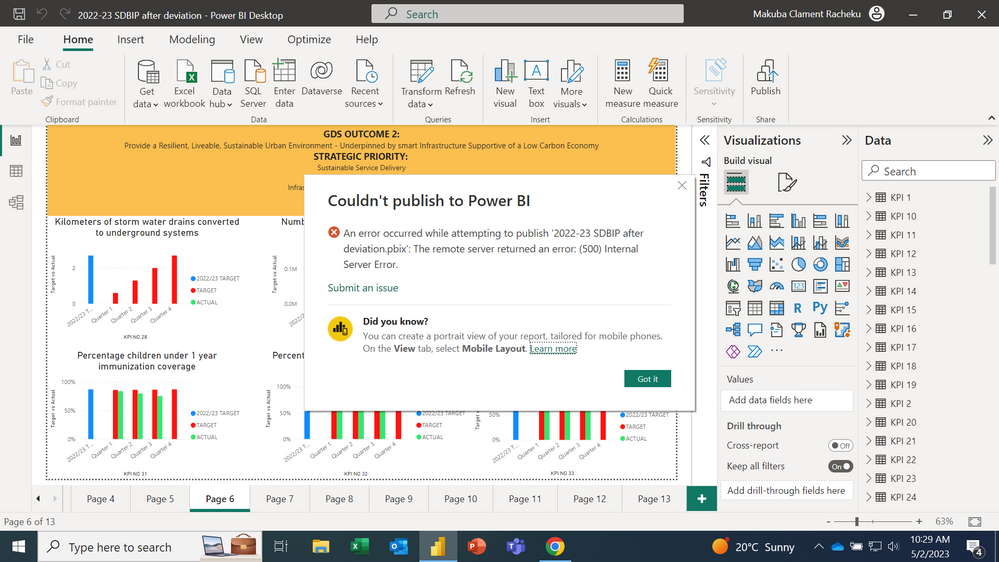
Am trying to publish my report and the system returns an error refer to the attarched screenshotScreenshot (64).png

1 ACCEPTED SOLUTION
v-jingzhang
Community Support
Community Support

Hi @Clament 


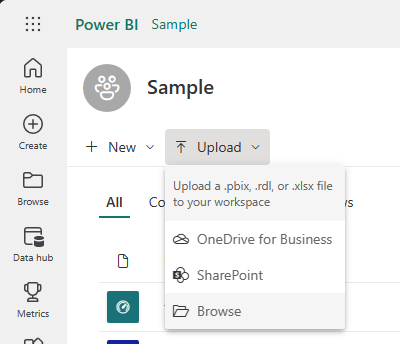
If you create a brand new pbix file and publish it to the same workspace, will this error happen again? In addition, please try logging to Power BI Service with the same Power BI account, then using Upload > Browse to upload the same pbix file into the same workspace. Check whether this option will work. 

vjingzhang_0-1683165644771.png


If this error still happens, please check whether there is enough remaining storage of the workspace for the pbix file from Settings > Manage group storage. Is this workspace a Pro workspace or a Premium workspace? If you publish the same pbix to another workspace, will this error happen? 


Best Regards,
Community Support Team _ Jing
If this post helps, please Accept it as Solution to help other members find it.


View solution in original post

2 REPLIES 2
v-jingzhang
Community Support
Community Support

Hi @Clament 


If you create a brand new pbix file and publish it to the same workspace, will this error happen again? In addition, please try logging to Power BI Service with the same Power BI account, then using Upload > Browse to upload the same pbix file into the same workspace. Check whether this option will work. 

vjingzhang_0-1683165644771.png


If this error still happens, please check whether there is enough remaining storage of the workspace for the pbix file from Settings > Manage group storage. Is this workspace a Pro workspace or a Premium workspace? If you publish the same pbix to another workspace, will this error happen? 


Best Regards,
Community Support Team _ Jing
If this post helps, please Accept it as Solution to help other members find it.


Hello, 

I have the same issue while I am trying to publish a Power BI report to a Workspace in Power BI service. 

This report is already in the workspace but I want to replace it. 

Sindy_0-1719996371171.png

This is the error mesage that I receive. 


Till now I have tryed :

1. Clear cashe in my browser

2. Clear Cache in Power BI Desktop file

3. Change the Name of the report and publish again

4. Get the report from the workspace using Upload option.


All those steps above did not resolcve the issue. 

Please can you help me with another idea how to fix 

Helpful resources

Announcements
Power BI DataViz World Championships

Power BI Dataviz World Championships

The Power BI Data Visualization World Championships is back! Get ahead of the game and start preparing now!

November Power BI Update Carousel

Power BI Monthly Update - November 2025

Check out the November 2025 Power BI update to learn about new features.

FabCon Atlanta 2026 carousel

FabCon Atlanta 2026

Join us at FabCon Atlanta, March 16-20, for the ultimate Fabric, Power BI, AI and SQL community-led event. Save $200 with code FABCOMM.