Join us at FabCon Atlanta from March 16 - 20, 2026, for the ultimate Fabric, Power BI, AI and SQL community-led event. Save $200 with code FABCOMM.
Register now!The Power BI Data Visualization World Championships is back! Get ahead of the game and start preparing now! Learn more
Hi All,
I have a scenario similar to "Events in Progress" but the data is at minute level.
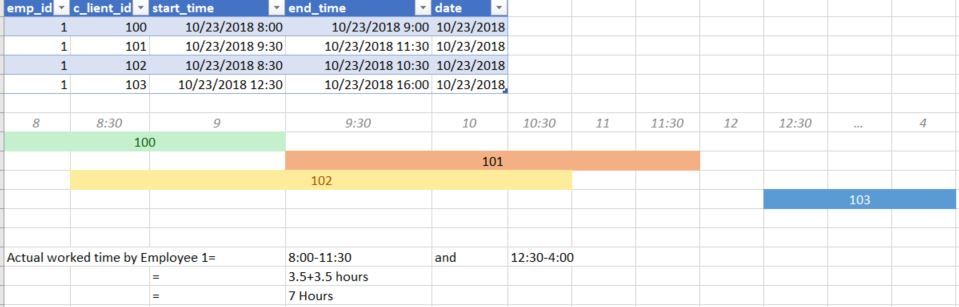
Objective: Calculate total Hours worked by Employee
How can I build this in Dax??
My approach was to compare data in "row 1" with data in "row 2" and update the variables in iterator (sumx(tbl, var true_start_time=...,true_end_time=.. Return, ....some_complex_dax.....)
but even this approach fails for the case, where there is a gap in the overlapping time frames; just as in the case in the img.
Shoot your thoughts or point me to resources if there are any that solves this issue.
Hi @krish003,
Based on your information, I'm still a little confused about your logic.
If it is convenient, could you share your data sample and your desired ouput in power bi.
I would appreciate it if you could describe your logic in more details.
Best Regards,
Cherry
The Power BI Data Visualization World Championships is back! Get ahead of the game and start preparing now!
| User | Count |
|---|---|
| 38 | |
| 38 | |
| 36 | |
| 28 | |
| 28 |
| User | Count |
|---|---|
| 124 | |
| 88 | |
| 74 | |
| 66 | |
| 65 |