Join us at FabCon Atlanta from March 16 - 20, 2026, for the ultimate Fabric, Power BI, AI and SQL community-led event. Save $200 with code FABCOMM.
Register now!The Power BI Data Visualization World Championships is back! Get ahead of the game and start preparing now! Learn more
Hello guys,
In some columns of my data the first months are blank, but in the other columns the data exists in these first months.
When I visualise the data with the first blank rows in a chart, the date axis starts with the first existing data. But when I put my date slicer at the beginning of the database, I want to show the blank data in the visual too.
So I think this works with "Show items with no data" and it works with a table. But it doesnt work with line chart:
As you can see, the blank rows are displayed in the table, but not in the line chart. The line chart begins at the 1th January 2021, but I put the slicer at the end of 2019. I want to show the date axis like in the left chart "mittlere O2-Konz. in ml/l"
Trough my google research, it should be possible with "show items with no data". But somehow it doesnt work in my dashboard with any data.
Thanks in advance!
Solved! Go to Solution.
Hi @Clout ,
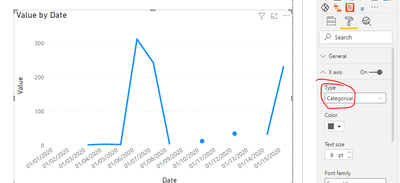
If you change the type of the x-axis to "categorical" and enable 'Show items with no data' option, you can see the blank values.
Best regards,
Lionel Chen
If this post helps, then please consider Accept it as the solution to help the other members find it more quickly.
Hi @Clout ,
If you change the type of the x-axis to "categorical" and enable 'Show items with no data' option, you can see the blank values.
Best regards,
Lionel Chen
If this post helps, then please consider Accept it as the solution to help the other members find it more quickly.
Okay thank you, so I think its not possible another way.
Thank you amitchandak - just added +0 to my measure and the magic happened 🙂
Thank you for your answer @amitchandak
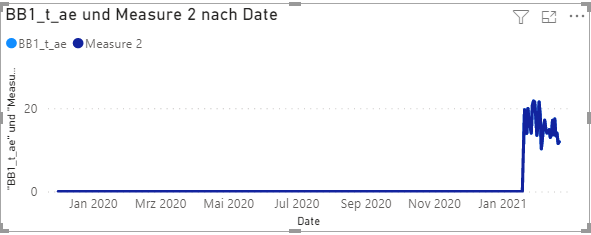
Now it will show me the whole time, but now it looks like that too:
Is it possible to hide the line which is 0?
The Power BI Data Visualization World Championships is back! Get ahead of the game and start preparing now!
| User | Count |
|---|---|
| 39 | |
| 39 | |
| 37 | |
| 29 | |
| 24 |
| User | Count |
|---|---|
| 120 | |
| 95 | |
| 70 | |
| 69 | |
| 65 |