This time we’re going bigger than ever. Fabric, Power BI, SQL, AI and more. We're covering it all. You won't want to miss it.
Learn moreLevel up your Power BI skills this month - build one visual each week and tell better stories with data! Get started
Hi everyone, can somebody help me out with this challenge I'm facing.
Here is my sample data:
ID Week Var1
1 1 no
2 1 null
3 1 yes
1 2 yes
2 2 yes
3 2 yes
So I have a unique ID, weeknumber and a variable (yes, no, empty). My goal is to track the changes from 0 -> 1 every week (so not from empty (null) -> 1).
My idea was to add a column with the value of the previous week for that unique ID. But somehow it doesn't work. This is what I've tried:
previous = CALCULATE(sum(Blad1[Var1]);Blad1[ID];Blad1[week]-1)
and also tried this solution, but nothing:
Does someone has a solution for this problem? Would really appreciate it!
Solved! Go to Solution.
Hi,
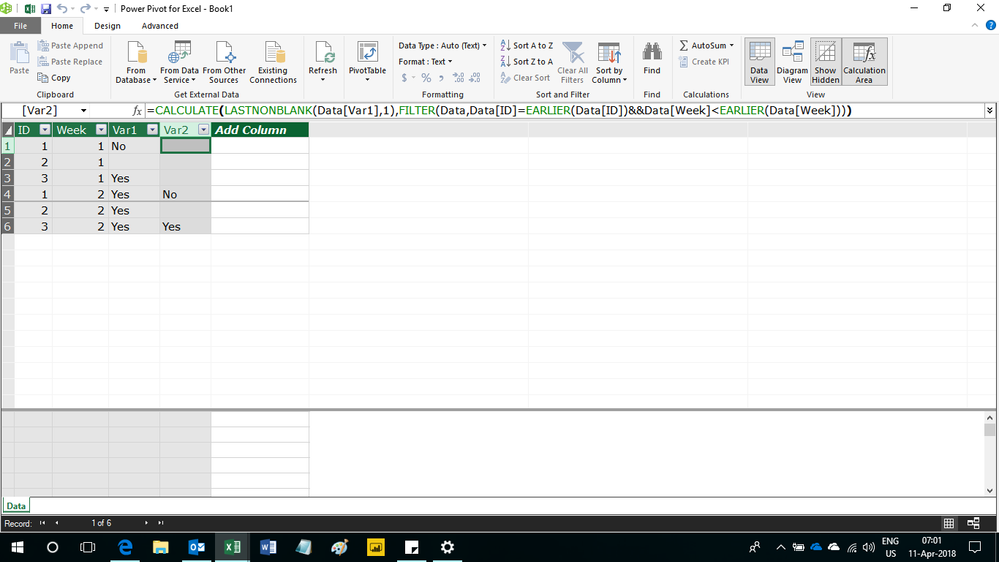
Enter this calculated column formula
=CALCULATE(LASTNONBLANK(Data[Var1],1),FILTER(Data,Data[ID]=EARLIER(Data[ID])&&Data[Week]<EARLIER(Data[Week])))
Hope this helps.
Hi,
Enter this calculated column formula
=CALCULATE(LASTNONBLANK(Data[Var1],1),FILTER(Data,Data[ID]=EARLIER(Data[ID])&&Data[Week]<EARLIER(Data[Week])))
Hope this helps.
Check out the April 2026 Power BI update to learn about new features.
Sign up to receive a private message when registration opens and key events begin.
If you have recently started exploring Fabric, we'd love to hear how it's going. Your feedback can help with product improvements.
| User | Count |
|---|---|
| 36 | |
| 32 | |
| 26 | |
| 24 | |
| 17 |
| User | Count |
|---|---|
| 70 | |
| 50 | |
| 31 | |
| 26 | |
| 22 |