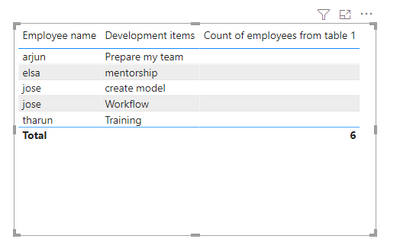
These are my tables, Table 1--- skills- > employees have multiple skills, Development item---> Focussed to do in future.
In Table 2 and Table 3, you can see there is a relation from Table 1 SKILLS & Development item.
Table 1 basically denotes total organization information, from that Skills and Development items created in Table 2 and Table 3.
So, Table 1 has a total of 6 employees in an organization.
My expected result is, that I want to bring the count of employees as 6 (table 1) to table 3. anyone pls Let me know the solution how it can be achieved.
@MahyarTF
@amitchandak @Vijay_A_Verma
Table 1
Employee name | skills | Development item |
arjun | Python, data, excel | Prepare my team |
rithik | Program, java | 0 |
edvid | Chemistry,physics,maths,biology | 0 |
tharun | javascript | Training |
elsa | 0 | mentorship |
jose | 0 | Workflow, create model |
Table 2
Employee name | skills |
arjun | Python |
arjun | data |
arjun | excel |
rithik | Program |
rithik | java |
edvid | Chemistry |
edvid | ,physics, |
edvid | ,maths, |
edvid | biology |
tharun | javascript |
Table 3
Employee name | Development items |
arjun | Prepare my team |
tharun | Training |
elsa | mentorship |
jose | Workflow |
jose | create model |
Expected Output.
Employee name | Development items(count) | Count of employees from table 1 |
arjun | Prepare my team | |
tharun | Training | |
elsa | mentorship | |
jose | Workflow | |
jose | create model | |
Totals | 5 | 6 |