FabCon is coming to Atlanta
Join us at FabCon Atlanta from March 16 - 20, 2026, for the ultimate Fabric, Power BI, AI and SQL community-led event. Save $200 with code FABCOMM.
Register now!- Power BI forums
- Get Help with Power BI
- Desktop
- Service
- Report Server
- Power Query
- Mobile Apps
- Developer
- DAX Commands and Tips
- Custom Visuals Development Discussion
- Health and Life Sciences
- Power BI Spanish forums
- Translated Spanish Desktop
- Training and Consulting
- Instructor Led Training
- Dashboard in a Day for Women, by Women
- Galleries
- Data Stories Gallery
- Themes Gallery
- Contests Gallery
- QuickViz Gallery
- Quick Measures Gallery
- Visual Calculations Gallery
- Notebook Gallery
- Translytical Task Flow Gallery
- TMDL Gallery
- R Script Showcase
- Webinars and Video Gallery
- Ideas
- Custom Visuals Ideas (read-only)
- Issues
- Issues
- Events
- Upcoming Events
Get Fabric Certified for FREE during Fabric Data Days. Don't miss your chance! Request now
- Power BI forums
- Forums
- Get Help with Power BI
- Desktop
- % of 2 columns .. I am missing something
- Subscribe to RSS Feed
- Mark Topic as New
- Mark Topic as Read
- Float this Topic for Current User
- Bookmark
- Subscribe
- Printer Friendly Page

- Mark as New
- Bookmark
- Subscribe
- Mute
- Subscribe to RSS Feed
- Permalink
- Report Inappropriate Content
% of 2 columns .. I am missing something
I am looking to calculate a backup % success rate ... I followed the below:
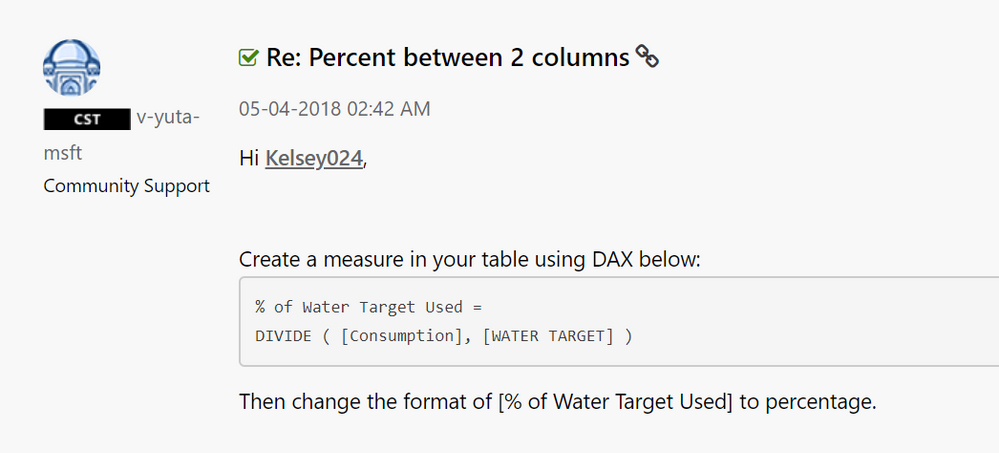
So my measure looks like the below and I get the error underneath ...

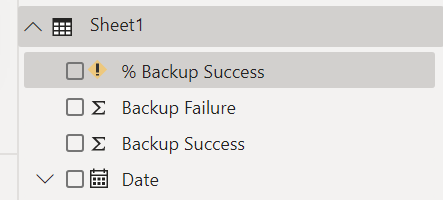
here are the columns:
Solved! Go to Solution.


- Mark as New
- Bookmark
- Subscribe
- Mute
- Subscribe to RSS Feed
- Permalink
- Report Inappropriate Content
Hi @Anonymous ,
You have formatted the units to get .004.
Select your measure, the ribon above should pop up.
Else you can use the format measure.
Measure = Format ([your Measure] , "Percent")
Regards,
Harsh Nathani


- Mark as New
- Bookmark
- Subscribe
- Mute
- Subscribe to RSS Feed
- Permalink
- Report Inappropriate Content
Hi @Anonymous
If you've fixed the issue on your own please kindly share your solution. if the above posts help, please kindly mark it as a solution to help others find it more quickly. If not, please kindly elaborate more. thanks!
If this post helps, then please consider Accept it as the solution to help the other members find it more
quickly.
- Mark as New
- Bookmark
- Subscribe
- Mute
- Subscribe to RSS Feed
- Permalink
- Report Inappropriate Content
HI @Anonymous ,
Try
Divide(Sheet1[Backup Failure] , Sheet1 [Backup Success])
Or
Divide(Max(Sheet1[Backup Failure] ), Max(Sheet1 [Backup Success]))
Regards,
HN
- Mark as New
- Bookmark
- Subscribe
- Mute
- Subscribe to RSS Feed
- Permalink
- Report Inappropriate Content
I tried the below ...
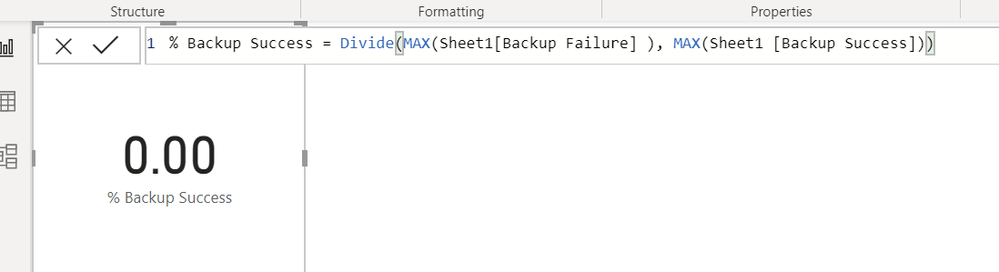
The correct % when the 2 numbers are done correctly is around 99.57% ... I tried COUNT and it gave me 1.00.
When I tried:
Divide(Sheet1[Backup Failure] , Sheet1 [Backup Success])
it gave me the error of:

- Mark as New
- Bookmark
- Subscribe
- Mute
- Subscribe to RSS Feed
- Permalink
- Report Inappropriate Content
Hi @Anonymous ,
Try Sum instead of Count.
Incase the issue is not resolved, pls share sample Data.
Regards,
Harsh
- Mark as New
- Bookmark
- Subscribe
- Mute
- Subscribe to RSS Feed
- Permalink
- Report Inappropriate Content
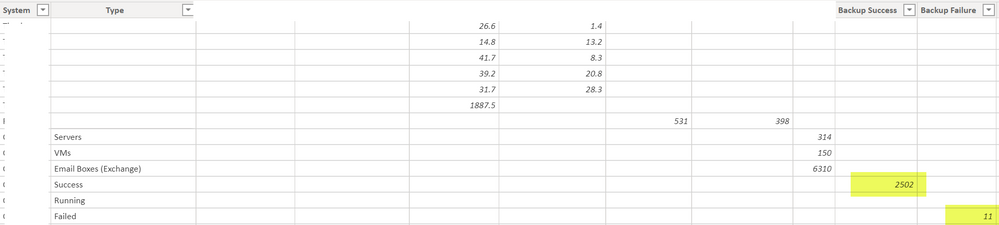
I tried SUM and it moved it back to 0.00
Here are the 2 datapoints in those columns ...
- Mark as New
- Bookmark
- Subscribe
- Mute
- Subscribe to RSS Feed
- Permalink
- Report Inappropriate Content
Hi @Anonymous ,
Create a measure
Div =
Var a = Calculate (Max(sheet1[Backup Success]), Filter (Sheet1, Sheet1 [Type] = "Success"))
Var b = Calculate (Max(sheet1[Backup Failure]), Filter (Sheet1, Sheet1 [Type] = "Failed"))
Return
Divide(b,a)
Regards
HN
- Mark as New
- Bookmark
- Subscribe
- Mute
- Subscribe to RSS Feed
- Permalink
- Report Inappropriate Content
I used your above code:
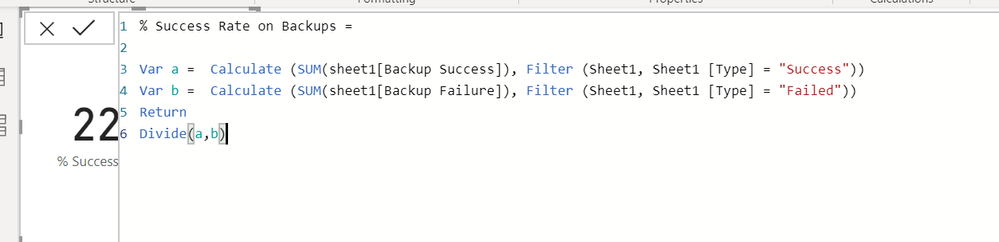
Here is the result of it ...
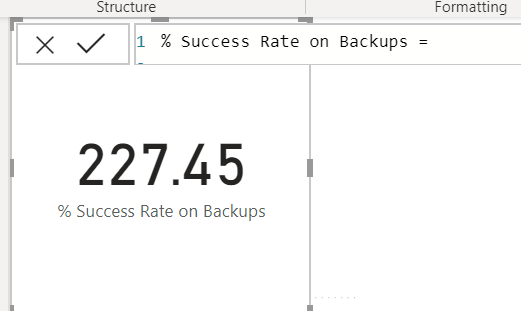
I switch the Divide(a,b) to Divide(b,a) just to see what would happen and got 0.00
- Mark as New
- Bookmark
- Subscribe
- Mute
- Subscribe to RSS Feed
- Permalink
- Report Inappropriate Content
Hi @Anonymous ,
Increase the decimal points.
11/2502 = 0.00440
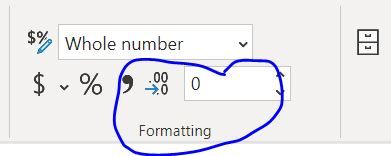
Change the value from 0 to 4 in the circle above and drop down should have decimal.
Regards,
Harsh Nathani
Did I answer your question? Mark my post as a solution! Appreciate with a Kudos!! (Click the Thumbs Up Button)
- Mark as New
- Bookmark
- Subscribe
- Mute
- Subscribe to RSS Feed
- Permalink
- Report Inappropriate Content
@harshnathani I formatted the units to get .004 % ... not sure how to show that in percent form though.
I found this is another post searching ... I dont have those options in my ribbon:
- Mark as New
- Bookmark
- Subscribe
- Mute
- Subscribe to RSS Feed
- Permalink
- Report Inappropriate Content
Hi @Anonymous ,
You have formatted the units to get .004.
Select your measure, the ribon above should pop up.
Else you can use the format measure.
Measure = Format ([your Measure] , "Percent")
Regards,
Harsh Nathani
- Mark as New
- Bookmark
- Subscribe
- Mute
- Subscribe to RSS Feed
- Permalink
- Report Inappropriate Content
I switch the data up a little to see about making it easier ... put everything on 1 row and then created a calculated column of failure + success ... with hopes of being able to then just divide success into backup total count
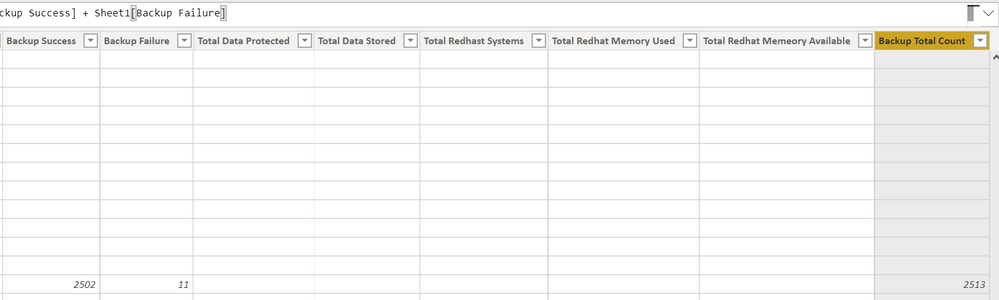
However, now it wont find the success or total count columns to make the formula ... I tried adding sheet1 in there, but did not do anyting helpful.
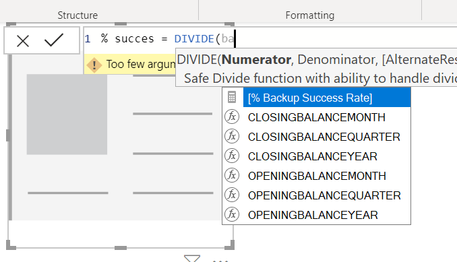
then I tried the above code and updated some to the new column I added ..
Helpful resources

Power BI Monthly Update - November 2025
Check out the November 2025 Power BI update to learn about new features.

Fabric Data Days
Advance your Data & AI career with 50 days of live learning, contests, hands-on challenges, study groups & certifications and more!

FabCon Atlanta 2026
Join us at FabCon Atlanta, March 16-20, for the ultimate Fabric, Power BI, AI and SQL community-led event. Save $200 with code FABCOMM.


