Join us at FabCon Atlanta from March 16 - 20, 2026, for the ultimate Fabric, Power BI, AI and SQL community-led event. Save $200 with code FABCOMM.
Register now!The Power BI Data Visualization World Championships is back! Get ahead of the game and start preparing now! Learn more
I have this column with "null" values and "0" values (responses)
amount = calculate(countrows([table]);value = 0)
amount = 23
dax counts all rows
amount should be 3, because 3 rows contain value 0
so I tried the filter allnoblankrow but I still get amount 23
can somebody give me the dax formule that gives amount = 3
I can't replace the null because they should remain blank for the response%

Solved! Go to Solution.
Hey, here is the formula you are looking for (hopefully)
CALCULATE(
COUNTROWS('TableWithZeroAndBlankValues')
,'TableWithZeroAndBlankValues'[Amount] = 0 && NOT(ISBLANK('TableWithZeroAndBlankValues'[Amount]))
)Regards
Tom
Hey, here is the formula you are looking for (hopefully)
CALCULATE(
COUNTROWS('TableWithZeroAndBlankValues')
,'TableWithZeroAndBlankValues'[Amount] = 0 && NOT(ISBLANK('TableWithZeroAndBlankValues'[Amount]))
)Regards
Tom
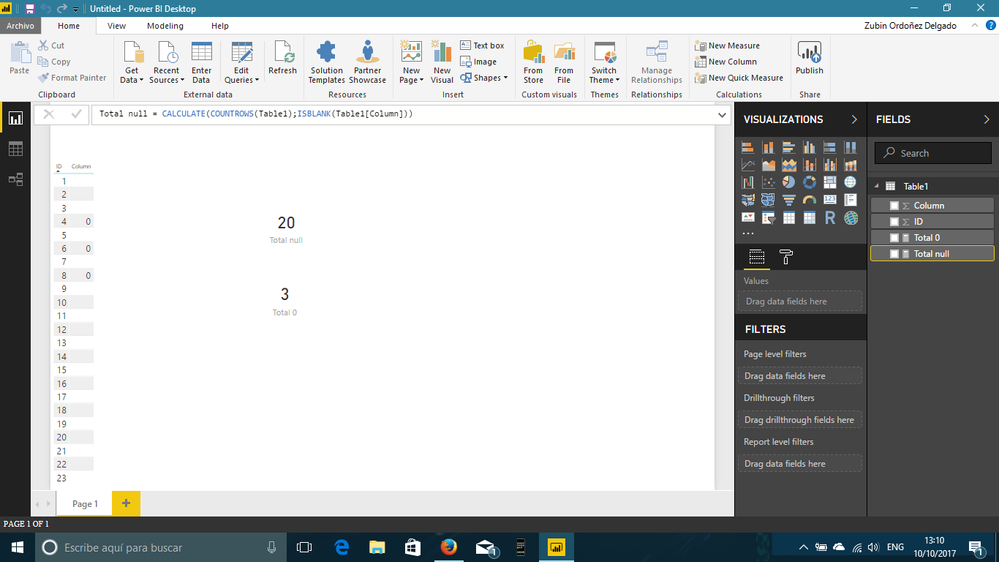
Hi @reije021
Try this...
Total null = CALCULATE(COUNTROWS(Table1);ISBLANK(Table1[Column]))
Total 0 = COUNT(Table1[Column])
The Power BI Data Visualization World Championships is back! Get ahead of the game and start preparing now!
| User | Count |
|---|---|
| 40 | |
| 35 | |
| 34 | |
| 31 | |
| 28 |
| User | Count |
|---|---|
| 137 | |
| 102 | |
| 71 | |
| 67 | |
| 65 |