FabCon is coming to Atlanta
Join us at FabCon Atlanta from March 16 - 20, 2026, for the ultimate Fabric, Power BI, AI and SQL community-led event. Save $200 with code FABCOMM.
Register now!- Power BI forums
- Get Help with Power BI
- Desktop
- Service
- Report Server
- Power Query
- Mobile Apps
- Developer
- DAX Commands and Tips
- Custom Visuals Development Discussion
- Health and Life Sciences
- Power BI Spanish forums
- Translated Spanish Desktop
- Training and Consulting
- Instructor Led Training
- Dashboard in a Day for Women, by Women
- Galleries
- Data Stories Gallery
- Themes Gallery
- Contests Gallery
- QuickViz Gallery
- Quick Measures Gallery
- Visual Calculations Gallery
- Notebook Gallery
- Translytical Task Flow Gallery
- TMDL Gallery
- R Script Showcase
- Webinars and Video Gallery
- Ideas
- Custom Visuals Ideas (read-only)
- Issues
- Issues
- Events
- Upcoming Events
The Power BI Data Visualization World Championships is back! Get ahead of the game and start preparing now! Learn more
- Power BI forums
- Forums
- Get Help with Power BI
- Desktop
- new column that tags every first appearence of a n...
- Subscribe to RSS Feed
- Mark Topic as New
- Mark Topic as Read
- Float this Topic for Current User
- Bookmark
- Subscribe
- Printer Friendly Page


- Mark as New
- Bookmark
- Subscribe
- Mute
- Subscribe to RSS Feed
- Permalink
- Report Inappropriate Content
new column that tags every first appearence of a number within a month
Hi all,
I have a measure that allows me to calculate the number of calls within a year following three conditions :
- [CallType] = C
- [Durée]<=30 AND <120 (seconds)
- Distinct [Clip] (phone number) per month : if I have 2 identic [Clip] within a month it counts only once, but if the same [Clip] appears in two different months we count it once in each month) + all [Clip]=BLANK()
CALLS < 2Min =

SUMX(
            VALUES(CallHistory[Année-mois]),
            CALCULATE(
                DISTINCTCOUNTNOBLANK(CallHistory[Clip])
                + CALCULATE(COUNTROWS(CallHistory), CallHistory[Clip]=BLANK()),
                CallHistory[CallType]="C",
                FiltreAppels[Durée]>=30,
                FiltreAppels[Durée]<120
        )
    )
I need to create a column such as IF(same rules as the measure), "1", "0").
In other words, I need a column that :
IF (AND(CallHistory[CallType]="C",
AND(FiltreAppels[Durée]>=30,
AND(FiltreAppels[Durée]<120,
OR(CallHistory[Clip]=BLANK(), [Clip.... ??]
[Clip.... ??] = first appearence of this Clip within the month
Any idea on how do I write that?
Thanks in advance,
Ana
Solved! Go to Solution.


- Mark as New
- Bookmark
- Subscribe
- Mute
- Subscribe to RSS Feed
- Permalink
- Report Inappropriate Content
Hi,
Share data in a format that can be pasted in an MS Excel file.
Regards,
Ashish Mathur
http://www.ashishmathur.com
https://www.linkedin.com/in/excelenthusiasts/
- Mark as New
- Bookmark
- Subscribe
- Mute
- Subscribe to RSS Feed
- Permalink
- Report Inappropriate Content
Hi,
Write these calculated column formulas
Month of call = MONTH(Data[StartOfCall])Column = if(CALCULATE(COUNTROWS(Data),FILTER(Data,Data[Clip]=EARLIER(Data[Clip])&&Data[CallType]="C"&&Data[Durée]<=120&&Data[StartOfCall]<=EARLIER(Data[StartOfCall])&&Data[Month of call]=EARLIER(Data[Month of call])))=1,1,BLANK())Hope this helps.
Regards,
Ashish Mathur
http://www.ashishmathur.com
https://www.linkedin.com/in/excelenthusiasts/
- Mark as New
- Bookmark
- Subscribe
- Mute
- Subscribe to RSS Feed
- Permalink
- Report Inappropriate Content
Hello,
I need to add a new condition to this calculation : if the number ([Clip]) is already flagged as "Reactif" within the month, I should not count it. In other words, to my column "CALLS < 2 min"
CALLS < 2Min = if(CALCULATE(COUNTROWS(Data), FILTER(
                  Data,Data[Clip]=EARLIER(Data[Clip])&&
                  Data[CallType]="C"&&
                  Data[Durée]<=120&&
                  Data[StartOfCall]<=EARLIER(Data[StartOfCall])&&
                  Data[Month of call]=EARLIER(Data[Month of call])))=1,1,BLANK())
I need to add the condition "if it's flagged Reactif whitin the month then BLANK()
Here's a sample of the data
@Ashish_Mathur any inspiration on how to do this?
- Mark as New
- Bookmark
- Subscribe
- Mute
- Subscribe to RSS Feed
- Permalink
- Report Inappropriate Content
Hi,
That download link opens up an error page.
Regards,
Ashish Mathur
http://www.ashishmathur.com
https://www.linkedin.com/in/excelenthusiasts/
- Mark as New
- Bookmark
- Subscribe
- Mute
- Subscribe to RSS Feed
- Permalink
- Report Inappropriate Content
Hi, could you please try this link : https://we.tl/t-XeMJWDtxqy?utm_campaign=TRN_TDL_05&utm_source=sendgrid&utm_medium=email&trk=TRN_TDL_...
Thank you in advance!
- Mark as New
- Bookmark
- Subscribe
- Mute
- Subscribe to RSS Feed
- Permalink
- Report Inappropriate Content
Hi,
Try this calculated column formula
CALLS < 2Min = if(CALCULATE(COUNTROWS(Data),FILTER(Data,Data[Clip]=EARLIER(Data[Clip])&&Data[Yearmonth]=EARLIER(Data[Yearmonth])))>0,BLANK(),if(CALCULATE(COUNTROWS(Data), FILTER(
                  Data,Data[Clip]=EARLIER(Data[Clip])&&
                  Data[CallType]="C"&&
                  Data[Durée]<=120&&
                  Data[StartOfCall]<=EARLIER(Data[StartOfCall])&&
                  Data[Month of call]=EARLIER(Data[Month of call])))=1,1,BLANK()))
Hope this helps.
Regards,
Ashish Mathur
http://www.ashishmathur.com
https://www.linkedin.com/in/excelenthusiasts/
- Mark as New
- Bookmark
- Subscribe
- Mute
- Subscribe to RSS Feed
- Permalink
- Report Inappropriate Content
Thank you so much!
It works nicely, I only made one adaptation : instead of "Month of call" I used "YearMonth of call".
- Mark as New
- Bookmark
- Subscribe
- Mute
- Subscribe to RSS Feed
- Permalink
- Report Inappropriate Content
You are welcome.
Regards,
Ashish Mathur
http://www.ashishmathur.com
https://www.linkedin.com/in/excelenthusiasts/
- Mark as New
- Bookmark
- Subscribe
- Mute
- Subscribe to RSS Feed
- Permalink
- Report Inappropriate Content
- Mark as New
- Bookmark
- Subscribe
- Mute
- Subscribe to RSS Feed
- Permalink
- Report Inappropriate Content
Hi,
Write these calculated column formulas
Month of call = MONTH(Data[StartOfCall])Column = if(CALCULATE(COUNTROWS(Data),FILTER(Data,Data[Clip]=EARLIER(Data[Clip])&&Data[CallType]="C"&&Data[Durée]<=120&&Data[StartOfCall]<=EARLIER(Data[StartOfCall])&&Data[Month of call]=EARLIER(Data[Month of call])))=1,1,BLANK())Hope this helps.
Regards,
Ashish Mathur
http://www.ashishmathur.com
https://www.linkedin.com/in/excelenthusiasts/
- Mark as New
- Bookmark
- Subscribe
- Mute
- Subscribe to RSS Feed
- Permalink
- Report Inappropriate Content
Hi,
Share some data and show the expected result. Do you want a measure solution?
Regards,
Ashish Mathur
http://www.ashishmathur.com
https://www.linkedin.com/in/excelenthusiasts/
- Mark as New
- Bookmark
- Subscribe
- Mute
- Subscribe to RSS Feed
- Permalink
- Report Inappropriate Content
Hi Ashish,
thank you for your suggestion : )
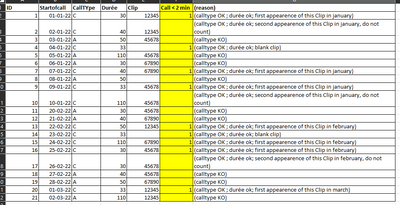
heres a table of an example. The yellow column is the expected result and the 'reason' column explains why it counts as 1 or BLANK.
- Mark as New
- Bookmark
- Subscribe
- Mute
- Subscribe to RSS Feed
- Permalink
- Report Inappropriate Content
Hi,
Share data in a format that can be pasted in an MS Excel file.
Regards,
Ashish Mathur
http://www.ashishmathur.com
https://www.linkedin.com/in/excelenthusiasts/

Helpful resources

Power BI Dataviz World Championships
The Power BI Data Visualization World Championships is back! Get ahead of the game and start preparing now!

Power BI Monthly Update - November 2025
Check out the November 2025 Power BI update to learn about new features.

FabCon Atlanta 2026
Join us at FabCon Atlanta, March 16-20, for the ultimate Fabric, Power BI, AI and SQL community-led event. Save $200 with code FABCOMM.

| User | Count |
|---|---|
| 66 | |
| 46 | |
| 42 | |
| 26 | |
| 19 |


| User | Count |
|---|---|
| 193 | |
| 124 | |
| 101 | |
| 67 | |
| 49 |


