Join us at FabCon Atlanta from March 16 - 20, 2026, for the ultimate Fabric, Power BI, AI and SQL community-led event. Save $200 with code FABCOMM.
Register now!The Power BI Data Visualization World Championships is back! Get ahead of the game and start preparing now! Learn more
Hi All,
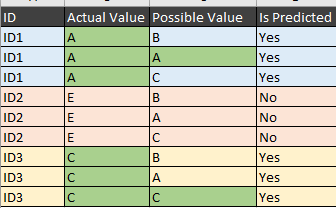
I have data like below table
I want to create "Is Predicted" Filed based on the below condition by using M query
Sample data:
| ID | Actual Value | Possible Value | Is Predicted |
| ID1 | A | B | Yes |
| ID1 | A | A | Yes |
| ID1 | A | C | Yes |
| ID2 | E | B | No |
| ID2 | E | A | No |
| ID2 | E | C | No |
| ID3 | C | B | Yes |
| ID3 | C | A | Yes |
| ID3 | C | C | Yes |
Solved! Go to Solution.
@Anonymous
As a custom column, you can use
"Changed Type" is just the previous step's name. You have to change it according to your last step in the Query Editor
=let myID=[ID] in let mylist=Table.SelectRows(#"Changed Type",each [ID]=myID)[Possible Value] in if List.Contains(mylist,[Actual Value]) then "Yes" else "No"
Hi @Anonymous
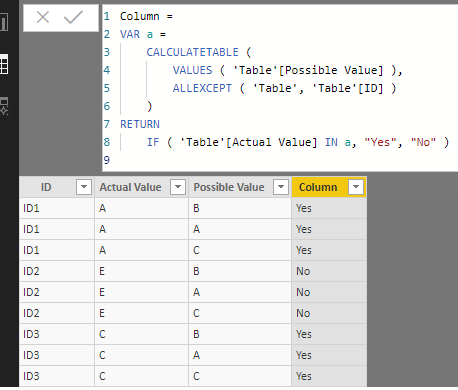
You may create a calculated column with DAX as below:
Column =
VAR a =
CALCULATETABLE (
VALUES ( 'Table'[Possible Value] ),
ALLEXCEPT ( 'Table', 'Table'[ID] )
)
RETURN
IF ( 'Table'[Actual Value] IN a, "Yes", "No" )
Regards,
@Anonymous
As a custom column, you can use
"Changed Type" is just the previous step's name. You have to change it according to your last step in the Query Editor
=let myID=[ID] in let mylist=Table.SelectRows(#"Changed Type",each [ID]=myID)[Possible Value] in if List.Contains(mylist,[Actual Value]) then "Yes" else "No"
The Power BI Data Visualization World Championships is back! Get ahead of the game and start preparing now!
| User | Count |
|---|---|
| 38 | |
| 36 | |
| 33 | |
| 33 | |
| 29 |
| User | Count |
|---|---|
| 134 | |
| 96 | |
| 78 | |
| 67 | |
| 65 |