Join us at FabCon Atlanta from March 16 - 20, 2026, for the ultimate Fabric, Power BI, AI and SQL community-led event. Save $200 with code FABCOMM.
Register now!The Power BI Data Visualization World Championships is back! Get ahead of the game and start preparing now! Learn more
hello!
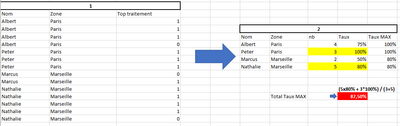
I need some helps to do this without creating many tables and overload my model.
I have the First table and want to have the red result. I think i need to create an intermediate table (2) in a var DAX but can't use new column.
If you can help me...
I find a solution by create 2 intermediates tables... but I need to do this with 3 Indicators (6 tables are created....)
Thank you a lot for your help!
hello! Thank you a lot for your answering but it's doesn't work... it gave me 100%
Hi @GyMpX
Create following measures:
Number = COUNT('Table'[Top traitement])
rate =
var _sum = SUM('Table'[Top traitement])
return
DIVIDE(_sum,[Number])
Measure = MAXX(FILTER(ALLEXCEPT('Table','Table'[Top traitement]),'Table'[Zone] = SELECTEDVALUE('Table'[Zone])),[rate])
Measure 2 = IF([rate] = MAXX(FILTER(ALLEXCEPT('Table','Table'[Top traitement]),'Table'[Zone] = SELECTEDVALUE('Table'[Zone])),[rate]),[Number])
Measure 3 =
var _a = SUMX(ALLEXCEPT('Table','Table'[Top traitement]), [Measure]*[Measure 2])
var _b = SUMX(ALLEXCEPT('Table','Table'[Top traitement]),[Measure 2])
return
DIVIDE(_a,_b)
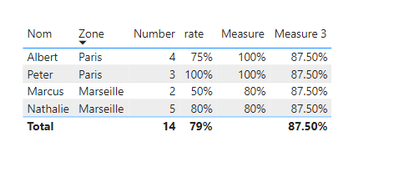
I think this is the result you want:
Best regards,
Yadong Fang
If this post helps, then please consider Accept it as the solution to help the other members find it more quickly.
The Power BI Data Visualization World Championships is back! Get ahead of the game and start preparing now!
Check out the November 2025 Power BI update to learn about new features.
| User | Count |
|---|---|
| 65 | |
| 44 | |
| 40 | |
| 29 | |
| 19 |
| User | Count |
|---|---|
| 200 | |
| 130 | |
| 102 | |
| 72 | |
| 55 |