
Join us at FabCon Atlanta from March 16 - 20, 2026, for the ultimate Fabric, Power BI, AI and SQL community-led event. Save $200 with code FABCOMM.
Register now!The Power BI Data Visualization World Championships is back! It's time to submit your entry. Live now!
I have a PBI that's about 6 gigs in size and I'm trying load/add a few table that total to probably 20milion row.
after I load and refresh, the data seems to load properly but when it tries to save it, I get an error about not having enough memory.
What can I do to overcome this? Is it strictly an issue with my machine? Any settings I can make? doI need to make my pbix file smaller?
I also just downloaded DAX studio to see if I can find out anything and the only thing that sticks out is that my 'joinkey' columsn take a lot of size. Is this something that I can reduce?
The joinkey is essetially the primary key I have been using to join multiple tables and it is a unique combination of a bunch of different columns. i,e Date&type&Gender&age column for example.
Solved! Go to Solution.
Hi, @user9394
According to your description, when you load the data in Power Bi Desktop , it returns the memory load issues. Right?
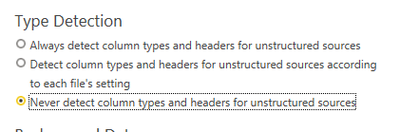
First , you can try to close this option in Power BI Desktop in "Options", you can keep the same as the yellow seleection:
Second, you can refeer to this document to try to solve the "Not enough memory error in Power BI":
How to fix Memory error Allocation failure in Power BI? (windowsreport.com)
You can also avoid using the calculated column .
Thank you for your time and sharing, and thank you for your support and understanding of PowerBI!
Best Regards,
Aniya Zhang
If this post helps, then please consider Accept it as the solution to help the other members find it more quickly
Hi, @user9394
According to your description, when you load the data in Power Bi Desktop , it returns the memory load issues. Right?
First , you can try to close this option in Power BI Desktop in "Options", you can keep the same as the yellow seleection:
Second, you can refeer to this document to try to solve the "Not enough memory error in Power BI":
How to fix Memory error Allocation failure in Power BI? (windowsreport.com)
You can also avoid using the calculated column .
Thank you for your time and sharing, and thank you for your support and understanding of PowerBI!
Best Regards,
Aniya Zhang
If this post helps, then please consider Accept it as the solution to help the other members find it more quickly
| User | Count |
|---|---|
| 50 | |
| 43 | |
| 36 | |
| 32 | |
| 29 |
| User | Count |
|---|---|
| 139 | |
| 129 | |
| 61 | |
| 59 | |
| 57 |