cancel
Showing results for 
Search instead for 
Did you mean: 

The Power BI Data Visualization World Championships is back! Get ahead of the game and start preparing now! Learn more

Reply
jppuam
Helper V
Helper V

mapping 2 tables with 2 fields

Hello,

i'm need to filter a table based in one column from a table, but i've to check if that field exists in tw0 columns from the other table.

for example i've a code in table A, and i want to check if that code apears on field 2 ou field 3 from other table.


how can i do that ?


thank you,

JR

1 ACCEPTED SOLUTION
v-lili6-msft
Community Support
Community Support

hi,@jppuam

    After my research, you can do these as below:

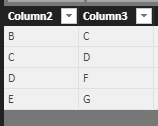
Assume that we have to table like these:

table 1:
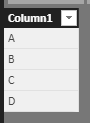
4.PNG

table2;

5.PNG


Step1:

use LOOKUPVALUE() function  to search match value

Look Column 2 = LOOKUPVALUE(Table1[Column1],Table1[Column1],Table2[Column2])
Look Column 3 = LOOKUPVALUE(Table1[Column1],Table1[Column1],Table2[Column3])

6.PNG

Step2:

Use this formula to create a table for this match values

Table = DISTINCT(UNION(FILTER(VALUES(Table2[Look Column 2]),Table2[Look Column 2]<>BLANK()),FILTER(VALUES(Table2[Look Column 3]),Table2[Look Column 3]<>BLANK())))

Result:

 7.PNG


If not your case, 

please share some data sample and expected output. You can upload it to OneDrive or Dropbox and post the link here. Do mask sensitive data before uploading.


Best Regards,

Lin


Community Support Team _ Lin
If this post helps, then please consider Accept it as the solution to help the other members find it more quickly.

View solution in original post

5 REPLIES 5
v-lili6-msft
Community Support
Community Support

hi,@jppuam

    After my research, you can do these as below:

Assume that we have to table like these:

table 1:

4.PNG

table2;

5.PNG


Step1:

use LOOKUPVALUE() function  to search match value

Look Column 2 = LOOKUPVALUE(Table1[Column1],Table1[Column1],Table2[Column2])
Look Column 3 = LOOKUPVALUE(Table1[Column1],Table1[Column1],Table2[Column3])

6.PNG

Step2:

Use this formula to create a table for this match values

Table = DISTINCT(UNION(FILTER(VALUES(Table2[Look Column 2]),Table2[Look Column 2]<>BLANK()),FILTER(VALUES(Table2[Look Column 3]),Table2[Look Column 3]<>BLANK())))

Result:

 7.PNG


If not your case, 

please share some data sample and expected output. You can upload it to OneDrive or Dropbox and post the link here. Do mask sensitive data before uploading.


Best Regards,

Lin


Community Support Team _ Lin
If this post helps, then please consider Accept it as the solution to help the other members find it more quickly.
edhans
Super User
Super User

You might look at using the LOOKUPVALUE() function as a calculated column. It operates similarly to a VLOOKUP() in Excel. If the data is in a different table, the source and destination tables have to have a relationship.


Did I answer your question? Mark my post as a solution!
Did my answers help arrive at a solution? Give it a kudos by clicking the Thumbs Up!

DAX is for Analysis. Power Query is for Data Modeling


Proud to be a Super User!

MCSA: BI Reporting

Hello,

what i'm trying to do is to check if a field 1 is equal to reference or equal to object (these 2 fields in other table).

can i create a new table with the result of the matches ?


thanks,

JR

How can i put in the filter area one field (removing the null values) or another field ?


i want to put :


filter dep1 (all removing the nulls) or dep2 when equals to something ?


thanks

JR

You are going to need to post some sample data to more clearly explain to us what you are doing.


Did I answer your question? Mark my post as a solution!
Did my answers help arrive at a solution? Give it a kudos by clicking the Thumbs Up!

DAX is for Analysis. Power Query is for Data Modeling


Proud to be a Super User!

MCSA: BI Reporting

Helpful resources

Announcements
Power BI DataViz World Championships

Power BI Dataviz World Championships

The Power BI Data Visualization World Championships is back! Get ahead of the game and start preparing now!

December 2025 Power BI Update Carousel

Power BI Monthly Update - December 2025

Check out the December 2025 Power BI Holiday Recap!

FabCon Atlanta 2026 carousel

FabCon Atlanta 2026

Join us at FabCon Atlanta, March 16-20, for the ultimate Fabric, Power BI, AI and SQL community-led event. Save $200 with code FABCOMM.