cancel
Showing results for 
Search instead for 
Did you mean: 

The Power BI Data Visualization World Championships is back! Get ahead of the game and start preparing now! Learn more

Reply
mbalraj
Regular Visitor

map plotting wrong location

Hi


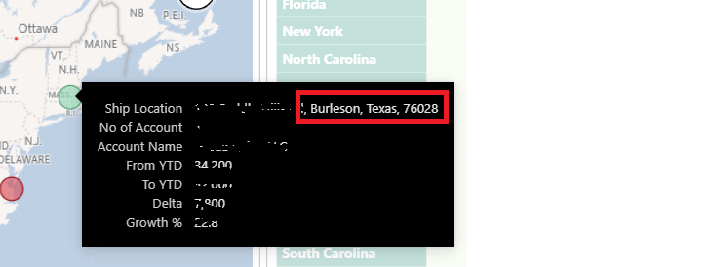
I am using a concatenated custome address field with Street, City and zip code combination to plot locations on the map. While most addresses are plotted correctly some addresses are way off the mark.


Please refer to my screen shot of one such error.This address is in Texas but it is plotting it incorectlyThis address is in Texas but it is plotting it incorectly

 Would help to know why this is happening.


Thank you for your help

1 ACCEPTED SOLUTION
Anonymous
Not applicable

Hi @mbalraj ,


Please check the similar post: https://community.powerbi.com/t5/Desktop/MAP-showing-wrong-locations/m-p/177797


It explains the main points of some locations, and shares an official document, which is about the tips and tricks of Power BI map visualization.


Best Regards,

Stephen Tao


If this post helps, then please consider Accept it as the solution to help the other members find it more quickly.

View solution in original post

3 REPLIES 3
Anonymous
Not applicable

Hi @mbalraj ,


Please check the similar post: https://community.powerbi.com/t5/Desktop/MAP-showing-wrong-locations/m-p/177797


It explains the main points of some locations, and shares an official document, which is about the tips and tricks of Power BI map visualization.


Best Regards,

Stephen Tao


If this post helps, then please consider Accept it as the solution to help the other members find it more quickly.

PaulDBrown
Community Champion
Community Champion

The foolproof method is converting the addresses to latitude and longitude coordinates. There are ways to do this automatically in Excel (Google is your friend)


Did I answer your question? Mark my post as a solution!
In doing so, you are also helping me. Thank you!

Proud to be a Super User!
Paul on Linkedin.


Greg_Deckler
Community Champion
Community Champion

@mbalraj You are kind of at the mercy of Bing maps to a large degree. Make sure that you have the correct data category. I often find that Place is one of the best data categories to use. For example, Burleson, Texas, 76028 is plotted correctly when I use Place as the data categorization.


Follow on LinkedIn
@ me in replies or I'll lose your thread!!!
Instead of a Kudo, please vote for this idea
Become an expert!: Enterprise DNA
External Tools: MSHGQM
YouTube Channel!: Microsoft Hates Greg
Latest book!:
DAX For Humans

DAX is easy, CALCULATE makes DAX hard...

Helpful resources

Announcements
Power BI DataViz World Championships

Power BI Dataviz World Championships

The Power BI Data Visualization World Championships is back! Get ahead of the game and start preparing now!

December 2025 Power BI Update Carousel

Power BI Monthly Update - December 2025

Check out the December 2025 Power BI Holiday Recap!

FabCon Atlanta 2026 carousel

FabCon Atlanta 2026

Join us at FabCon Atlanta, March 16-20, for the ultimate Fabric, Power BI, AI and SQL community-led event. Save $200 with code FABCOMM.