cancel
Showing results for 
Search instead for 
Did you mean: 

The Power BI Data Visualization World Championships is back! Get ahead of the game and start preparing now! Learn more

Reply
D_PBI
Post Partisan
Post Partisan

left join

Hi
I have two tables case and caseorganisationsponsorid. I would like to be able to perform a LEFT JOIN so all comes back from the case table whether the caseorganisationsponsorid table has a value present for the join or not (hence the LEFT JOIN). To add, the right-sided table performs some grouping/concatenation.

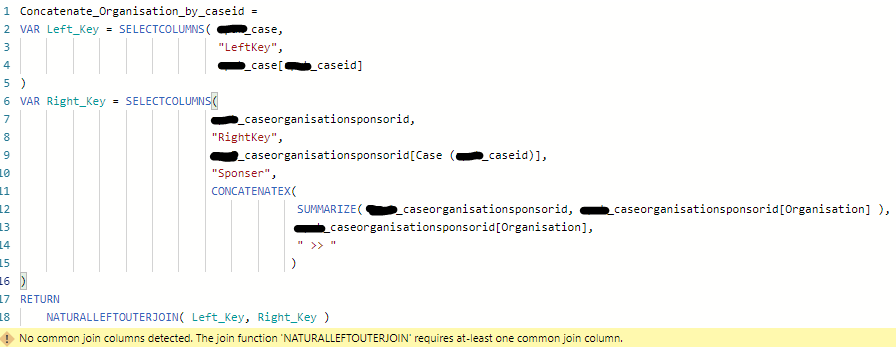
Are joins in Power BI/DAX (not Power Query) purely INNER JOINS unless you specify a function like NATURALLEFTOUTERJOIN ?

I've tried a few things but am getting in a pickle. My latest attempt is below which doesn't work, but it should be enough for you to understand my aim. I'm aware this can be done in Power Query but to learn new ways I would like to understand how to achieve this using DAX??  In placing the measure in the table visual should (hopefully) follow row context filtering so the concatenation of organisations should be placed on the relevant caseid row in the table visual.
Capture.PNG

Please can someone help?
Thanks.

1 ACCEPTED SOLUTION
zoloturu
Memorable Member
Memorable Member

Hi @D_PBI ,


We can think about LEFT JOIN as a subset of CROSS JOIN result. In SQL such logic was used at start and only after we received separate syntax for LEFT and RIGHT JOINs. So based on this we can use a function GENERATEALL (similar to CROSS APPLY in SQL).


Here is an example of table showing join using DAX:

Table Example = 
GENERATEALL(
    'Table1',
    VAR __Table1_Col1 = Table1[Col1]

    RETURN
        CALCULATETABLE('Table2',
        Table2[Col5] = __Table1_Col1
        )
) 

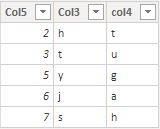
Input tables:


Table1
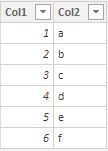
join1.JPG


Table2

join2.JPG


Table result of an aforementioned formula
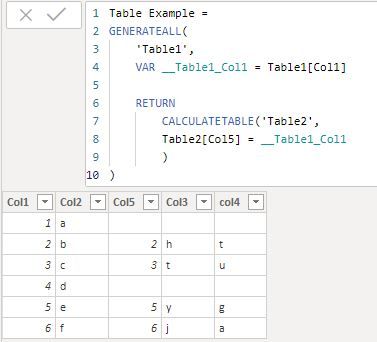
join3.JPG


Regards,
Ruslan Zolotukhin (zoloturu)
BI Engineer at Akvelon Inc. / Kharkiv Power BI User Group Leader / DAX & Power BI Trainer
-------------------------------------------------------------------
Did I answer your question? Mark my post as a solution!
It was useful? Press Thumbs Up!

You are from Ukraine? If yes then welcome to Power BI User Group - KhPUG website. Other country? Check and find proper one - Power BI User Groups

View solution in original post

1 REPLY 1
zoloturu
Memorable Member
Memorable Member

Hi @D_PBI ,


We can think about LEFT JOIN as a subset of CROSS JOIN result. In SQL such logic was used at start and only after we received separate syntax for LEFT and RIGHT JOINs. So based on this we can use a function GENERATEALL (similar to CROSS APPLY in SQL).


Here is an example of table showing join using DAX:

Table Example = 
GENERATEALL(
    'Table1',
    VAR __Table1_Col1 = Table1[Col1]

    RETURN
        CALCULATETABLE('Table2',
        Table2[Col5] = __Table1_Col1
        )
) 

Input tables:


Table1

join1.JPG


Table2

join2.JPG


Table result of an aforementioned formula

join3.JPG


Regards,
Ruslan Zolotukhin (zoloturu)
BI Engineer at Akvelon Inc. / Kharkiv Power BI User Group Leader / DAX & Power BI Trainer
-------------------------------------------------------------------
Did I answer your question? Mark my post as a solution!
It was useful? Press Thumbs Up!

You are from Ukraine? If yes then welcome to Power BI User Group - KhPUG website. Other country? Check and find proper one - Power BI User Groups
Helpful resources

Announcements
Power BI DataViz World Championships

Power BI Dataviz World Championships

The Power BI Data Visualization World Championships is back! Get ahead of the game and start preparing now!

December 2025 Power BI Update Carousel

Power BI Monthly Update - December 2025

Check out the December 2025 Power BI Holiday Recap!

FabCon Atlanta 2026 carousel

FabCon Atlanta 2026

Join us at FabCon Atlanta, March 16-20, for the ultimate Fabric, Power BI, AI and SQL community-led event. Save $200 with code FABCOMM.