Join us at FabCon Atlanta from March 16 - 20, 2026, for the ultimate Fabric, Power BI, AI and SQL community-led event. Save $200 with code FABCOMM.
Register now!The Power BI Data Visualization World Championships is back! Get ahead of the game and start preparing now! Learn more
Hello,
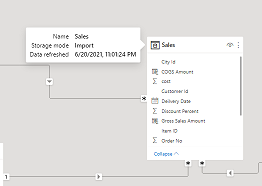
with the last update of Power BI Desktop I can not see the date of the last refresh of my imported data anymore. In previous time i went with the mouse over the table and i saw the date when the data was last time refreshed. now i can only see :
" storage mode Import " not the a date anymore. does anyone have an idea where i can see the date of the last sucessfull refresh. It is not possible to know the status of the data anymore.
thanks
Solved! Go to Solution.
Thanks very much. In Data model view i also can see it.
The Power BI Data Visualization World Championships is back! Get ahead of the game and start preparing now!
Check out the November 2025 Power BI update to learn about new features.
| User | Count |
|---|---|
| 59 | |
| 43 | |
| 42 | |
| 23 | |
| 17 |
| User | Count |
|---|---|
| 190 | |
| 122 | |
| 96 | |
| 66 | |
| 47 |