Jumpstart your career with the Fabric Career Hub
Find everything you need to get certified on Fabric—skills challenges, live sessions, exam prep, role guidance, and a 50 percent discount on exams.
Get started- Power BI forums
- Updates
- News & Announcements
- Get Help with Power BI
- Desktop
- Service
- Report Server
- Power Query
- Mobile Apps
- Developer
- DAX Commands and Tips
- Custom Visuals Development Discussion
- Health and Life Sciences
- Power BI Spanish forums
- Translated Spanish Desktop
- Power Platform Integration - Better Together!
- Power Platform Integrations (Read-only)
- Power Platform and Dynamics 365 Integrations (Read-only)
- Training and Consulting
- Instructor Led Training
- Dashboard in a Day for Women, by Women
- Galleries
- Community Connections & How-To Videos
- COVID-19 Data Stories Gallery
- Themes Gallery
- Data Stories Gallery
- R Script Showcase
- Webinars and Video Gallery
- Quick Measures Gallery
- 2021 MSBizAppsSummit Gallery
- 2020 MSBizAppsSummit Gallery
- 2019 MSBizAppsSummit Gallery
- Events
- Ideas
- Custom Visuals Ideas
- Issues
- Issues
- Events
- Upcoming Events
- Community Blog
- Power BI Community Blog
- Custom Visuals Community Blog
- Community Support
- Community Accounts & Registration
- Using the Community
- Community Feedback
Earn a 50% discount on the DP-600 certification exam by completing the Fabric 30 Days to Learn It challenge.
- Power BI forums
- Forums
- Get Help with Power BI
- Desktop
- Re: % increase of Year to Date on the Same Year to...
- Subscribe to RSS Feed
- Mark Topic as New
- Mark Topic as Read
- Float this Topic for Current User
- Bookmark
- Subscribe
- Printer Friendly Page

- Mark as New
- Bookmark
- Subscribe
- Mute
- Subscribe to RSS Feed
- Permalink
- Report Inappropriate Content
% increase of Year to Date on the Same Year to date 1 calendar week ago
Good Evening,
Im looking to create a % increase in Week on Week performance, But the weeks must be a running total of the year to date
See below, I would need in W7 to get a % increase from W6 to W7. Below shows a basic
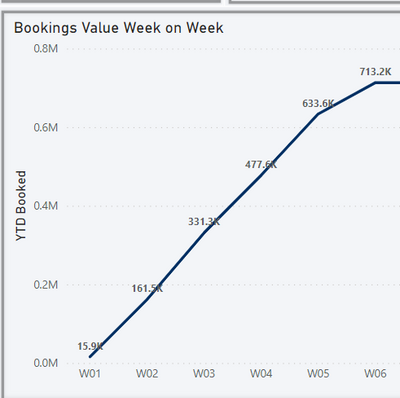
Many thanks for your help in advance
Solved! Go to Solution.


- Mark as New
- Bookmark
- Subscribe
- Mute
- Subscribe to RSS Feed
- Permalink
- Report Inappropriate Content
Hi,
Assuming Week numbers on the X-axis have been dragged from the Calendar table and there is a relationship (Many to One and Single) from the Date column Booking table to the Date column of the Calendar Table, write these measures:
TP = SUM(Booking[Total Price])
TP YTD = calculate([tp],datesytd(calendar[date],"31/12"))
TP YTD till last week = calculate([tp tyd],datesbetween(calendar[date],min(calendar[date])-7,min(calendar[date])-1))
Growth (%) = divide(([TP YTD]-[TP YTD till last week]),[TP YTD till last week])
Hope this helps.
Regards,
Ashish Mathur
http://www.ashishmathur.com
https://www.linkedin.com/in/excelenthusiasts/
- Mark as New
- Bookmark
- Subscribe
- Mute
- Subscribe to RSS Feed
- Permalink
- Report Inappropriate Content
Perfect, thank you. Only thing it doesnt do is exlucde the calc on the first week of the year, so brings in the full year from before, Is there a way to exlclude this?
- Mark as New
- Bookmark
- Subscribe
- Mute
- Subscribe to RSS Feed
- Permalink
- Report Inappropriate Content
Hi,
Assuming Week numbers on the X-axis have been dragged from the Calendar table and there is a relationship (Many to One and Single) from the Date column Booking table to the Date column of the Calendar Table, write these measures:
TP = SUM(Booking[Total Price])
TP YTD = calculate([tp],datesytd(calendar[date],"31/12"))
TP YTD till last week = calculate([tp tyd],datesbetween(calendar[date],min(calendar[date])-7,min(calendar[date])-1))
Growth (%) = divide(([TP YTD]-[TP YTD till last week]),[TP YTD till last week])
Hope this helps.
Regards,
Ashish Mathur
http://www.ashishmathur.com
https://www.linkedin.com/in/excelenthusiasts/
- Mark as New
- Bookmark
- Subscribe
- Mute
- Subscribe to RSS Feed
- Permalink
- Report Inappropriate Content
Perfect, thank you. Only thing it doesnt do is exlucde the calc on the first week of the year, so brings in the full year from before, Is there a way to exlclude this?
- Mark as New
- Bookmark
- Subscribe
- Mute
- Subscribe to RSS Feed
- Permalink
- Report Inappropriate Content
You are welcome. Does this measure work?
TP YTD till last week = if(Calendar[Week]="W1",blank(),calculate([tp tyd],datesbetween(calendar[date],min(calendar[date])-7,min(calendar[date])-1)))
Regards,
Ashish Mathur
http://www.ashishmathur.com
https://www.linkedin.com/in/excelenthusiasts/

- Mark as New
- Bookmark
- Subscribe
- Mute
- Subscribe to RSS Feed
- Permalink
- Report Inappropriate Content
@Johnce1607 , Try like
TOTALYTD(SUM(Booking[Total Price]),dateadd(CalendarBooked[Date],-7, Day))
Microsoft Power BI Learning Resources, 2023 !!
Learn Power BI - Full Course with Dec-2022, with Window, Index, Offset, 100+ Topics !!
Did I answer your question? Mark my post as a solution! Appreciate your Kudos !! Proud to be a Super User! !!

Helpful resources

New forum boards available in Real-Time Intelligence.
Ask questions in Eventhouse and KQL, Eventstream, and Reflex.


| User | Count |
|---|---|
| 94 | |
| 87 | |
| 79 | |
| 75 | |
| 69 |


| User | Count |
|---|---|
| 119 | |
| 105 | |
| 90 | |
| 64 | |
| 63 |


