Join us at FabCon Atlanta from March 16 - 20, 2026, for the ultimate Fabric, Power BI, AI and SQL community-led event. Save $200 with code FABCOMM.
Register now!The Power BI Data Visualization World Championships is back! Get ahead of the game and start preparing now! Learn more
Hi all,
I am struggling to get a if when statement to work as a calculated column in power query. the logic I am trying to create is:
if [sales] > 0
where [region] = AMER
and [returns] < 1 where [type] IN 1,2,3,4,5
Then 1 else " "
I am not fully sure if this is even possible in PQ, any suggestions on how to get this logic to work in PQ?
Thank you!
Solved! Go to Solution.
Hi @Anonymous ,
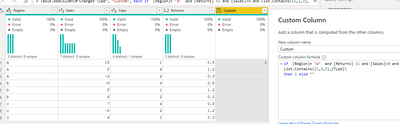
Try to create a custom column with Power query:
if [Region]= "a" and [Returns] <1 and [Sales]>0 and List.Contains({1,2,3},[Type])
then 1 else ""
Best Regards,
Liang
If this post helps, then please consider Accept it as the solution to help the other members find it more quickly.
Hi @Anonymous ,
Try to create a custom column with Power query:
if [Region]= "a" and [Returns] <1 and [Sales]>0 and List.Contains({1,2,3},[Type])
then 1 else ""
Best Regards,
Liang
If this post helps, then please consider Accept it as the solution to help the other members find it more quickly.
@V-lianl-msft I keep getting this error when using this logic: [Expression.Error] We cannot convert the value null to type Logical.
how fo you handle this?
This is defently possible in power query, You need to filter the value based on required value and also need to mentioned the condition for it.
@rajkmr106 what would the correct logic look like?
if [sales] > 0
filter [region] = AMER
and [returns] < 1 filter [type] IN 1,2,3,4,5
Then 1 else " " ?
Check out the November 2025 Power BI update to learn about new features.
Advance your Data & AI career with 50 days of live learning, contests, hands-on challenges, study groups & certifications and more!
| User | Count |
|---|---|
| 58 | |
| 45 | |
| 42 | |
| 21 | |
| 18 |