Join us at FabCon Atlanta from March 16 - 20, 2026, for the ultimate Fabric, Power BI, AI and SQL community-led event. Save $200 with code FABCOMM.
Register now!The Power BI Data Visualization World Championships is back! Get ahead of the game and start preparing now! Learn more
Hello community,
I have a list of Vessels attributed to a Fleet. Each month, I am recording the status.
I have several years of records and hundred of vessels.
I would like to display only the vessels which have had fleet changes
For example, I have 4 vessels, 2 of them have had fleet changes:
| 01/05/2022 | IGLOO | Fleet A |
| 01/06/2022 | IGLOO | Fleet A |
| 01/07/2022 | IGLOO | Fleet A |
| 01/05/2022 | CAPTAIN LEON | Fleet A |
| 01/06/2022 | CAPTAIN LEON | Fleet A |
| 01/07/2022 | CAPTAIN LEON | Fleet B |
| 01/05/2022 | SWEET | Fleet C |
| 01/06/2022 | SWEET | Fleet C |
| 01/07/2022 | SWEET | Fleet C |
| 01/05/2022 | UNICORN | Fleet B |
| 01/06/2022 | UNICORN | Fleet C |
| 01/05/2022 | UNICORN | Fleet C |
I would like to display:
DateCategoryStore
| 01/05/2022 | CAPTAIN LEON | Fleet A |
| 01/06/2022 | CAPTAIN LEON | Fleet A |
| 01/07/2022 | CAPTAIN LEON | Fleet B |
| 01/05/2022 | UNICORN | Fleet B |
| 01/06/2022 | UNICORN | Fleet C |
| 01/05/2022 | UNICORN | Fleet C |
I thank you in advance for your help!
Solved! Go to Solution.
A measure like this will count the number of category / store combinations.
Filter Measure =
VAR _CategoryStore =
CALCULATETABLE(
SUMMARIZE(
'Table',
'Table'[Category],
'Table'[Store]
),
ALLEXCEPT('Table','Table'[Category]))
RETURN
COUNTROWS(_CategoryStore)
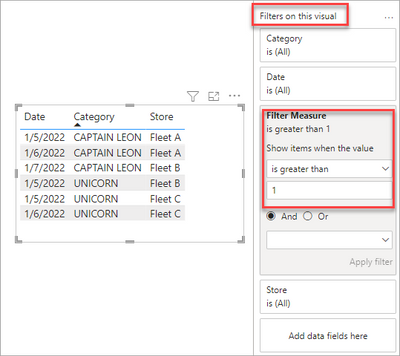
Then we can apply that as filter to the table:
A measure like this will count the number of category / store combinations.
Filter Measure =
VAR _CategoryStore =
CALCULATETABLE(
SUMMARIZE(
'Table',
'Table'[Category],
'Table'[Store]
),
ALLEXCEPT('Table','Table'[Category]))
RETURN
COUNTROWS(_CategoryStore)
Then we can apply that as filter to the table:
The Power BI Data Visualization World Championships is back! Get ahead of the game and start preparing now!
| User | Count |
|---|---|
| 41 | |
| 39 | |
| 37 | |
| 29 | |
| 24 |
| User | Count |
|---|---|
| 119 | |
| 100 | |
| 72 | |
| 69 | |
| 65 |