Join us at FabCon Atlanta from March 16 - 20, 2026, for the ultimate Fabric, Power BI, AI and SQL community-led event. Save $200 with code FABCOMM.
Register now!The Power BI Data Visualization World Championships is back! Get ahead of the game and start preparing now! Learn more
hi,
im trying to display a formula in a KPI chart in my power bi app.
the calculation is the Max number of my "ID" column divided by a static number.
i have 2 questions;
how would i include a static number in my dataset? im used to using qlik where you can define a variable and then call that variable in the calucaltion, is there a similar method in power bi?
2. how would i show the calucaltion in a KPI/text box?
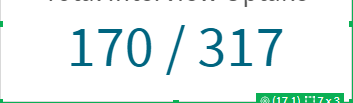
i.e something like this is what i want to display:
where 170 is the max number of my ID column and 317 is a static number that can be updated manually.
thanks!
Solved! Go to Solution.
Hi @Anonymous ,
You will be required to create below 3 measure :
1) Max of ID = MAX('Table'[ID]) -> This will give you the maximum value from ID column
2) Static value = 317 -> This will store a static value as per your requirement
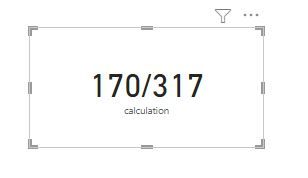
3) Calculation = CONVERT([Max of ID],STRING)&"/"&CONVERT([Static value],STRING) -> This will help you show the calculation in KPI card/textbox as below -
Please accept the solution if this answers your query.
Thanks!
Avantika
Hi @Anonymous ,
You will be required to create below 3 measure :
1) Max of ID = MAX('Table'[ID]) -> This will give you the maximum value from ID column
2) Static value = 317 -> This will store a static value as per your requirement
3) Calculation = CONVERT([Max of ID],STRING)&"/"&CONVERT([Static value],STRING) -> This will help you show the calculation in KPI card/textbox as below -
Please accept the solution if this answers your query.
Thanks!
Avantika
The Power BI Data Visualization World Championships is back! Get ahead of the game and start preparing now!
Check out the November 2025 Power BI update to learn about new features.
| User | Count |
|---|---|
| 59 | |
| 46 | |
| 42 | |
| 23 | |
| 17 |
| User | Count |
|---|---|
| 190 | |
| 122 | |
| 96 | |
| 66 | |
| 47 |