cancel
Showing results for 
Search instead for 
Did you mean: 

Get Fabric Certified for FREE during Fabric Data Days. Don't miss your chance! Request now

Reply
kevinjhk
New Member

how to pivot two data types of multiple columns into three columns

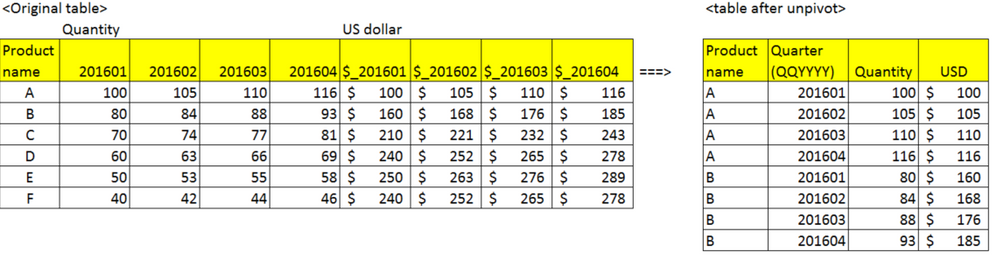
I have an origianl data to show Quantity and USD by product name and by quarter (in format of YYYYQQ) as below.

I want to transform this to the table form at the right side. I know how to unpivot multiple columns into two columns if the columns are the same type, either quantity or US dollar. But i couldn't do two different data types into three columns; so one for quarter that is shared with Quantity and USD. 


image.png


1 ACCEPTED SOLUTION

Or, a better way might be this:


1. Unpivot all columns except Product Name (rename the "Attribute" column to, say "Quarter")

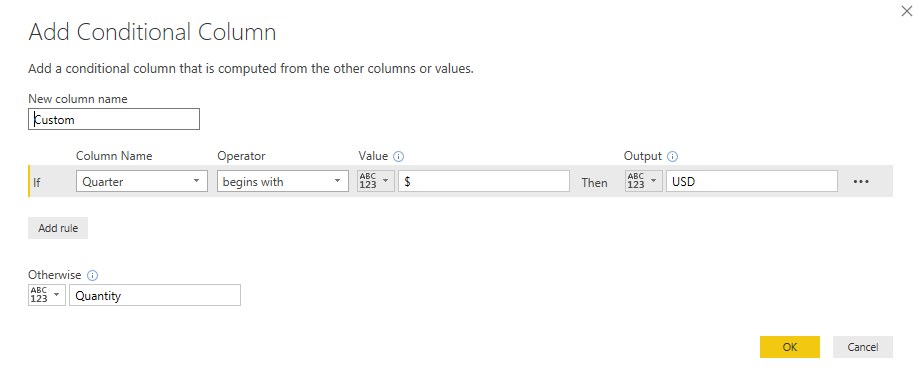
2. Add a conditional column using this condition: 

Conditional.png

3. Pivot the column you just created:

Pivot.png


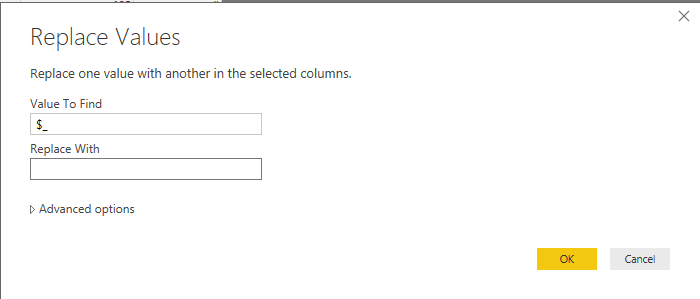
4. Replace values (to get rid of the $_ prefix):

Replace.png

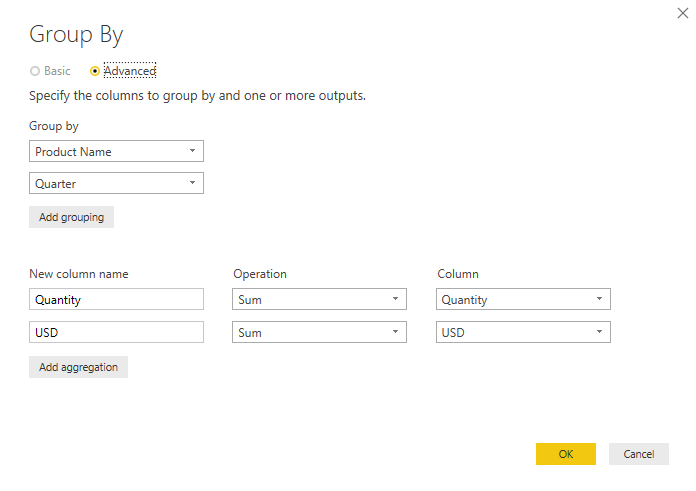
5. Then group the rows:

Group.png


View solution in original post

5 REPLIES 5
MalS
Resolver III
Resolver III

You can duplicate the data table, then unpivot the quantities in one copy of table and the dollar amounts in the other copy. 


Finally, you can bring it all back together again with a 'Merge Queries' operation.


Let me know if you need more detail on the steps required to do this. 

Anonymous
Not applicable

thanks for solution....


kudosSmiley Happy


regards,

Rahul M

Or, a better way might be this:


1. Unpivot all columns except Product Name (rename the "Attribute" column to, say "Quarter")

2. Add a conditional column using this condition: 

Conditional.png

3. Pivot the column you just created:

Pivot.png


4. Replace values (to get rid of the $_ prefix):

Replace.png

5. Then group the rows:

Group.png


Hi @MalS


I have a same problem, please help me on this,


https://community.powerbi.com/t5/Desktop/Conditional-Formatting-Slicer/m-p/207232#M91309


Many Thanks,

Thiyaga

 Hi MalS, the second one," a better way", works very well. it's a brilliant idea. thanks a lot for your help.

Helpful resources

Announcements
November Power BI Update Carousel

Power BI Monthly Update - November 2025

Check out the November 2025 Power BI update to learn about new features.

Fabric Data Days Carousel

Fabric Data Days

Advance your Data & AI career with 50 days of live learning, contests, hands-on challenges, study groups & certifications and more!

FabCon Atlanta 2026 carousel

FabCon Atlanta 2026

Join us at FabCon Atlanta, March 16-20, for the ultimate Fabric, Power BI, AI and SQL community-led event. Save $200 with code FABCOMM.

Top Solution Authors
Top Kudoed Authors