cancel
Showing results for 
Search instead for 
Did you mean: 

The Power BI Data Visualization World Championships is back! It's time to submit your entry. Live now!

Reply
heyydrien
Regular Visitor

how to load R packages

I'd like to create an R visual but Power BI can't seem to locate the ggplot2 package: "R script error. Error in library(ggplot2) : there is no package called 'ggplot2'". The ggplot2 is already installed and loaded in my R environment. In addition, my R home directory is set in Power BI and I've already created basic R plots that do not require additional packages. In the R script editor, I've also tried replacing "library(ggplot2)" with "library("ggplot2", lib.loc="C:/path-to-my-r-packages")" but no success so far. Any tips you have would be greatly appreciated!


1 REPLY 1
Anonymous
Not applicable

Hi @heyydrien,


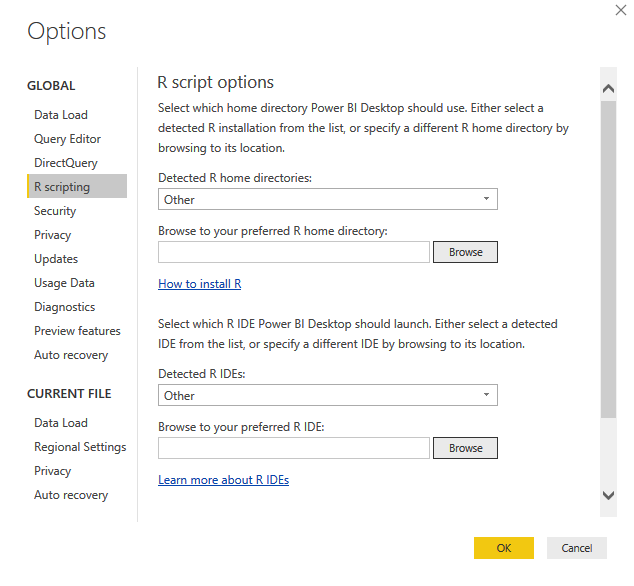
Maybe you can try to setting the full path of r script in options:

7.PNG


Regards,

Xiaoxin Sheng

Helpful resources

Announcements
Power BI DataViz World Championships

Power BI Dataviz World Championships

The Power BI Data Visualization World Championships is back! It's time to submit your entry.

January Power BI Update Carousel

Power BI Monthly Update - January 2026

Check out the January 2026 Power BI update to learn about new features.

FabCon Atlanta 2026 carousel

FabCon Atlanta 2026

Join us at FabCon Atlanta, March 16-20, for the ultimate Fabric, Power BI, AI and SQL community-led event. Save $200 with code FABCOMM.