cancel
Showing results for 
Search instead for 
Did you mean: 

The Power BI Data Visualization World Championships is back! Get ahead of the game and start preparing now! Learn more

Reply
SantoshKumar
Microsoft Employee
Microsoft Employee

how to get rowcount based on text filter or if text containing the word "xyz" etc

 etcHi All,

I have a table and in that one column contains few values as below.
requirement :

i want get the count of rows with some conditions like below:

1. Count of row which contains only "first"

2.  Count of row which contains  "first" and "Second"

3. Count of row which contains "first" but not "Second" or "third" etc.


Sample column posted below:


Column
first;second;third;fourth;fifth;
first;second;third;fourth;
first;second;third;fourth;fifth;
first;second;
first;second;third;fourth;fifth;
second;third;fourth;fifth;
first;third;fourth;fifth;
first;fourth;fifth;
first;second;third;fifth;
second;third;fourth;fifth;
first;fourth;fifth;
first;second;
first;second;third;fifth;
first;second;fourth;fifth;
third;fourth;fifth;
fourth;fifth;
first;second;third;fourth;fifth;


thanks

Santosh

1 ACCEPTED SOLUTION

You could play with the new CONTAINSTRING function which was recently released:


First # = 
CALCULATE ( COUNTROWS ( 'Table' ), CONTAINSSTRING ( 'Table'[Column], "first" ) )

First & Second # =
//Use this if you expect second after first. If you want it irrespective of order, then do 2 CONTAINSSTRING check.
CALCULATE (
    COUNTROWS ( 'Table' ),
    CONTAINSSTRING ( 'Table'[Column], "first*second" )
)

First Not Second & Third # = 
CALCULATE (
    COUNTROWS ( 'Table' ),
    CONTAINSSTRING ( 'Table'[Column], "first" ),
    NOT ( CONTAINSSTRING ( 'Table'[Column], "second" ) ),
    NOT ( CONTAINSSTRING ( 'Table'[Column], "third" ) )
)

View solution in original post

4 REPLIES 4
Gopal30
Helper I
Helper I

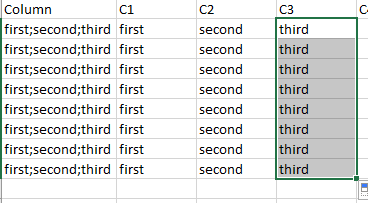
To achieve this you first need to split the column for each value for example:

Capture.PNG


You can achieve this in Query Editor--> Transform(Toolbar) --> Split Column --> By Delimiter


I hope you are looking for this. 


Cheers!

@Gopal30thanks for your response but i want to have a measure to get the count as my table contains huge rows.

split doesnot make sense at this time.

You could play with the new CONTAINSTRING function which was recently released:


First # = 
CALCULATE ( COUNTROWS ( 'Table' ), CONTAINSSTRING ( 'Table'[Column], "first" ) )

First & Second # =
//Use this if you expect second after first. If you want it irrespective of order, then do 2 CONTAINSSTRING check.
CALCULATE (
    COUNTROWS ( 'Table' ),
    CONTAINSSTRING ( 'Table'[Column], "first*second" )
)

First Not Second & Third # = 
CALCULATE (
    COUNTROWS ( 'Table' ),
    CONTAINSSTRING ( 'Table'[Column], "first" ),
    NOT ( CONTAINSSTRING ( 'Table'[Column], "second" ) ),
    NOT ( CONTAINSSTRING ( 'Table'[Column], "third" ) )
)

@AkhilAshokThanks a Lot. This feature is awesome 🙂 

Helpful resources

Announcements
Power BI DataViz World Championships

Power BI Dataviz World Championships

The Power BI Data Visualization World Championships is back! Get ahead of the game and start preparing now!

December 2025 Power BI Update Carousel

Power BI Monthly Update - December 2025

Check out the December 2025 Power BI Holiday Recap!

FabCon Atlanta 2026 carousel

FabCon Atlanta 2026

Join us at FabCon Atlanta, March 16-20, for the ultimate Fabric, Power BI, AI and SQL community-led event. Save $200 with code FABCOMM.