cancel
Showing results for 
Search instead for 
Did you mean: 

Get Fabric Certified for FREE during Fabric Data Days. Don't miss your chance! Request now

Reply
calerof
Impactful Individual

how to get net sales from two tables, a) Invoices and b) Credit notes

Hello Community,

I'm working with SAP B1.

I'm struggling to get the detailed net sales by customer from two tables:

  1. Detial Invoices by line item (INV1)
  2. Detail Credit notes by line item (RIN1)

These two tables relate to the calendar table and to the total invoice table (OINV) and total credit note table (ORIN). Also, to several other master data, i.e. customer code, item code.


When I apply the following code I get the total net sales correctly as one value:

Sales YTD = IF(
                MIN( 'Calendar'[Date] ) <= CALCULATE( MAX( OINV[DocDate] ), ALL( OINV ) ),
                CALCULATE(
                        SUMX(INV1, INV1[Subtotal MXP] )
                        -
                        SUMX(RIN1, RIN1[Subtotal MXP NCred]),
                        DATESYTD( 'Calendar'[Date] )
                )
) 

I also attempted the following variance in the code above and it worked fine for the total net sales as one value:


Sales YTD = IF(
                MIN( 'Calendar'[Date] ) <= CALCULATE( MAX( OINV[DocDate] ), ALL( OINV ) ),
                CALCULATE(
                        OINV[Net Sales],
                        DATESYTD( 'Calendar'[Date] )
                )
) 

where:


Net Sales = INV1[Subtotal MXP] - RIN1[Subtotal MXP NCred]

and:


Subtotal MXP = SUM( INV1[Line Total] )
Subtotal MXP NCred = SUM( RIN1[Line Total] )

The problem comes when I try to create a matrix/chart with net sales by customer, my result looks like this:
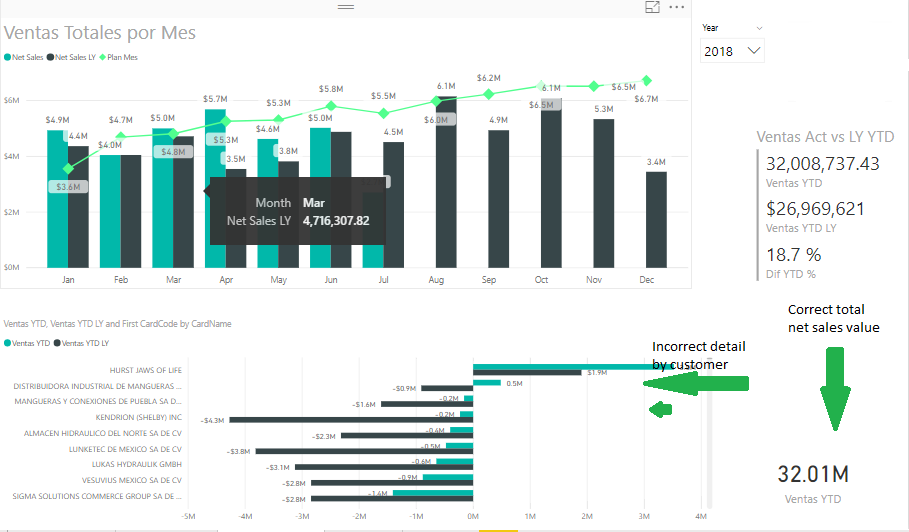
 

Bottom left chart with errorBottom left chart with error

Any help would be greatly appreciated.


Kind regards,


Fernando


1 ACCEPTED SOLUTION
calerof
Impactful Individual

Hello Xiaoxin,


Thank you very much for your message. I managed to fix or rather overcome this issue by doing two things:

  1. Merged the columns missing in the detailed tables, i.e. OINV and ORIN into INV1 and RIN1, so I had all required information in two tables instead of four.
  2. Created a new table with UNION and SUMMARIZEDCOLUMNS to bring together INV1 and RIN1's required columns.
  3. Finally, in the edit queries mode, Transform, Number Column, I multiplied the credit notes's quantity and amount (LineTotal) by -1, so I could just SUM their values.

Learning but always feeling supported by the community.


Thanks!


Fernando


View solution in original post

2 REPLIES 2
Anonymous
Not applicable

HI @calerof,


Can you please share a pbix file for test?


BTW, nested measures not fully works on summary level, it will drill and calculate on detail records and summary result instead calculate with summary records.


Regards,
Xiaoxin Sheng

calerof
Impactful Individual

Hello Xiaoxin,


Thank you very much for your message. I managed to fix or rather overcome this issue by doing two things:

  1. Merged the columns missing in the detailed tables, i.e. OINV and ORIN into INV1 and RIN1, so I had all required information in two tables instead of four.
  2. Created a new table with UNION and SUMMARIZEDCOLUMNS to bring together INV1 and RIN1's required columns.
  3. Finally, in the edit queries mode, Transform, Number Column, I multiplied the credit notes's quantity and amount (LineTotal) by -1, so I could just SUM their values.

Learning but always feeling supported by the community.


Thanks!


Fernando


Helpful resources

Announcements
November Power BI Update Carousel

Power BI Monthly Update - November 2025

Check out the November 2025 Power BI update to learn about new features.

Fabric Data Days Carousel

Fabric Data Days

Advance your Data & AI career with 50 days of live learning, contests, hands-on challenges, study groups & certifications and more!

FabCon Atlanta 2026 carousel

FabCon Atlanta 2026

Join us at FabCon Atlanta, March 16-20, for the ultimate Fabric, Power BI, AI and SQL community-led event. Save $200 with code FABCOMM.

Top Solution Authors
Top Kudoed Authors