cancel
Showing results for 
Search instead for 
Did you mean: 

The Power BI Data Visualization World Championships is back! Get ahead of the game and start preparing now! Learn more

Reply
Anonymous
Not applicable

how to calculate percentage

Hi All,

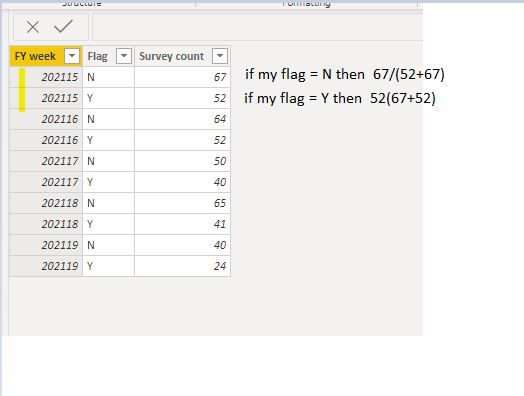
I need to calculate percenatge measure, same year i have Y & N and survey count.

Ex: Take FYweek as 202115 ==> if Flag = "N" then 67/(52+67)

                                                    if Flag = "Y" then 52(67+52)


Capture.JPG

regrad,

Navin_512

2 ACCEPTED SOLUTIONS
Pragati11
Super User
Super User

Hi @Anonymous ,


Create following calculated columns:

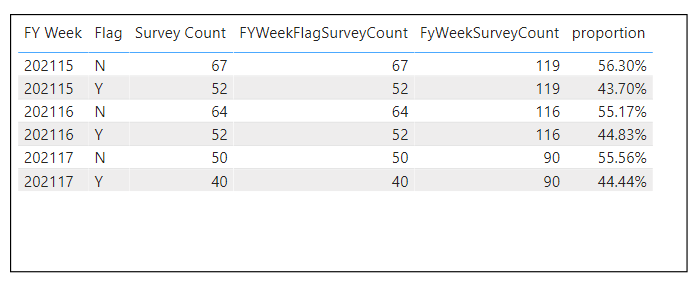
FyWeekSurveyCount = CALCULATE(SUM(FYSurvey[Survey Count]), FILTER(ALLSELECTED(FYSurvey), FYSurvey[FY Week] = EARLIER(FYSurvey[FY Week])))
 
FYWeekFlagSurveyCount = CALCULATE(SUM(FYSurvey[Survey Count]), FILTER(ALLSELECTED(FYSurvey), FYSurvey[FY Week] = EARLIER(FYSurvey[FY Week]) && FYSurvey[Flag] = EARLIER(FYSurvey[Flag])))
 
Then create a measure:
proportion = DIVIDE(SUM(FYSurvey[FYWeekFlagSurveyCount]), SUM(FYSurvey[FyWeekSurveyCount]), 0)
 
Convert the above measure to PERCENTAGE under Modelling tab.
 
Then move the following to the table visual, you will get something like below:
percentage.png
Hope this helps.
 
Thanks,
Pragati

Best Regards,

Pragati Jain


MVP logo


LinkedIn | Twitter | Blog YouTube 

Did I answer your question? Mark my post as a solution! This will help others on the forum!

Appreciate your Kudos!!

Proud to be a Super User!!

View solution in original post

harshnathani
Community Champion
Community Champion

Hi @Anonymous ,


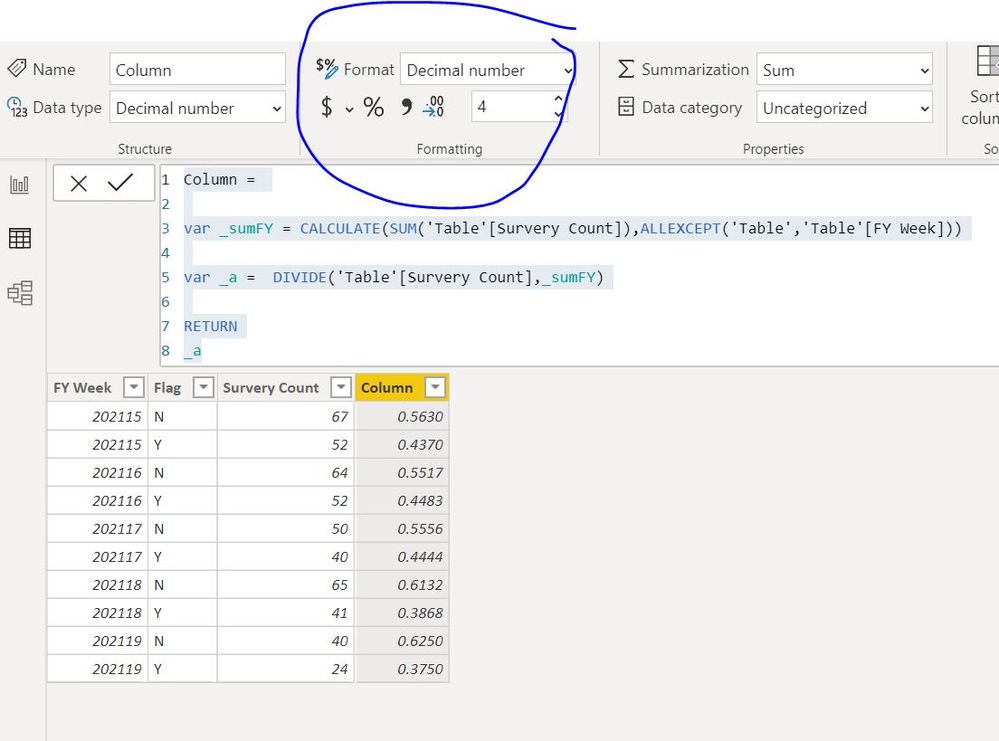
1.jpg


Column =

var _sumFY = CALCULATE(SUM('Table'[Survery Count]),ALLEXCEPT('Table','Table'[FY Week]))

var _a = DIVIDE('Table'[Survery Count],_sumFY)

RETURN
_a
 
 
Regards,
Harsh Nathani
Did I answer your question? Mark my post as a solution! Appreciate with a Kudos!! (Click the Thumbs Up Button)

View solution in original post

3 REPLIES 3
amitchandak
Super User
Super User

@Anonymous , try like

divide(sum(Table[survey count]),calculate(sum(Table[survey count]),allexcept(Table,Table[FY Week]))

Share with Power BI Enthusiasts: Full Power BI Video (20 Hours) YouTube
Microsoft Fabric Series 60+ Videos YouTube
Microsoft Fabric Hindi End to End YouTube
harshnathani
Community Champion
Community Champion

Hi @Anonymous ,


1.jpg


Column =

var _sumFY = CALCULATE(SUM('Table'[Survery Count]),ALLEXCEPT('Table','Table'[FY Week]))

var _a = DIVIDE('Table'[Survery Count],_sumFY)

RETURN
_a
 
 
Regards,
Harsh Nathani
Did I answer your question? Mark my post as a solution! Appreciate with a Kudos!! (Click the Thumbs Up Button)
Pragati11
Super User
Super User

Hi @Anonymous ,


Create following calculated columns:

FyWeekSurveyCount = CALCULATE(SUM(FYSurvey[Survey Count]), FILTER(ALLSELECTED(FYSurvey), FYSurvey[FY Week] = EARLIER(FYSurvey[FY Week])))
 
FYWeekFlagSurveyCount = CALCULATE(SUM(FYSurvey[Survey Count]), FILTER(ALLSELECTED(FYSurvey), FYSurvey[FY Week] = EARLIER(FYSurvey[FY Week]) && FYSurvey[Flag] = EARLIER(FYSurvey[Flag])))
 
Then create a measure:
proportion = DIVIDE(SUM(FYSurvey[FYWeekFlagSurveyCount]), SUM(FYSurvey[FyWeekSurveyCount]), 0)
 
Convert the above measure to PERCENTAGE under Modelling tab.
 
Then move the following to the table visual, you will get something like below:
percentage.png
Hope this helps.
 
Thanks,
Pragati

Best Regards,

Pragati Jain


MVP logo


LinkedIn | Twitter | Blog YouTube 

Did I answer your question? Mark my post as a solution! This will help others on the forum!

Appreciate your Kudos!!

Proud to be a Super User!!

Helpful resources

Announcements
Power BI DataViz World Championships

Power BI Dataviz World Championships

The Power BI Data Visualization World Championships is back! Get ahead of the game and start preparing now!

December 2025 Power BI Update Carousel

Power BI Monthly Update - December 2025

Check out the December 2025 Power BI Holiday Recap!

FabCon Atlanta 2026 carousel

FabCon Atlanta 2026

Join us at FabCon Atlanta, March 16-20, for the ultimate Fabric, Power BI, AI and SQL community-led event. Save $200 with code FABCOMM.