Hi All;
Newbie here and of course on a tight schedule. Been working this issue for 30 hours alreday, and my brian is now too twisted to figure this out. Hope there is help out there.
I first tried to work with a bell curve - have the curve, but don't know how to plot my data on it so I switched to working on a Histogarm - But I only have 1/2 my data (all the positive ratios, none of the negative ratios).
The histogram should assume the shape of the bell curve.
My ratios range from -2000 to positive 400
Bins should be...open to suggestions, but right now I'm using -2000 to -37, -36.99 to -25, -24.99 to -13, -12.99 to -0.01, 0-12.99, 13 to 24.99, 25 to 36.99, 37 to 2000
here's my Catagory table:
| Category | LL | UL |
| Neg 37 -2000 | -37.00% | -2000.00% |
| Neg 25 -36 | -25.00% | -36.99% |
| Neg 13 -24 | -13.00% | -24.99% |
| Neg 0 -12 | 0.00% | -12.99% |
| Pos 0-12 | 0.00% | 12.99% |
| Pos 13-24 | 13.00% | 24.99% |
| Pos 25-36 | 25.00% | 36.99% |
| Pos 37-2000 | 37.00% | 2000.00% |
And here's my column:
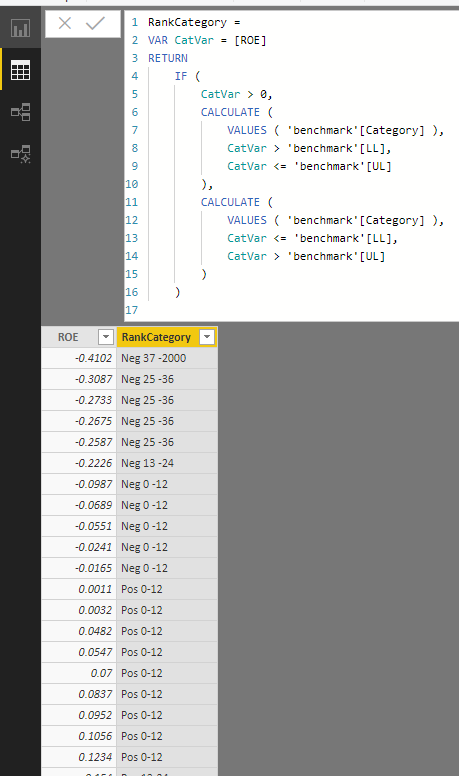
RankCategory = VAR CatVar=[ROE] RETURN CALCULATE (VALUES('benchmark'[Category]), CatVar>'benchmark'[LL],CatVar<='benchmark'[UL])
here is my ratio column and my result column:
| ROE | RankCategory |
| -41.02% | |
| -30.87% | |
| -27.33% | |
| -26.75% | |
| -25.87% | |
| -22.26% | |
| -9.87% | |
| -6.89% | |
| -5.51% | |
| -2.41% | |
| -1.65% | |
| 0.11% | Pos 0-12 |
| 0.32% | Pos 0-12 |
| 4.82% | Pos 0-12 |
| 5.47% | Pos 0-12 |
| 7.00% | Pos 0-12 |
| 8.37% | Pos 0-12 |
| 9.52% | Pos 0-12 |
| 10.56% | Pos 0-12 |
| 12.34% | Pos 0-12 |
| 15.40% | Pos 13-24 |
| 15.90% | Pos 13-24 |
| 17.09% | Pos 13-24 |
| 25.98% | Pos 25-36 |
| 26.38% | Pos 25-36 |
| 26.41% | Pos 25-36 |
| 26.59% | Pos 25-36 |
| 40.81% | Pos 37-2000 |
***As I was creating this, I found that this isn't always putting the ROE into the right BIN, which is a problem too
Thanks for any help or guidance