FabCon is coming to Atlanta
Join us at FabCon Atlanta from March 16 - 20, 2026, for the ultimate Fabric, Power BI, AI and SQL community-led event. Save $200 with code FABCOMM.
Register now!- Power BI forums
- Get Help with Power BI
- Desktop
- Service
- Report Server
- Power Query
- Mobile Apps
- Developer
- DAX Commands and Tips
- Custom Visuals Development Discussion
- Health and Life Sciences
- Power BI Spanish forums
- Translated Spanish Desktop
- Training and Consulting
- Instructor Led Training
- Dashboard in a Day for Women, by Women
- Galleries
- Data Stories Gallery
- Themes Gallery
- Contests Gallery
- QuickViz Gallery
- Quick Measures Gallery
- Visual Calculations Gallery
- Notebook Gallery
- Translytical Task Flow Gallery
- TMDL Gallery
- R Script Showcase
- Webinars and Video Gallery
- Ideas
- Custom Visuals Ideas (read-only)
- Issues
- Issues
- Events
- Upcoming Events
The Power BI Data Visualization World Championships is back! Get ahead of the game and start preparing now! Learn more
- Power BI forums
- Forums
- Get Help with Power BI
- Desktop
- Re: highlight weekends in matrix
- Subscribe to RSS Feed
- Mark Topic as New
- Mark Topic as Read
- Float this Topic for Current User
- Bookmark
- Subscribe
- Printer Friendly Page

- Mark as New
- Bookmark
- Subscribe
- Mute
- Subscribe to RSS Feed
- Permalink
- Report Inappropriate Content
highlight weekends in matrix
Hi Dear Community,
I have a Matrix like below, with Days as column and usernames as rows and count on the value.
Now, my end user asked me to highlight the weekends on this matrix. Because he needs to know which users have the 'Count' value in the weekends.
I have no idea how can I do that. I just create a calculated column with WeekDay(date) function. I don't know what else to do. Help me please

Solved! Go to Solution.


- Mark as New
- Bookmark
- Subscribe
- Mute
- Subscribe to RSS Feed
- Permalink
- Report Inappropriate Content
Here is one way I found to work.
On your Date table, add a column with this expression
Day Color = IF(WEEKDAY('Date'[Date])=1, "Red")
Then, concatenate the expression in your measure that goes in the values area with & " "
Measure = SUM(Table[Column]) & " "
Then add conditional format to that measure in the matrix, choose Field Value, and your Date[Day Color] field (it will default to First aggregation).
Here is an example I what I saw when I did the above (note one value is blank but still show red).

If this works for you, please mark it as the solution. Kudos are appreciated too. Please let me know if not.
Regards,
Pat
Did I answer your question? Mark my post as a solution! Kudos are also appreciated!
To learn more about Power BI, follow me on Twitter or subscribe on YouTube.
@mahoneypa HoosierBI on YouTube


- Mark as New
- Bookmark
- Subscribe
- Mute
- Subscribe to RSS Feed
- Permalink
- Report Inappropriate Content
@Anonymous , Hope you have workday in the date table
create a measure like
if(FIRSTNONBLANK(date[Work Day],blank())= 0,"green","red") // change color as per need
if(max(date[Work Day])= 0,"green","red") // change color as per need
Then use Conditional formatting with field option.
https://radacad.com/dax-and-conditional-formatting-better-together-find-the-biggest-and-smallest-numbers-in-the-column
https://docs.microsoft.com/en-us/power-bi/desktop-conditional-table-formatting#color-by-color-values

- Mark as New
- Bookmark
- Subscribe
- Mute
- Subscribe to RSS Feed
- Permalink
- Report Inappropriate Content
If so, you can use the Day of Week and conditional formatting to highlight the weekends. How do you want the weekends highlighted?
Please @mention me in your reply if you want a response.
Copying DAX from this post? Click here for a hack to quickly replace it with your own table names
Has this post solved your problem? Please Accept as Solution so that others can find it quickly and to let the community know your problem has been solved.
If you found this post helpful, please give Kudos C
I work as a Microsoft trainer and consultant, specialising in Power BI and Power Query.
www.excelwithallison.com
- Mark as New
- Bookmark
- Subscribe
- Mute
- Subscribe to RSS Feed
- Permalink
- Report Inappropriate Content
@AllisonKennedy , I have workDay as a calculated column in my table. I have no Datetable separately?
@amitchandak How having a separate data table will help in this case?
- Mark as New
- Bookmark
- Subscribe
- Mute
- Subscribe to RSS Feed
- Permalink
- Report Inappropriate Content
- Mark as New
- Bookmark
- Subscribe
- Mute
- Subscribe to RSS Feed
- Permalink
- Report Inappropriate Content
@amitchandak , @AllisonKennedy thank you for your replies. but I still have the issue. So let me walk you through what I do:
I add the MonthDay as my column in the Matrix:
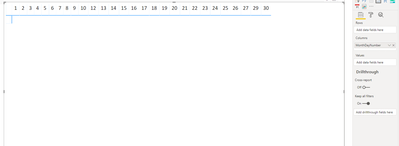
Then, I add my measure, which is a simple count : (the measure is
Then I created a color column in my Date table, saying if it is Sunday, then Red, otherwise, white.
Then I set the background color of my measure , with conditioanal formatting and field value of Color column:
the month is June, and it is working.
Now, when I add my Username to my rows, it goes like this :
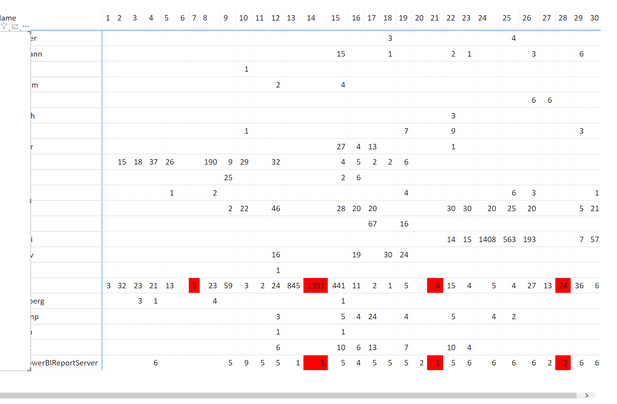
what I want is for the whole columns which represents Sundays, go red. Like 28 should be red totally. Not just where we have value.
So, I tried to add manually value to blank cells with the measure:
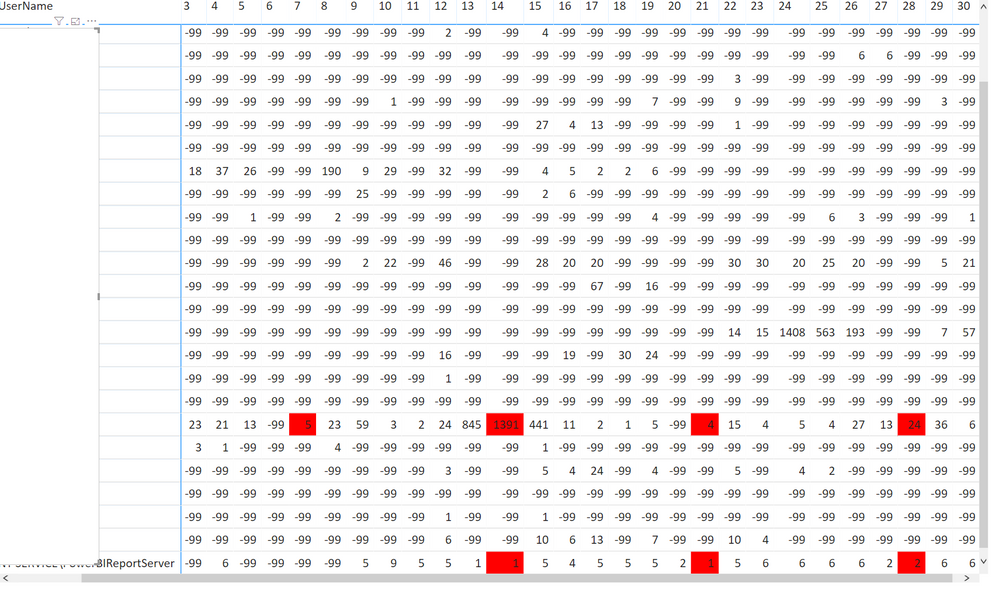
What am I doing wrong?


- Mark as New
- Bookmark
- Subscribe
- Mute
- Subscribe to RSS Feed
- Permalink
- Report Inappropriate Content
Hi @Anonymous ,
If you have a date column in your table, you can do like this(Please refer to my .pbix file.).

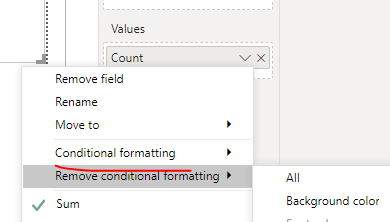
If you don't have a date column in your table, please give me a sample data.
Best regards,
Lionel Chen
If this post helps, then please consider Accept it as the solution to help the other members find it more quickly.
- Mark as New
- Bookmark
- Subscribe
- Mute
- Subscribe to RSS Feed
- Permalink
- Report Inappropriate Content
@v-lionel-msft hello Lionel,
Thank you for your reply. But as I described in my post. I need all the cells which are under the 'Sunday's have the red color. something like this :
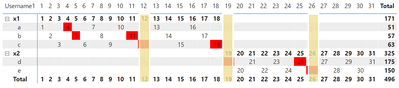
so that we can see if we have any value on Sundays.
- Mark as New
- Bookmark
- Subscribe
- Mute
- Subscribe to RSS Feed
- Permalink
- Report Inappropriate Content
- Mark as New
- Bookmark
- Subscribe
- Mute
- Subscribe to RSS Feed
- Permalink
- Report Inappropriate Content
Here is one way I found to work.
On your Date table, add a column with this expression
Day Color = IF(WEEKDAY('Date'[Date])=1, "Red")
Then, concatenate the expression in your measure that goes in the values area with & " "
Measure = SUM(Table[Column]) & " "
Then add conditional format to that measure in the matrix, choose Field Value, and your Date[Day Color] field (it will default to First aggregation).
Here is an example I what I saw when I did the above (note one value is blank but still show red).
If this works for you, please mark it as the solution. Kudos are appreciated too. Please let me know if not.
Regards,
Pat
Did I answer your question? Mark my post as a solution! Kudos are also appreciated!
To learn more about Power BI, follow me on Twitter or subscribe on YouTube.
@mahoneypa HoosierBI on YouTube
- Mark as New
- Bookmark
- Subscribe
- Mute
- Subscribe to RSS Feed
- Permalink
- Report Inappropriate Content
- Mark as New
- Bookmark
- Subscribe
- Mute
- Subscribe to RSS Feed
- Permalink
- Report Inappropriate Content
Measures can sit in any table, but it is not in same table. This simple model that I use when working on community solutions is described here.
The shown matrix uses the Date, Product, and Sales table from that model.
If this works for you, please mark it as the solution. Kudos are appreciated too. Please let me know if not.
Regards,
Pat
Did I answer your question? Mark my post as a solution! Kudos are also appreciated!
To learn more about Power BI, follow me on Twitter or subscribe on YouTube.
@mahoneypa HoosierBI on YouTube
- Mark as New
- Bookmark
- Subscribe
- Mute
- Subscribe to RSS Feed
- Permalink
- Report Inappropriate Content
You can also use your WorkDay column as is to do conditional formatting in the matrix, just depends what color you want it and if you also need it to work with the existing conditional formatting you may need to create a custom measure to incorporate both values, so let us know.
Please @mention me in your reply if you want a response.
Copying DAX from this post? Click here for a hack to quickly replace it with your own table names
Has this post solved your problem? Please Accept as Solution so that others can find it quickly and to let the community know your problem has been solved.
If you found this post helpful, please give Kudos C
I work as a Microsoft trainer and consultant, specialising in Power BI and Power Query.
www.excelwithallison.com
Helpful resources

Power BI Dataviz World Championships
The Power BI Data Visualization World Championships is back! Get ahead of the game and start preparing now!

Power BI Monthly Update - December 2025
Check out the December 2025 Power BI Holiday Recap!

FabCon Atlanta 2026
Join us at FabCon Atlanta, March 16-20, for the ultimate Fabric, Power BI, AI and SQL community-led event. Save $200 with code FABCOMM.

| User | Count |
|---|---|
| 39 | |
| 37 | |
| 33 | |
| 32 | |
| 29 |


| User | Count |
|---|---|
| 133 | |
| 88 | |
| 85 | |
| 68 | |
| 64 |


