cancel
Showing results for 
Search instead for 
Did you mean: 

The Power BI Data Visualization World Championships is back! It's time to submit your entry. Live now!

Reply
Zakaria_1980
Post Patron
Post Patron

help please

Hi,

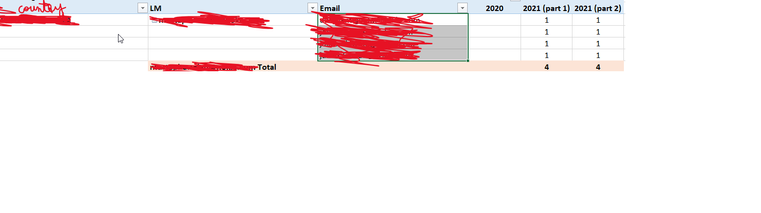
please I need your support. i have integrated some Data into PBI and i succedded to get the same view below that i get from Excel, but the question here, is there any possibility to replace all the 1 with Due and keep the total per LM and per Country counting the number of Due ?


Untitled.png


Thanks in advance.


2 REPLIES 2
Anonymous
Not applicable

@Zakaria_1980 

You can create a measure: 


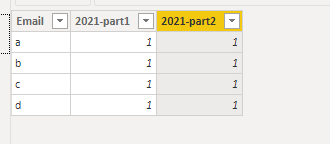
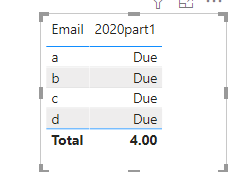
2020part1 = IF(HASONEVALUE('Table'[Email]),"Due",COUNT('Table'[2021-part1]))
 

Vpazhenmsft_0-1631774113682.png

Vpazhenmsft_1-1631774194596.png


Paul Zheng _ Community Support Team
If this post helps, please Accept it as the solution to help the other members find it more quickly.


amitchandak
Super User
Super User

@Zakaria_1980 , You can use isinscope to switch total

https://www.kasperonbi.com/use-isinscope-to-get-the-right-hierarchy-level-in-dax/


But I am not fully sure what you want. Can you share sample data and sample output in table format?

Share with Power BI Enthusiasts: Full Power BI Video (20 Hours) YouTube
Microsoft Fabric Series 60+ Videos YouTube
Microsoft Fabric Hindi End to End YouTube

Helpful resources

Announcements
Power BI DataViz World Championships

Power BI Dataviz World Championships

The Power BI Data Visualization World Championships is back! It's time to submit your entry.

January Power BI Update Carousel

Power BI Monthly Update - January 2026

Check out the January 2026 Power BI update to learn about new features.

FabCon Atlanta 2026 carousel

FabCon Atlanta 2026

Join us at FabCon Atlanta, March 16-20, for the ultimate Fabric, Power BI, AI and SQL community-led event. Save $200 with code FABCOMM.