FabCon is coming to Atlanta
Join us at FabCon Atlanta from March 16 - 20, 2026, for the ultimate Fabric, Power BI, AI and SQL community-led event. Save $200 with code FABCOMM.
Register now!- Power BI forums
- Get Help with Power BI
- Desktop
- Service
- Report Server
- Power Query
- Mobile Apps
- Developer
- DAX Commands and Tips
- Custom Visuals Development Discussion
- Health and Life Sciences
- Power BI Spanish forums
- Translated Spanish Desktop
- Training and Consulting
- Instructor Led Training
- Dashboard in a Day for Women, by Women
- Galleries
- Data Stories Gallery
- Themes Gallery
- Contests Gallery
- QuickViz Gallery
- Quick Measures Gallery
- Visual Calculations Gallery
- Notebook Gallery
- Translytical Task Flow Gallery
- TMDL Gallery
- R Script Showcase
- Webinars and Video Gallery
- Ideas
- Custom Visuals Ideas (read-only)
- Issues
- Issues
- Events
- Upcoming Events
The Power BI Data Visualization World Championships is back! Get ahead of the game and start preparing now! Learn more
- Power BI forums
- Forums
- Get Help with Power BI
- Desktop
- group by a column and the group item to be shown i...
- Subscribe to RSS Feed
- Mark Topic as New
- Mark Topic as Read
- Float this Topic for Current User
- Bookmark
- Subscribe
- Printer Friendly Page


- Mark as New
- Bookmark
- Subscribe
- Mute
- Subscribe to RSS Feed
- Permalink
- Report Inappropriate Content
group by a column and the group item to be shown in comma separated in single column
Have to group by a column and have the group items in coma seprated list in a cloum .
I am importing a sharePoint online list data in my powerBI and the data looks like below
ID Name
1 Pen
2 Chair
2 Table
3 Plug
3 Power
3 shocket
4 Board
4 Marker
4 Eraser
4 Clip
This data need to be tranlate to
ID New Column
1 Pen
2 Chair, table
3 Plug, Power, shocket
4 Board, Marker, Eraser, Clip
Solved! Go to Solution.

- Mark as New
- Bookmark
- Subscribe
- Mute
- Subscribe to RSS Feed
- Permalink
- Report Inappropriate Content
@mmoizk You'll have to simplify this... But here it is... Full Credit to @ImkeF
http://community.powerbi.com/t5/Desktop/Help-with-a-table-visualization/td-p/24143/page/3
- Mark as New
- Bookmark
- Subscribe
- Mute
- Subscribe to RSS Feed
- Permalink
- Report Inappropriate Content
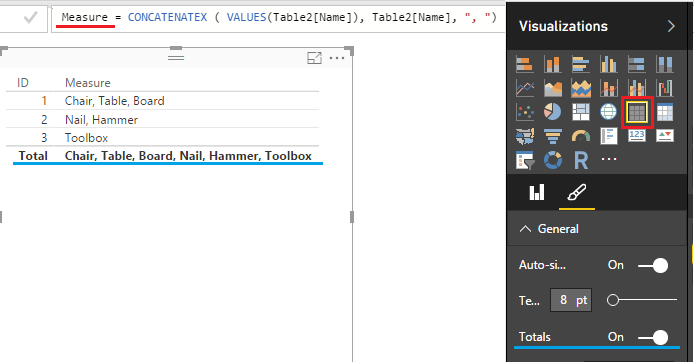
@mmoizk this works as a Measure
and you actually don't need the FILTER funciton (I was filtering out Names)
Measure = CONCATENATEX ( VALUES ( Table2[Name] ), Table2[Name], ", " )
In a Table Visualization turn off the Totals as in the picture
Otherwise Total row will concatenate ALL names
- Mark as New
- Bookmark
- Subscribe
- Mute
- Subscribe to RSS Feed
- Permalink
- Report Inappropriate Content
@mmoizk Try creating a new column with CONCATENATEX
= CONCATENATEX ( FILTER ( VALUES (Table[Name]) ), Table[Name], ", ")
Let me know if this works.
- Mark as New
- Bookmark
- Subscribe
- Mute
- Subscribe to RSS Feed
- Permalink
- Report Inappropriate Content
Thanks Sean,
I was trying to do this at ETL time so i have in my model as a dimension table which will then join to a Fact table that have this ID . If i understood it correctly you are asking me to do a Dax on the model .
- Mark as New
- Bookmark
- Subscribe
- Mute
- Subscribe to RSS Feed
- Permalink
- Report Inappropriate Content
@mmoizk You'll have to simplify this... But here it is... Full Credit to @ImkeF
http://community.powerbi.com/t5/Desktop/Help-with-a-table-visualization/td-p/24143/page/3
- Mark as New
- Bookmark
- Subscribe
- Mute
- Subscribe to RSS Feed
- Permalink
- Report Inappropriate Content
Thanks Sean, this is close to what i was looking. But i am getting some syntax erros. I have abondon that for now. I am working on the DAX for concatenation. The one you posted earlier , for some reason its not working for me. Let me state the problem again.
Dataset1
ID Tran
1 T1
2 T2
3 T3
Dataset2
Dataset1.ID Name
1 Chair
1 Table
1 Board
2 Nail
2 Hammer
3 Toolbox
In a Table display i would like
1 Tran1 Chair,Table,Board
2 Tran2 Nail, Hammer
3 Tran3 Toolbox
So if i want to use = CONCATENATEX ( FILTER ( VALUES (Table[Name]) ), Table[Name], ", ")
In dataset1 i do a new column
List = = CONCATENATEX ( FILTER ( VALUES (Dataset2[Name]) ), Dataset2[Name]), ", ")
- Mark as New
- Bookmark
- Subscribe
- Mute
- Subscribe to RSS Feed
- Permalink
- Report Inappropriate Content
@mmoizk this works as a Measure
and you actually don't need the FILTER funciton (I was filtering out Names)
Measure = CONCATENATEX ( VALUES ( Table2[Name] ), Table2[Name], ", " )
In a Table Visualization turn off the Totals as in the picture
Otherwise Total row will concatenate ALL names

- Mark as New
- Bookmark
- Subscribe
- Mute
- Subscribe to RSS Feed
- Permalink
- Report Inappropriate Content
Works! Used in a product import that requires that all categories (from a one to many relationship) are in the same field separated by comma.
Thank you!
- Mark as New
- Bookmark
- Subscribe
- Mute
- Subscribe to RSS Feed
- Permalink
- Report Inappropriate Content
- Mark as New
- Bookmark
- Subscribe
- Mute
- Subscribe to RSS Feed
- Permalink
- Report Inappropriate Content
Thanks Sean, it worked. I am getting desired results. I though measure is always a numeric. Just curious what else is possible with string/text as a measure ? Like here we concatenating string.

Helpful resources

Power BI Dataviz World Championships
The Power BI Data Visualization World Championships is back! Get ahead of the game and start preparing now!

Power BI Monthly Update - November 2025
Check out the November 2025 Power BI update to learn about new features.

FabCon Atlanta 2026
Join us at FabCon Atlanta, March 16-20, for the ultimate Fabric, Power BI, AI and SQL community-led event. Save $200 with code FABCOMM.

| User | Count |
|---|---|
| 59 | |
| 43 | |
| 42 | |
| 23 | |
| 17 |


| User | Count |
|---|---|
| 190 | |
| 122 | |
| 96 | |
| 66 | |
| 47 |


