cancel
Showing results for 
Search instead for 
Did you mean: 

Learn from the best! Meet the four finalists headed to the FINALS of the Power BI Dataviz World Championships! Register now

Reply
Anonymous
Not applicable

graph

hiiii

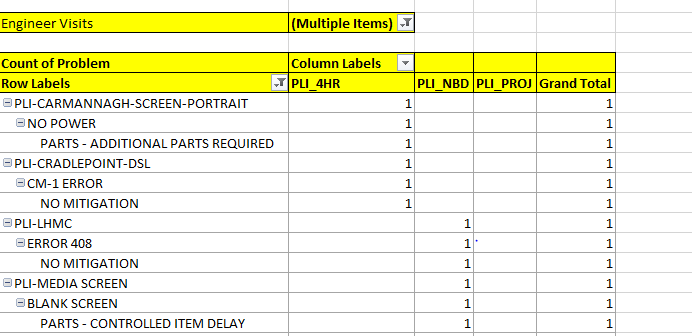
i have a confusion on choosing the chart to display my data 

i have in my row labels model,symptom and mitigation fields.

can some one suggest a graph to display


image.png


3 ACCEPTED SOLUTIONS
Anonymous
Not applicable

@Anonymous - 

Do you want the same chart as shown in the image?


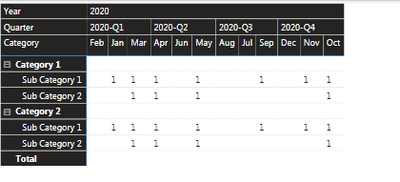
If yes, then matrix would do the work for you example below-

Matrix Visual.PNG


Appreciate your kudos!! Mark my post as solution if this helps.

View solution in original post

Hi @Anonymous 


as @Anonymous says, you can recreate your table using the Matrix visual.


https://docs.microsoft.com/en-us/power-bi/visuals/desktop-matrix-visual


Did I answer your question? Mark my post as a solution!

Proud to be a Super User!


View solution in original post

v-diye-msft
Community Support
Community Support

Hi @Anonymous 


If the above posts help, please kindly mark it as a answer to help others find it more quickly. thanks!

If not, please kindly elaborate more.


Community Support Team _ Dina Ye
If this post helps, then please consider Accept it as the solution to help the other members find it more
quickly.

View solution in original post

4 REPLIES 4
v-diye-msft
Community Support
Community Support

Hi @Anonymous 


If the above posts help, please kindly mark it as a answer to help others find it more quickly. thanks!

If not, please kindly elaborate more.


Community Support Team _ Dina Ye
If this post helps, then please consider Accept it as the solution to help the other members find it more
quickly.
Anonymous
Not applicable

@Anonymous - 

Do you want the same chart as shown in the image?


If yes, then matrix would do the work for you example below-

Matrix Visual.PNG


Appreciate your kudos!! Mark my post as solution if this helps.

Anonymous
Not applicable

Hi,


you can surely use matrix,


Best

Hi @Anonymous 


as @Anonymous says, you can recreate your table using the Matrix visual.


https://docs.microsoft.com/en-us/power-bi/visuals/desktop-matrix-visual


Did I answer your question? Mark my post as a solution!

Proud to be a Super User!


Helpful resources

Announcements
Join our Fabric User Panel

Join our Fabric User Panel

Share feedback directly with Fabric product managers, participate in targeted research studies and influence the Fabric roadmap.

February Power BI Update Carousel

Power BI Monthly Update - February 2026

Check out the February 2026 Power BI update to learn about new features.

FabCon Atlanta 2026 carousel

FabCon Atlanta 2026

Join us at FabCon Atlanta, March 16-20, for the ultimate Fabric, Power BI, AI and SQL community-led event. Save $200 with code FABCOMM.