Join us at FabCon Atlanta from March 16 - 20, 2026, for the ultimate Fabric, Power BI, AI and SQL community-led event. Save $200 with code FABCOMM.
Register now!Vote for your favorite vizzies from the Power BI Dataviz World Championship submissions. Vote now!
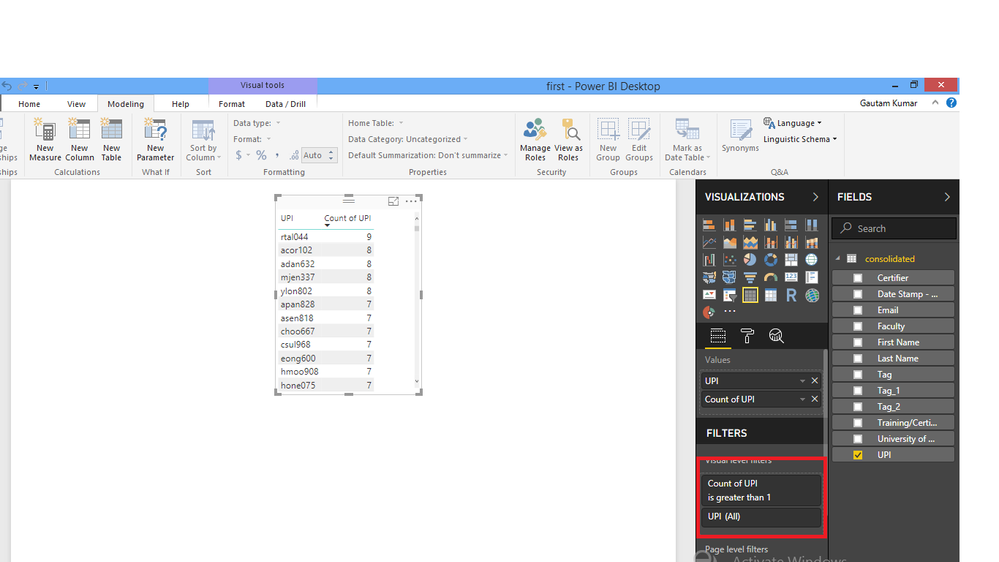
I have table visual with filter as shown in the screenshot. How can i get the total number of rows for the table visual.
Solved! Go to Solution.
hi @Archie1 i found a solution... i created 4 dax table as follow:
Table 1 = SUMMARIZE('relevantUPI Sign In','relevantUPI Sign In'[UPI..i.e..abcd123.],'relevantUPI Sign In'[Month],'relevantUPI Sign In'[What.are.you.coming.to.do.in.the.space.today.],"Count",COUNTROWS('relevantUPI Sign In'))
Table 2 = FILTER('Table 1',Not('Table 1'[What.are.you.coming.to.do.in.the.space.today.]="Workshop or Training"))
Table 3 = SUMMARIZE('Table 2','Table 2'[UPI..i.e..abcd123.],'Table 2'[Month],"count",SUM('Table 2'[Count]))
Table 4 = FILTER('Table 3','Table 3'[count]>1)
in table 4 i create a measure: Measure = COUNTROWS('Table 4')
this gives me the result i needed....
cheers,
Try this: create a measure with the following DAX
Count = COUNTROWS(consolidated)
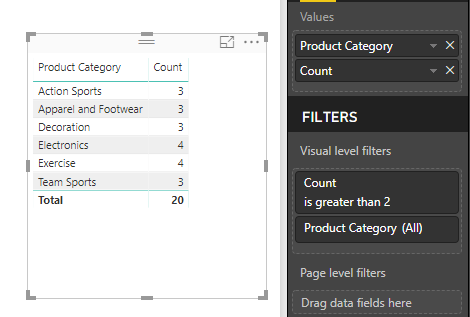
And then use it with UPI column to create a table. Create a filter for Count column for showing account >1.
Example for your reference.
Hi @Anonymous, in your example what i want as total of row number which is 6 and not the sum of count.
Hi @Anonymous,
Can you try this and let me know ?
CountofUPI= CALCULATE(
(COUNT('Tablename'[UPI])),
ALLEXCEPT('Tablename','Tablename'[filter1]),
'Tablename'[UPI] >1)
Hope it helps!!
Cheers,
hi @Archie1 i want the count of rows for UPI is not distinct. For eg
UPI -- Count
A -- 2
B -- 3
C -- 5
What i want is the number of rows which is 3 and not the sum of count.
Hi @Anonymous,
I think I got a solution for you.
check it out and let me know.
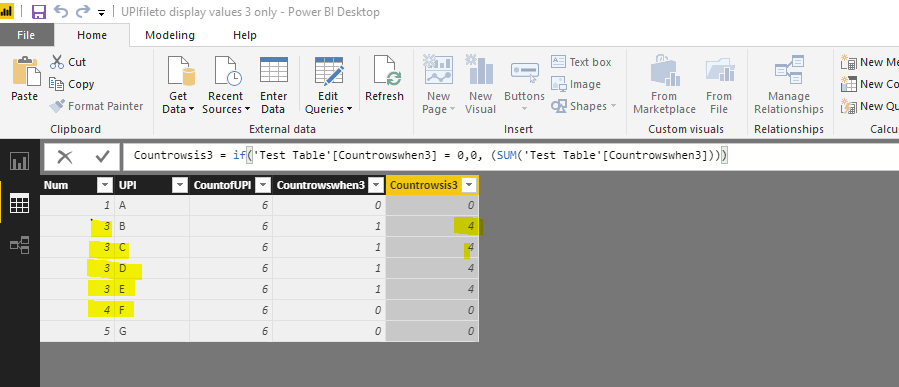
Initially I created 2 columns:
column 1: Countrowswhen3 = IF('Test Table'[Num] = 3,1,0)
column 2: Countrowsis3 = if('Test Table'[Countrowswhen3] = 0,0, (SUM('Test Table'[Countrowswhen3])))
Alternatively please find attached with an example that I used.
Cheers,
hi @Archie1 i found a solution... i created 4 dax table as follow:
Table 1 = SUMMARIZE('relevantUPI Sign In','relevantUPI Sign In'[UPI..i.e..abcd123.],'relevantUPI Sign In'[Month],'relevantUPI Sign In'[What.are.you.coming.to.do.in.the.space.today.],"Count",COUNTROWS('relevantUPI Sign In'))
Table 2 = FILTER('Table 1',Not('Table 1'[What.are.you.coming.to.do.in.the.space.today.]="Workshop or Training"))
Table 3 = SUMMARIZE('Table 2','Table 2'[UPI..i.e..abcd123.],'Table 2'[Month],"count",SUM('Table 2'[Count]))
Table 4 = FILTER('Table 3','Table 3'[count]>1)
in table 4 i create a measure: Measure = COUNTROWS('Table 4')
this gives me the result i needed....
cheers,
Vote for your favorite vizzies from the Power BI World Championship submissions!
If you love stickers, then you will definitely want to check out our Community Sticker Challenge!
Check out the January 2026 Power BI update to learn about new features.
| User | Count |
|---|---|
| 63 | |
| 51 | |
| 41 | |
| 23 | |
| 18 |
| User | Count |
|---|---|
| 130 | |
| 111 | |
| 48 | |
| 30 | |
| 28 |