Join us at FabCon Atlanta from March 16 - 20, 2026, for the ultimate Fabric, Power BI, AI and SQL community-led event. Save $200 with code FABCOMM.
Register now!The Power BI Data Visualization World Championships is back! Get ahead of the game and start preparing now! Learn more
i plan make a gap between data at multi-row card as below:

But what i got is as below:

any ideas how can i achieve as in first pic.
Hi @space83 ,
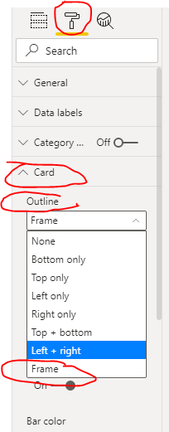
You can try adding borders, and check format – card – outline – frame
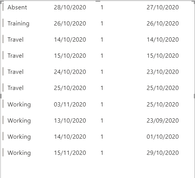
This is the original effect:
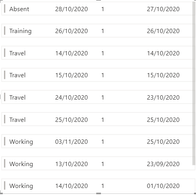
This is the effect when selected:
Best Regards,
Liu Yang
If this post helps, then please consider Accept it as the solution to help the other members find it more quickly
Hi @space83 ,
Currently, there are no options to eliminate column gaps on multi row card visual ,but you can use Table Visual, which has a lot of formatting options.
Here is a similar idea shared on Power BI Ideas. You can vote it up and add your comments there to improve Power BI on this feature.
Best Regards,
Liu Yang
If this post helps, then please consider Accept it as the solution to help the other members find it more quickly.
oh man, the 1st pic i attach is come out from power bi tutorial at microsoft page.
seems the example their given/display is not 100% can replicate.
its on desktop.
The Power BI Data Visualization World Championships is back! Get ahead of the game and start preparing now!
| User | Count |
|---|---|
| 37 | |
| 37 | |
| 33 | |
| 32 | |
| 29 |
| User | Count |
|---|---|
| 130 | |
| 88 | |
| 82 | |
| 68 | |
| 64 |