
Join us at FabCon Atlanta from March 16 - 20, 2026, for the ultimate Fabric, Power BI, AI and SQL community-led event. Save $200 with code FABCOMM.
Register now!Get Fabric Certified for FREE during Fabric Data Days. Don't miss your chance! Request now
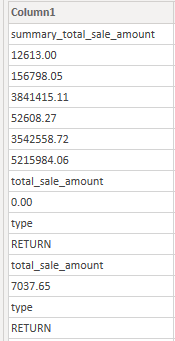
I have table
How extract (leave only) all rows between two specific strings in a dataframe
total_sale_amount and type
expected result
0.00
7037.65
Maybe using python?
Tryed this
import numpy as np
idx_start = dataset.index[dataset.Column1 == "total_sale_amount"]
idx_end = dataset.index[dataset.Column1 == "type"]
print(idx_start)
good = list(zip(list(idx_start), list(idx_end)))#required sequences
#unpack list of list
g2 = [list(range(x[0],x[1]+1)) for x in good]
#data.iloc[np.r_[[y for x in g2 for y in x]]]#If you want to return just the valid dataset
l =[y for x in g2 for y in x]
#'dataset'['mark'] = np.where((dataset.index.isin(l)),1,None)
But it return same result as dataset
Solved! Go to Solution.
Hi @Digger ,
Here are the steps you can follow:
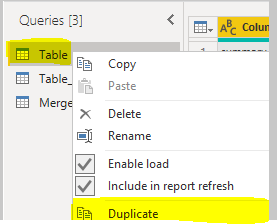
1. Enter Power Query through Transform data, select Table-right click-Duplicate to form a new table Table_duplicate.
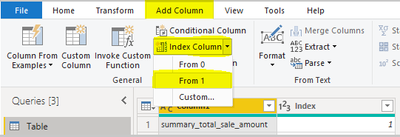
2. Select Table, Add Column – Index Column – From 1.
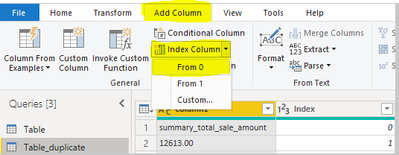
3. Select the new table Table_duplicate, Add Column – Index Column – From 0.
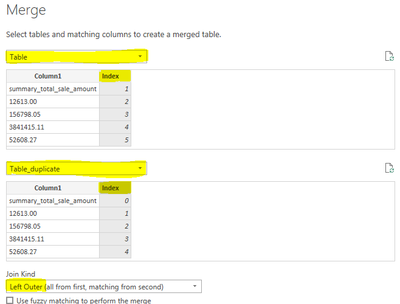
4. Select Home – Merge Queries - Merge Queries as New
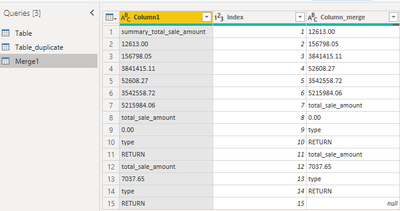
5. Enter the Merge interface, select the same [Index], Join kind = Left Outer
Result:
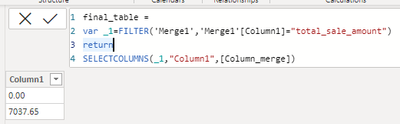
6. Create calculated table.
final_table =
var _1=FILTER('Merge1','Merge1'[Column1]="total_sale_amount")
return
SELECTCOLUMNS(_1,"Column1",[Column_merge])
7. Result:
Best Regards,
Liu Yang
If this post helps, then please consider Accept it as the solution to help the other members find it more quickly
Hi @Digger ,
Here are the steps you can follow:
1. Enter Power Query through Transform data, select Table-right click-Duplicate to form a new table Table_duplicate.
2. Select Table, Add Column – Index Column – From 1.
3. Select the new table Table_duplicate, Add Column – Index Column – From 0.
4. Select Home – Merge Queries - Merge Queries as New
5. Enter the Merge interface, select the same [Index], Join kind = Left Outer
Result:
6. Create calculated table.
final_table =
var _1=FILTER('Merge1','Merge1'[Column1]="total_sale_amount")
return
SELECTCOLUMNS(_1,"Column1",[Column_merge])
7. Result:
Best Regards,
Liu Yang
If this post helps, then please consider Accept it as the solution to help the other members find it more quickly
this is easy to do via an index column. Please provide sample data in usable format (not as a picture).
Check out the November 2025 Power BI update to learn about new features.
Advance your Data & AI career with 50 days of live learning, contests, hands-on challenges, study groups & certifications and more!